81
44000-UG-01-01-EN_CPI_Paypod Embedded Pay Station_User Guide_V1.1.pdf
Handling Cash
Paypod™ Embedded Pay Station
Published by CPI
· Emptying the coin recycler through the coin return conveyor and not the coin hoppers direct en-
sures that all coin counters are decreased correctly.
· For the emptying procedure you have to be logged on as an administrator.
1 If necessary, wait until a transaction has been fin-
ished.
To position a coin box/bag continue with the next step. To
just dispense a few coins jump to step5 .
2 Gain access to the coin recycler .
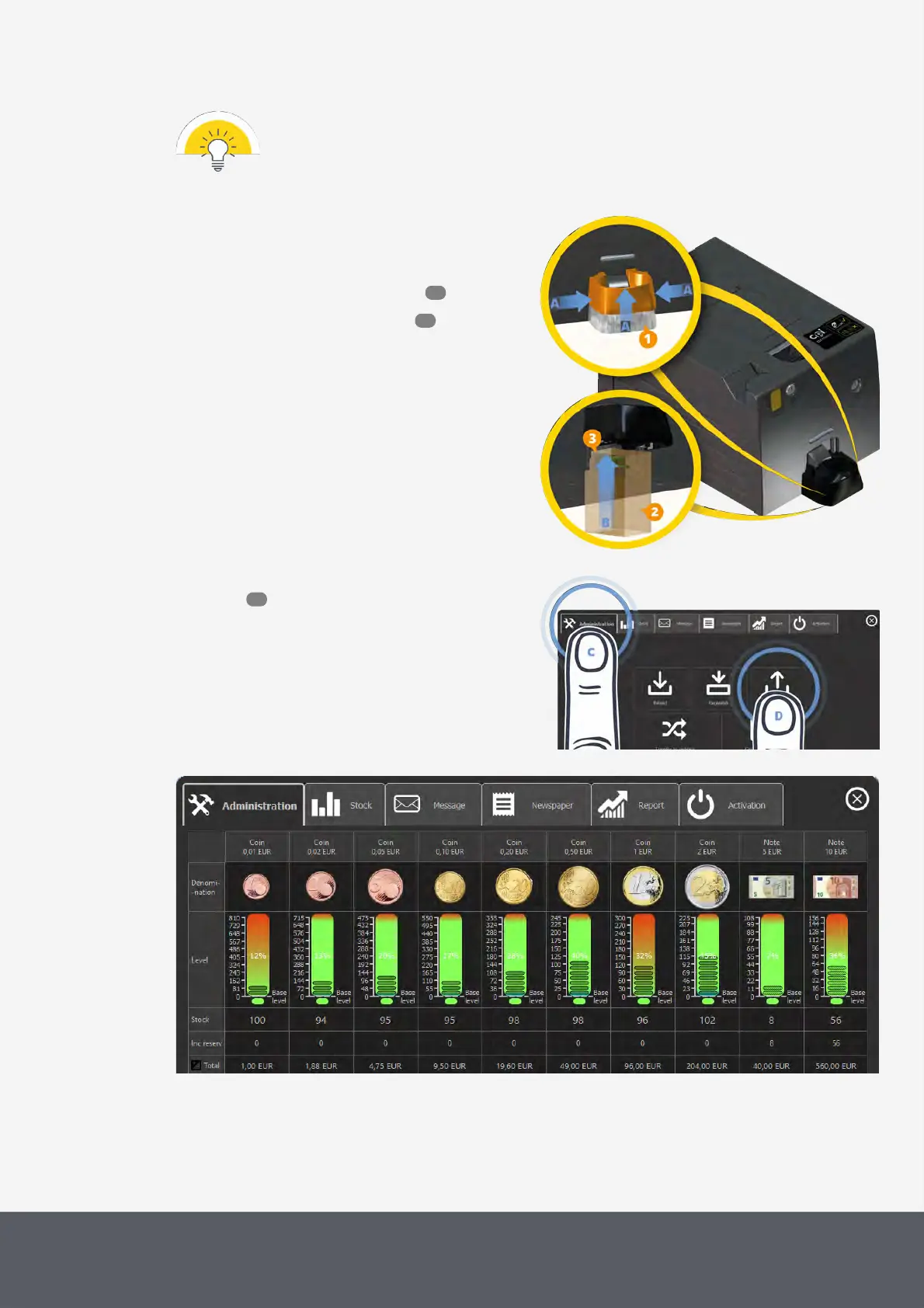
3 Raise coin return cup[1]:
· Press both sides of the coin return cup's bottom
together[A] and
· at the same time lift the return cup all the way to
the top until it locks in the top position[A].
4 Position a box or bag[2] under the coin return con-
veyor[3] large enough to collect all coins to be emp-
tied[B].
Lifting Coin Recycler's Return Cup
5 On the main screen of the POSlinq™ middle-
ware , select the Administration tab[C] and then
Float Down[D].
The float down screen displays all coin and banknote
denominations and their relevant filling level quanti-
ties:
Opening POSlinq™ Float Down Screen
POSlinq™ Float Down Screen
81
53
52



 To Next Page