Cyan Z-Series Engineering and Planning Guide Release 5.0
Page 34 © 2013 Cyan, Inc. – All Rights Reserved. 700-0023-05-00 Rev. 1
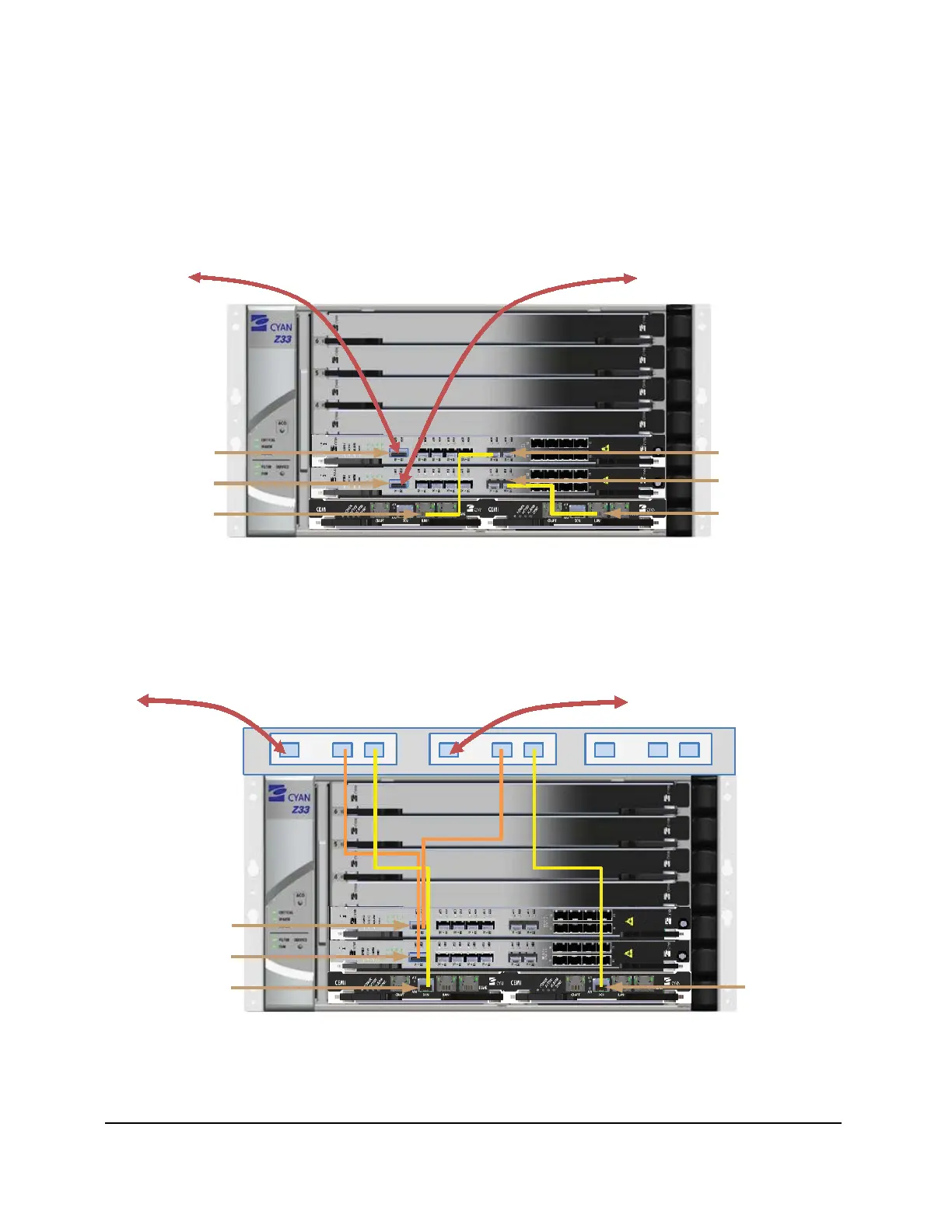
The figure below shows an example of connecting the CEMi iLAN port in slot A to an MSE-1482 GbE
copper port in slot 2 and the CEMi iLAN port in slot B to an MSE-1482 GbE port in slot 1. The MSE-1482
line card 10G OTN trunk interfaces integrate the CEMi with 10G traffic.
Communication is supported by connecting the CEMi iLAN port to a 1GE port on the MSE-1482 line card
as shown in the figure below. The MSE-1482 line card transports the traffic via Ethernet over SONET (EoS)
to a gateway node where the traffic is dropped locally to the customer’s management network.
To Outside Fiber Plant To Outside Fiber Plant
MSE-1482 10G OTN
Fiber Ports
MSE-1482 1000Base-F
Copper Ports
CEMi iLAN Port
Slot B
CEMi iLAN Port
Slot A
Figure 5: CEMi and MSE-1482 Configuration - Traffic via EoS
The next figure shows an example of using two CEMi controller cards and two MSE-1482 line cards to
transport management traffic to a gateway node via a dedicated wavelength that is multiplexed using the
passive WDM Module 1310/1550nm LGX. At the gateway node the wavelength is de-muxed and the
management traffic dropped locally to the customer’s management network.
To Outside Fiber Plant To Outside Fiber Plant
MSE-1482 10G OTN
Fiber Ports
CEMi DCN Port
Slot B
CEMi DCN Port
Slot A
Common
1310 1550
Common
1310 1550
Common
1310 1550
Figure 6: CEMi and MSE-1482 DCN Configuration Option



 To Next Page