ENGLISH
103
6.6.14.1 O1: Output 1 function setting
Output 1 notifies of an active alarm (i.e. that there is a system block). The output enables use of a normally
closed or normally open voltage-free contact.
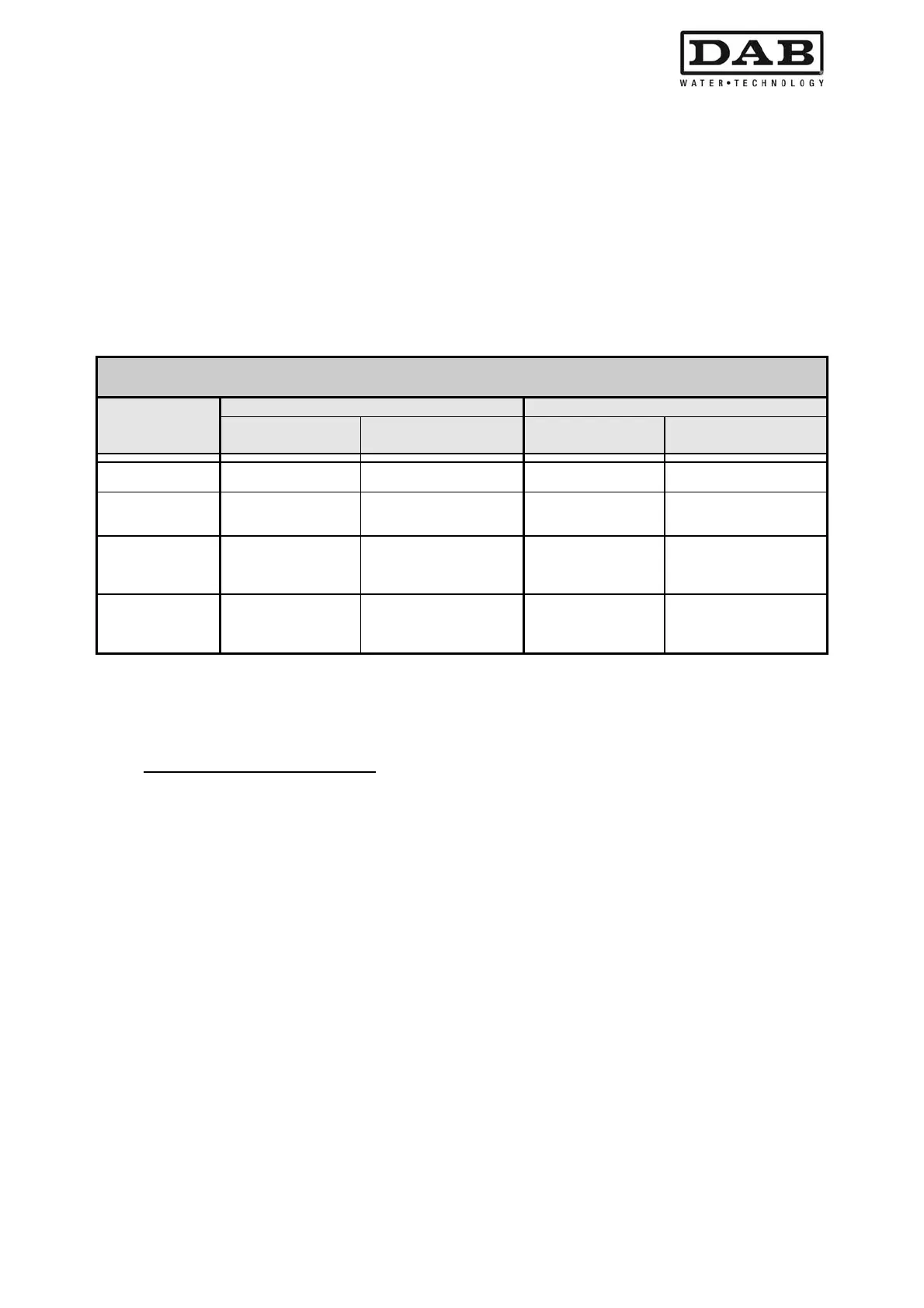
Parameter O1 is associated with the values and functions specified in Table 26.
6.6.14.2 O2: Output 2 function setting
Output 2 notifies of electric pump running status (pump on/off). The output enables use of a normally closed
or normally open voltage-free contact.
Parameter O2 is associated with the values and functions specified in Table 26.
Configuration of functions associated with outputs
Output
configuration
OUT1 OUT2
Activation
conditions
Output contact
status
Activation
conditions
Output contact
status
0
No function
associated
NO contact always open,
NC contact always closed
No function
associated
NO contact always open,
NC contact always closed
1
No function
associated
NO contact always
closed, NC contact always
open
No function
associated
NO contact always
closed, NC contact always
open
2
Presence of blocking
errors
In event of blocking errors
NO contact closes and
NC contact opens
Activation of output in
event of blocking
errors
When the pump is
running, the NO contact
closes and the NC contact
opens
3
Presence of blocking
errors
In event of blocking errors
NO contact opens and NC
contact closes
Activation of output in
event of blocking
errors
When the pump is
running, the NO contact
opens and the NC contact
closes
Table 26: Output configuration
6.6.15 RF: Fault and warning log reset
To clear the fault and warning log, press and hold the buttons + and – simultaneously for at least 2 seconds.
The number of faults present in the log (max. 64) are summarised below the RF symbol.
The log can be viewed from the MONITOR menu on the FF page.


 To Next Page
 Loading...