ENGLISH
72
3.1 Menus
The complete structure of all menus and relative items is shown in Table 9.
3.2 Access to menus
There are two ways to access the various menus from the main menu:
1) Direct access with button combinations
2) Access by name via drop-down menus
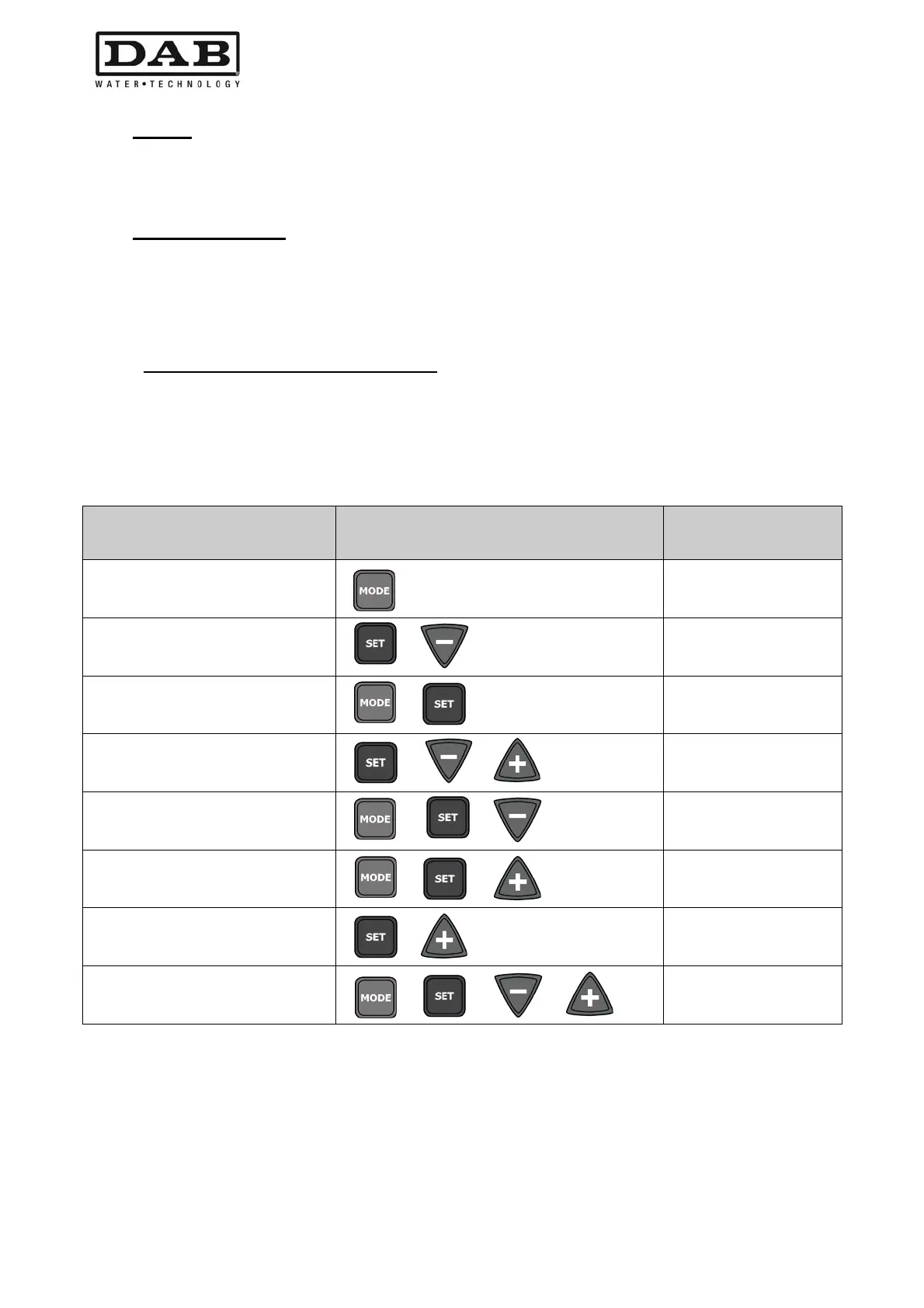
3.2.1 Direct access with button combinations
The menu is accessed directly by pressing the relative combination of buttons simultaneously (for example
MODE SET to enter the Setpoint menu) and the MODE button can be used to scroll through the various
items.
Table 8 shows the menus accessible via button combinations.
MENU NAME DIRECT ACCESS BUTTONS
PRESS-AND-
HOLD TIME
User
On release of button
Monitor
2 Sec
Setpoint
2 Sec
Manual
5 Sec
Installer
5 Sec
Technical assistance
5 Sec
Restore default
settings
2 Sec on power-up of
unit
Reset
2 Sec
Table 8: Access to menus


 To Next Page
 Loading...