User’s Manual EM11A015B
intelligent Touch Manager
86
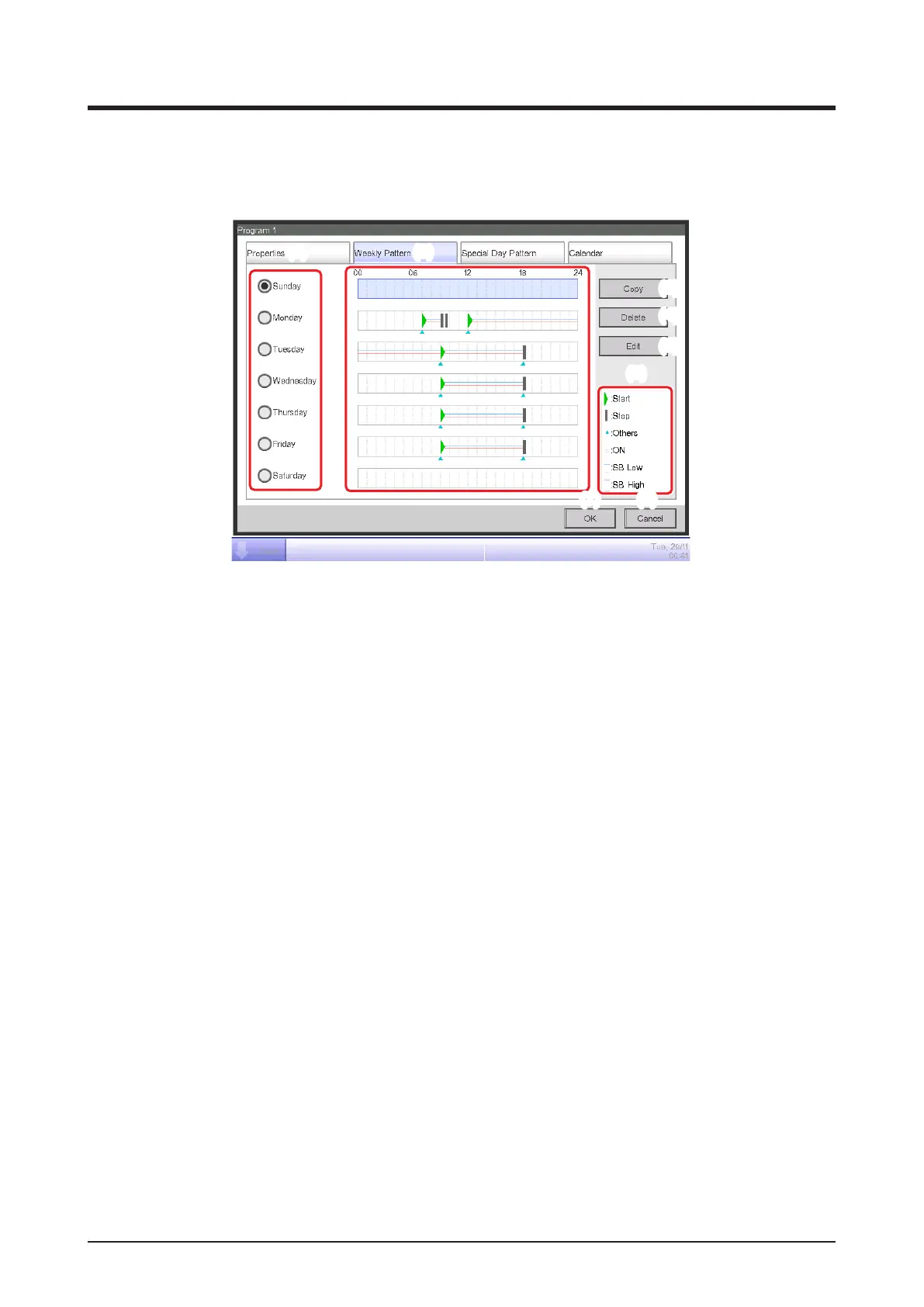
• Weekly Pattern Tab (Schedule Edit Screen)
This screen is displayed when you touch the Weekly Pattern tab on the Schedule Edit screen.
It allows you to set up a weekly schedule.
(1) (2)
(3)
(4)
(5)
(6)
(8)
(7)
(1) Day of the week radio button
Selects the day of the week to edit.
(2) Schedule Settings view
Displays the schedule set to each day of the week.
(3) Copy button
Displays the Copy to Selection screen for selecting the destination, to which the schedule set for
the day of the week, selected with the radio button, will be copied.
(4) Delete button
Deletes the schedule set to the day of the week selected with radio button. Touching the button
displays a deletion conrmation dialog.
(5) Edit button
Displays the Event List screen that allows you to edit the schedule set up for the day of the week
selected with the radio button.
(6) Legend view
Displays legends available in the Schedule Settings view area.
SB Low and SB High are displayed only when the optional setback function is enabled.
(7) OK button
Saves the edit and closes the screen.
(8) Cancel button
Cancels the edit and closes the screen. Touching the button displays a conrmation dialog.



 To Next Page