ECHO Series Ultrasonic Thickness Gages
27
Zero Calibration Only
If you have a test step block of known thickness and known velocity of sound in the
material, then you can calibrate the zero by measuring the time of flight from main-bang
to the first back echo for the thinner step. The calibrated zero is the calculated zero minus
the measured zero.
To accurately measure a thickness of unknown material you need to know the velocity of
the sound in the unknown material and the errors introduced by the cable and electronics.
This is called delay line and zero calibrated value for the transducer.
To perform a Zero calibration, follow these steps:
1. Power on the gage.
2. Use the up and down arrow keys to select your transducer.
3. Press F1 – Menu key.
4. Use the up and down arrow keys to select the Calibration option.
5. Press the MENU/OK key.
6. Verify your transducer selection and press the MENU/OK key.
To proceed with the Zero calibration, follow the instructions below:
1. Place couplant on the surface of a 5-step test block.
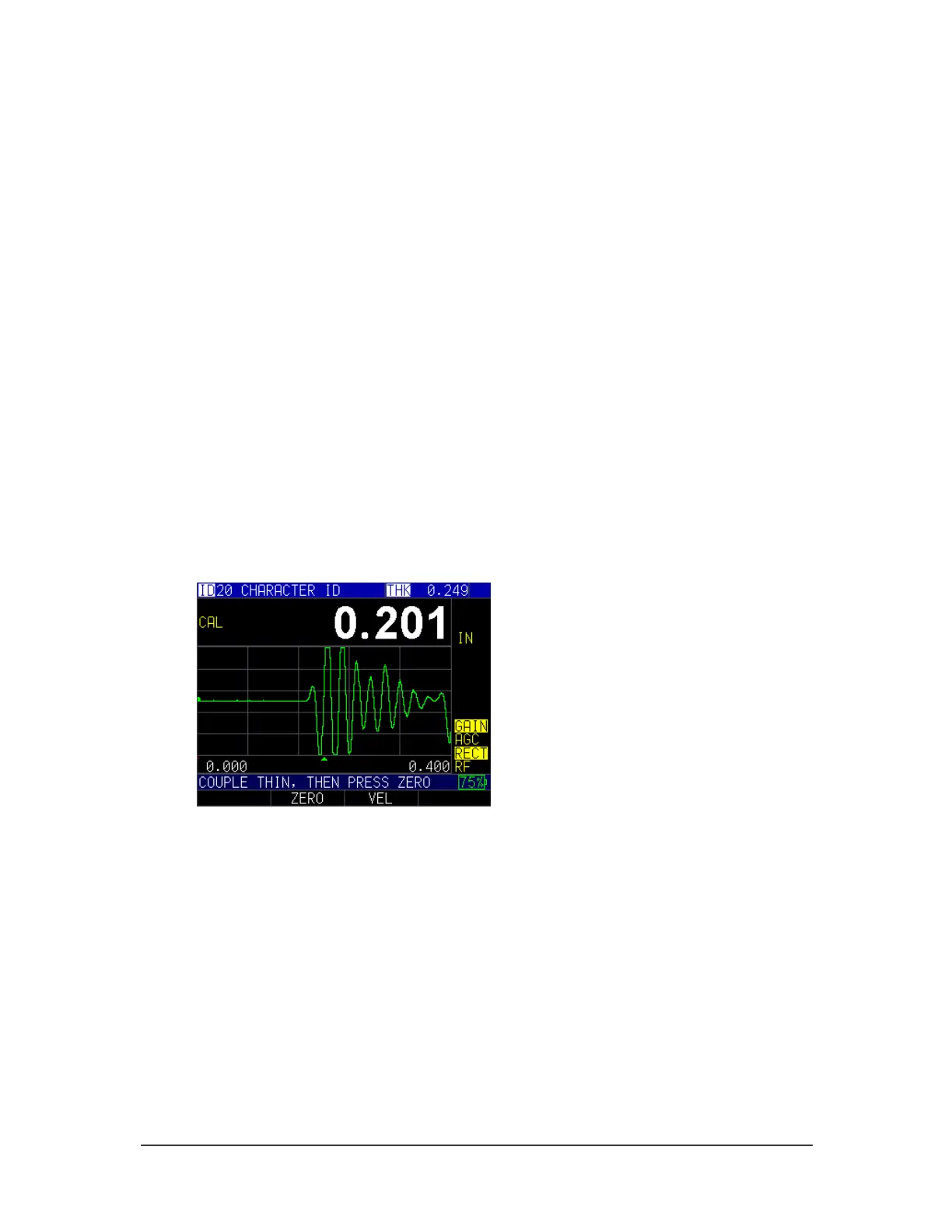
2. Couple the transducer to the material. A similar screen to the one shown below
will appear:
Cal screen
3. Measure the thinner step and press the F2 – Zero key.
4. After selecting the F2 key you can take the transducer off the test block. If
measured value is different than the known value of the step, adjust the measured
value by pressing up or down arrow key.
5. Press the MENU/OK key.
The gage will briefly display the calibrated zero value in the top of the screen and then
return to Measure mode.



 To Next Page