Danatronics, Corp.
40
Reset
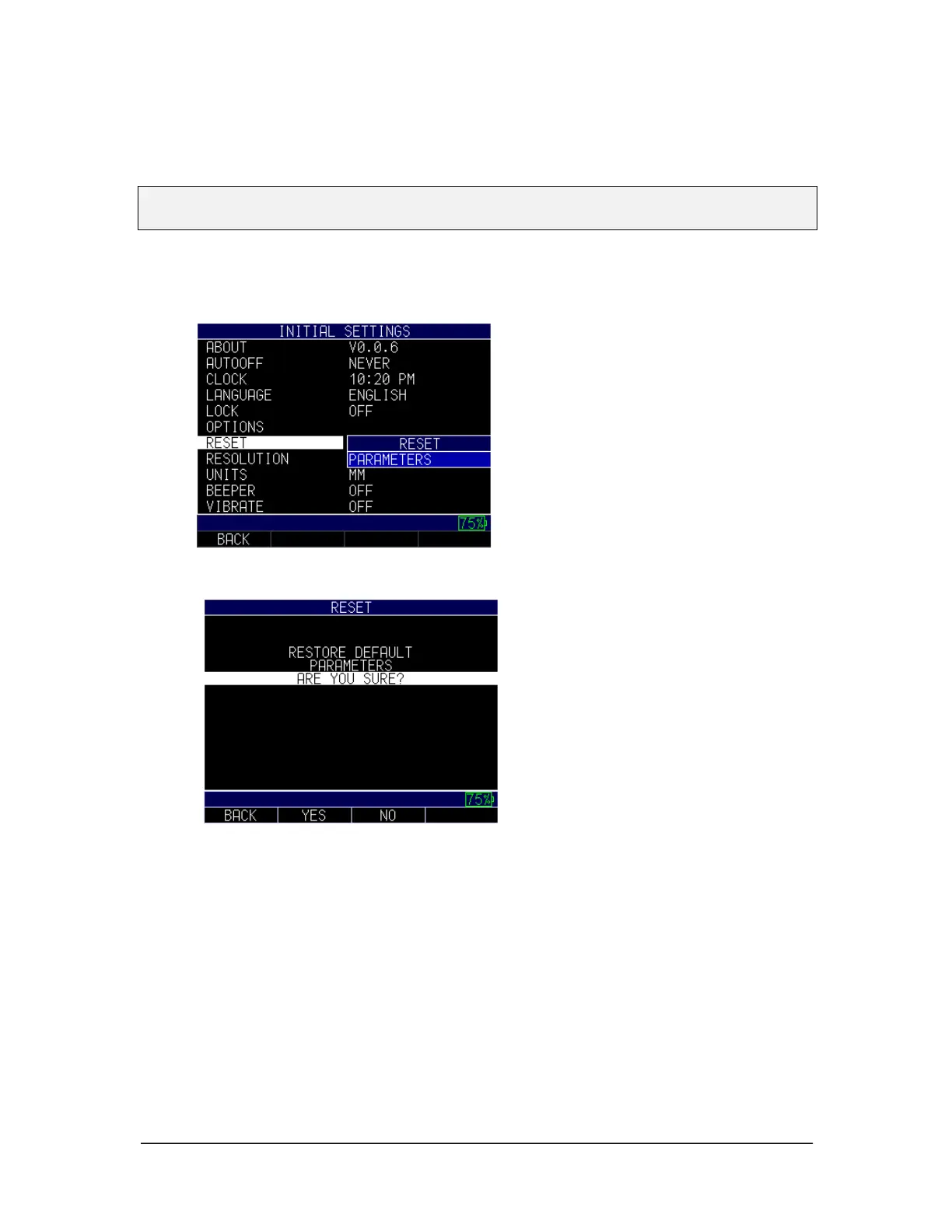
You can reset the gage parameters back to the default settings by performing a gage reset.
Note: Performing a reset permanently deletes all of the saved parameters from the gage
and replaces the settings with default values.
To perform a reset, follow these steps:
1. Use the up and down arrow keys to select the Reset option and press the
MENU/OK key.
2. Use the up and down arrow keys to select the Parameters option and press the
MENU/OK key. The following screen will appear:
3. Press the F2 – Yes key if you would like to reset the gage parameters back to the
default settings. Pressing the F2 key will bring you back to the Home screen.
4. Press the F3 – No key if you would like to cancel the reset function. Pressing the
F3 key, or the F1 key, will bring you back to the Initial Settings screen.
Resolution
The Resolution setting can be modified for corrosion or precision use. If your gage is
equipped with the precision option, the user can select between 0.001" and 0.0001" or
0.01mm to 0.001mm using the same process described below.
To select a resolution parameter, follow these steps:
1. Use the up and down arrow keys to select the Resolution option and press the
MENU/OK key.



 To Next Page