Danatronics, Corp.
96
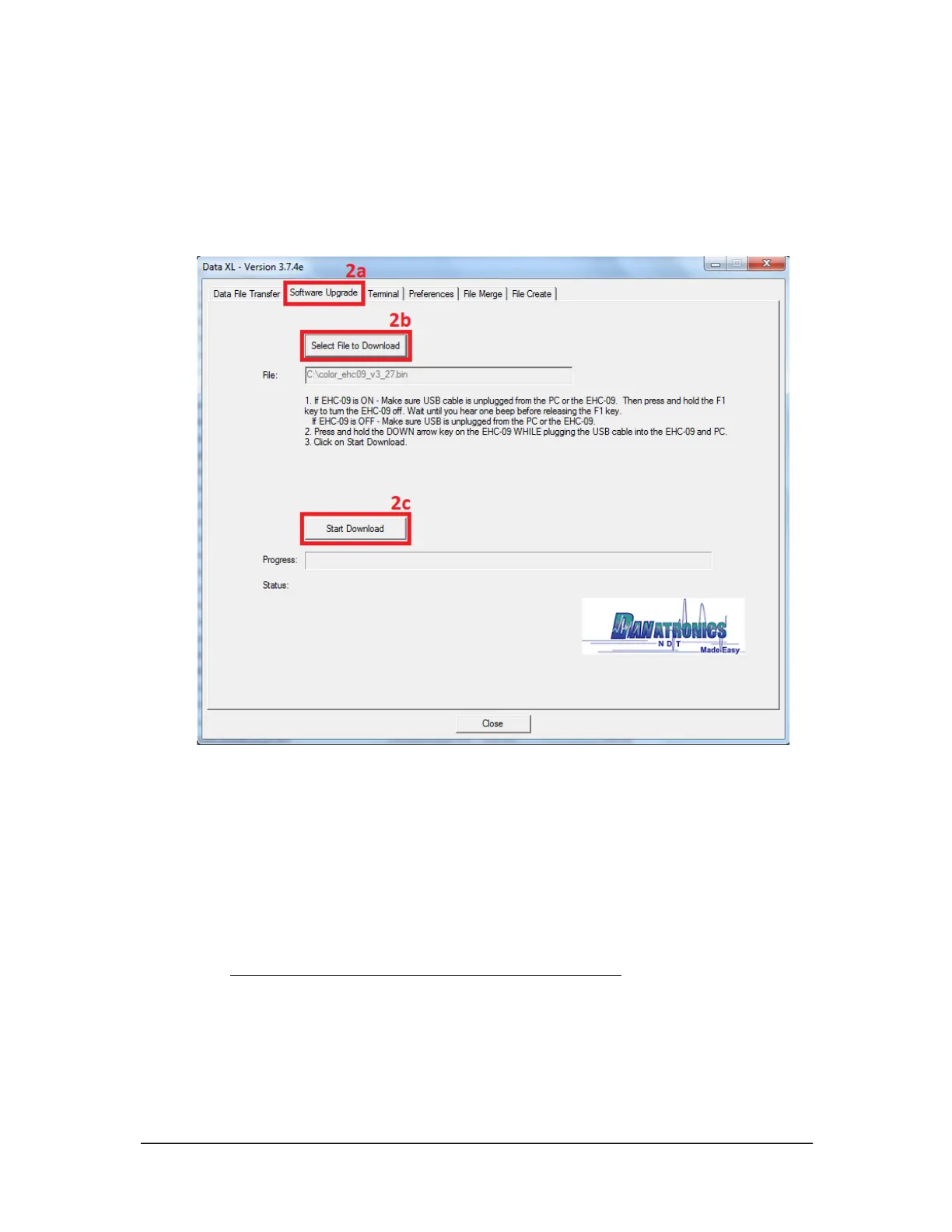
2c. Click the “Start Download” button which will commence with the software
update. Shortly after, the update program will proceed to update the thickness
gage. Once the update is completed the screen will display a message to
“Unplug USB cable to turn off power”. At this point the software update
process is completed and the thickness gage will now successfully enumerate
via USB with a computer running Windows 8 or Windows 10.
Exporting Files from a Gage
The steps in this section need to be performed to export a file from the gage to a
computer via USB. You will need the following:
• An ultrasonic thickness gage (EHC-09, UPG-07, ECHO 7, ECHO 8, ECHO 9, or
ECHO FD)
• Mini B USB cable
• A Computer with Windows XP, 7, 8 or 10 operating system
• Data XL (to download the latest version of Data XL click on the following
link http://www.danatronics.com/ultrasoundsupport.html)
To export files from a gage, follow these steps:
1. Plug the USB cable into the gage and the host computer.
2. Turn the gage on by holding the F1 key until the gage beeps.
3. Launch Data XL on the host computer.



 To Next Page