Danatronics, Corp.
94
Updating the ECHO 9 Gage
To update an ECHO 9 gage, follow the below steps:
1. Power on the ECHO 9 gage by holding the F1 key until the unit beeps and
displays the splash screen.
2. Connect the ECHO 9 gage via a USB cable to a computer that already has Data
XL software (v3.7.4 or higher) installed on it.
3. Launch Data XL software.
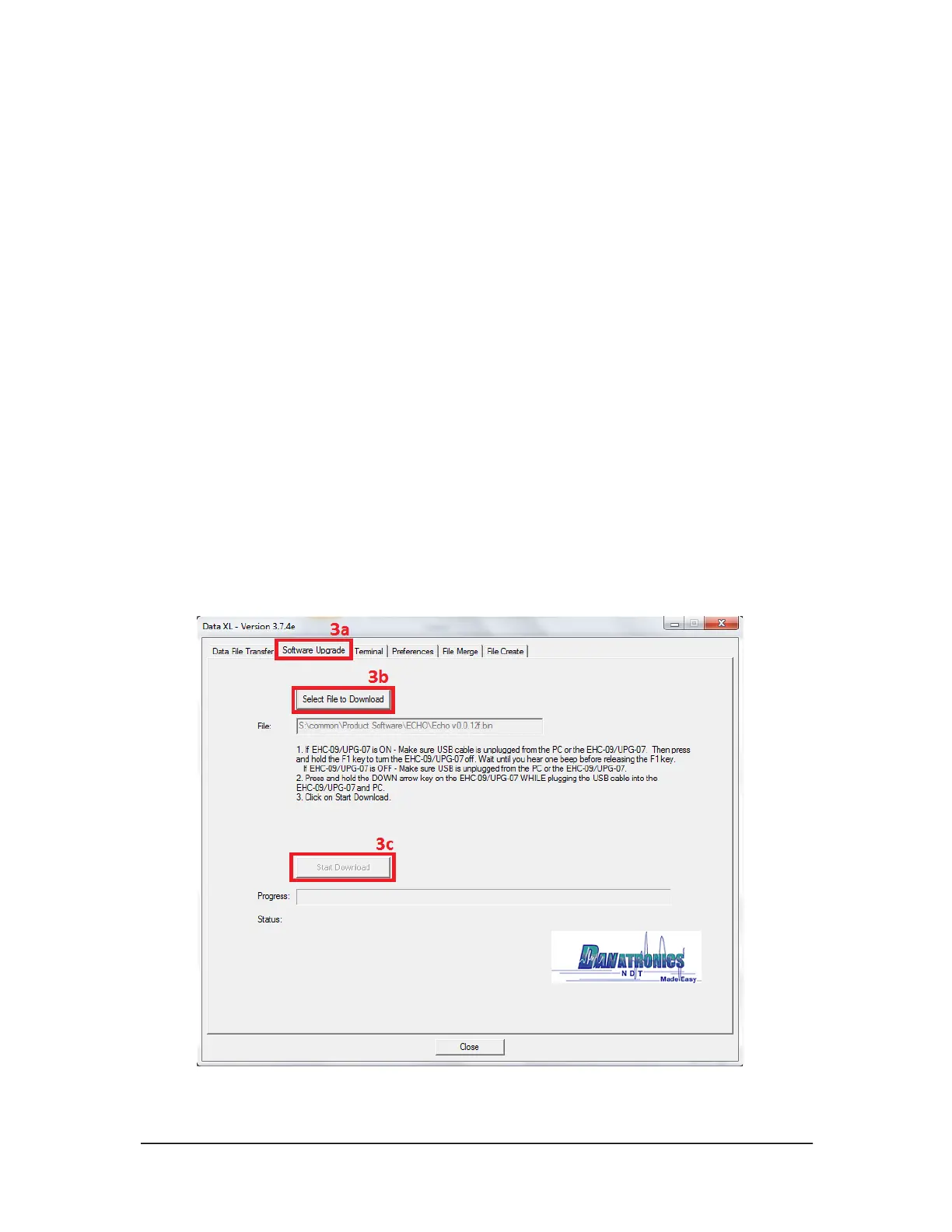
3a. Click the Software Upgrade tab located in the upper portion of Data XL.
3b. Click the Select File To Download button, which will launch an open file
dialog box. Select the file to update the ECHO 9 gage. (In the example below,
the file Echo v.0.0.12f.bin was chosen.)
3c. Click the Start Download button, which will commence with the software
update. The ECHO 9 gage should display the message “Launching Update”
on the screen. Shortly after, the update program will proceed to update the
gage. Once the update is complete, the screen will display a message to
“Unplug USB cable to turn off power”. At this point, the software update
process is completed.



 To Next Page