Image Quality
81
1
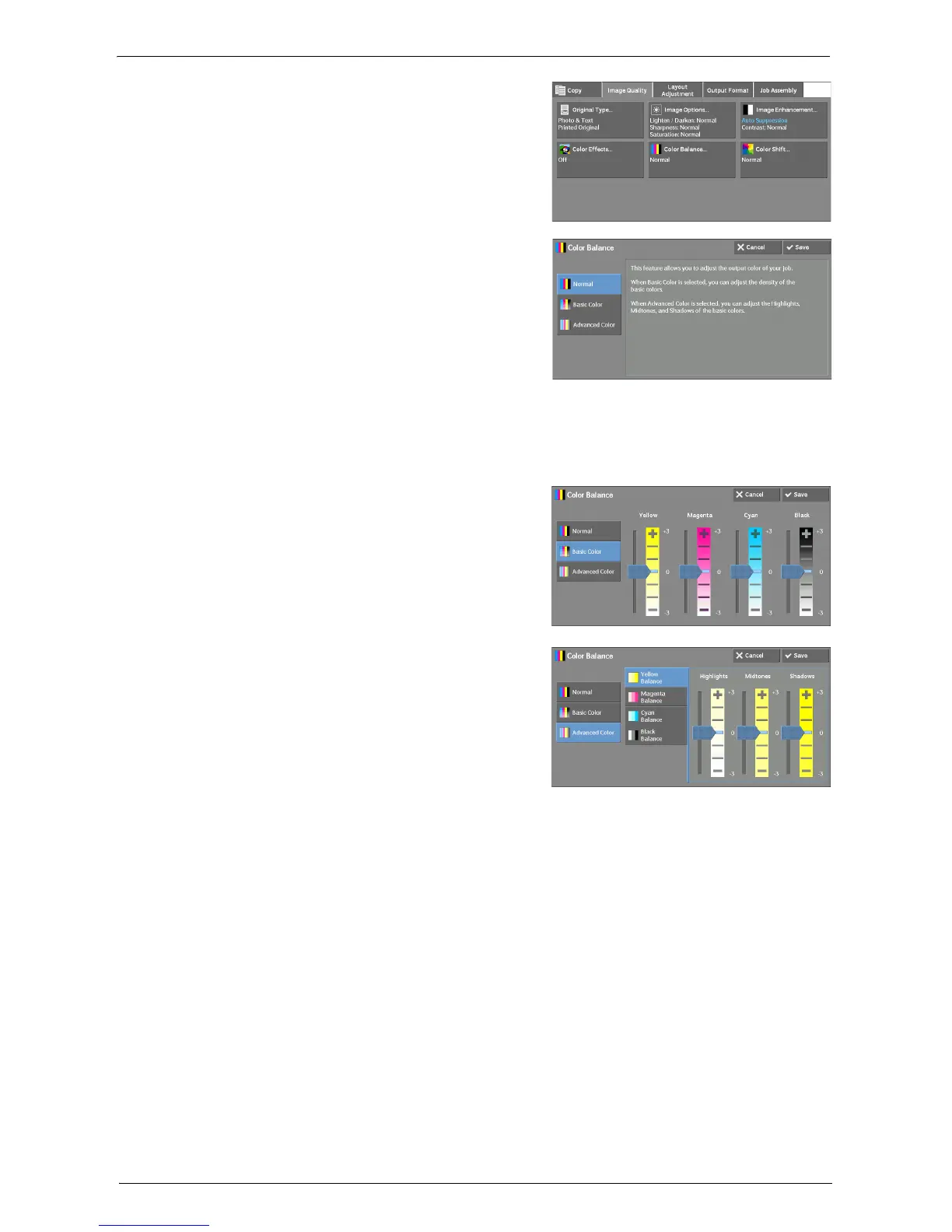
Select [Color Balance].
2
Select any option.
Normal
Always copies a document with the density balance set to "0" for the four toner colors: yellow,
magenta, cyan, and black.
Basic Color
Allows you to adjust the density level for each
toner color: yellow, magenta, cyan, and black.
Advanced Color
Allows you to adjust the density level for each
toner color (yellow, magenta, cyan, black) which
is divided to [Highlights], [Midtones], and
[Shadows].
Highlights
Allows you to adjust the color strength of low-density areas.
Example:
If low-density yellow is printed darker, adjust the color strength in the minus (-) direction
under [Yellow Balance] > [Highlights].
Midtones
Allows you to adjust the color strength of medium-density areas.
Example:
If medium-density yellow is printed lighter, adjust the color strength in the plus (+)
direction under [Yellow Balance] > [Midtones].
Shadows
Allows you to adjust the color strength of high-density areas.
Example:
If high-density yellow is printed lighter, adjust the color strength in the plus (+) direction
under [Yellow Balance] > [Shadows].














 To Next Page