Home
Digiever
Network Hardware
DS-2009
Page 160
Digiever DS-2009 - Page 160
243 pages
Manual
Save Page as PDF
To Next Page
To Next Page
To Previous Page
To Previous Page
Loading...
154
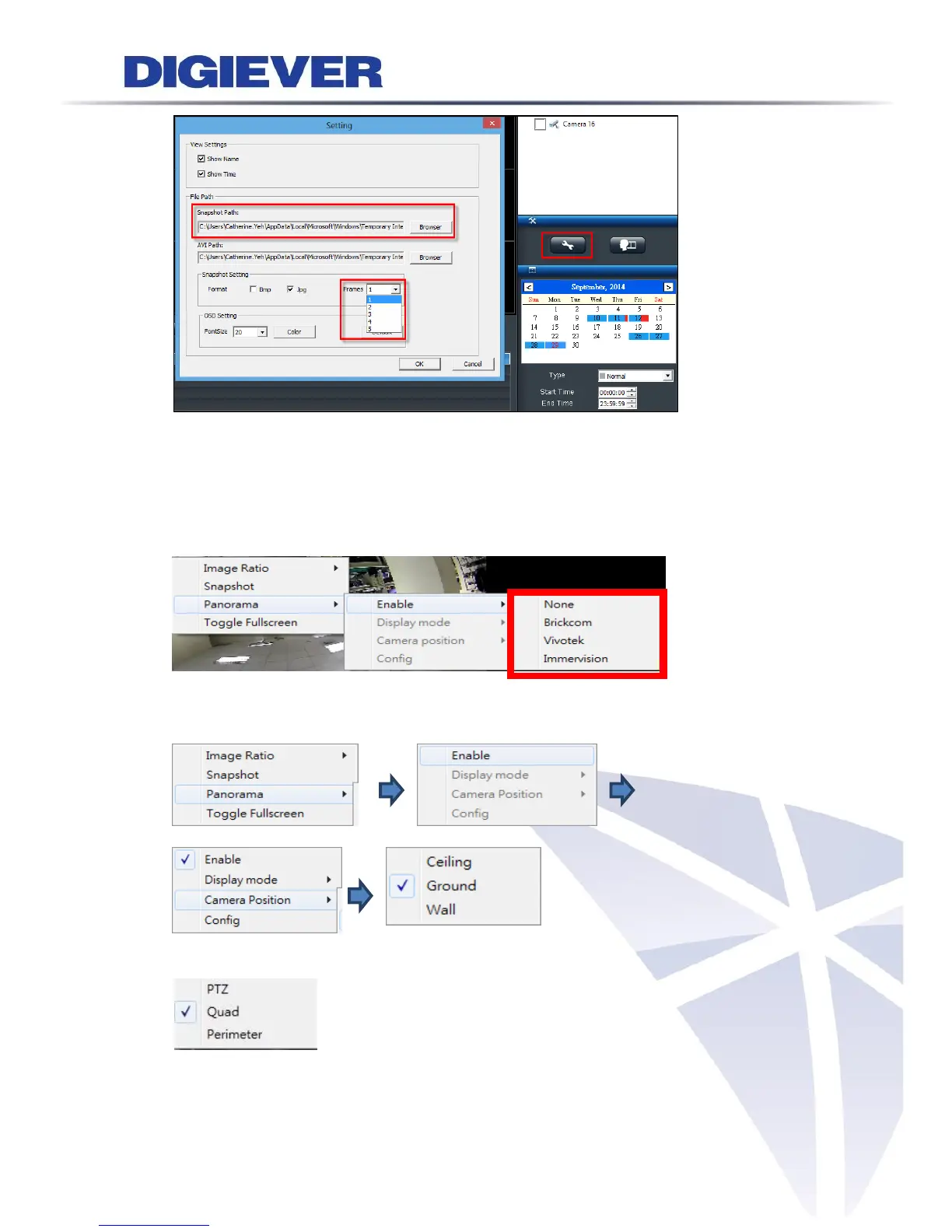
6.
Dew
arp for fishe
ye cameras
By right click o
n the video, user
s can choose the proper dew
arp
engine f
or fisheye
camer
a.
a. Choose the dewarp engine:
b. Choose the mounting type
c.
Choose the display mode
7.
Change OSD color and
fon
t size
159
161
Table of Contents
Main Page
Default Chapter
1
User Manual
1
Table of Contents
2
Chapter 1. Introduction
7
Hardware Description
8
DS-2000 Series
8
DS-4000 Series
9
DS-1100 Pro Series
10
DS-2100 Pro Series
11
DS-4200 Pro Series
12
DS-4200-RM Pro Series
13
DS-8200-RM Pro Series
14
DS-1100 Pro+ Series
15
DS-2100 Pro+ Series
16
DS-4200 Pro+ Series
17
DS-4200-RM Pro+ Series
18
DS-8200-RM Pro+ Series
19
DS-4300 Pro+ Series
20
DS-4300-RM Pro+ Series
21
DS-8300-RM Pro+ Series
22
LED Indicators Status
23
DS-2000 Series
23
DS-4000 Series
25
DS-1100 Pro Series
27
DS-2100 Pro Series
28
DS-4200 Pro Series
29
DS-4200-RM Pro Series
31
DS-8200-RM Pro Series
33
DS-1100 Pro+ Series
35
DS-2100 Pro+ Series
36
DS-4200 Pro+ Series
37
DS-4200-RM Pro+ Series
39
DS-8200-RM Pro+ Series
41
DS-4300 Pro+ Series
43
DS-4300-RM Pro+ Series
45
DS-8300-RM Pro+ Series
47
Dual Display Solution: HDMI/VGA/DVI-I Connection
49
Chapter 2. NVR Installation
50
Remote Web Browser PC System Requirements
50
Connect to NVR
51
Quick Guide
51
Install EZ Search
51
Install NVR Decoder
60
Install Nvrplayer
62
Install NVR Check
68
User Manual
72
Browse CD
72
Activate Live View Service
73
Quick Configuration
76
Start
76
Network Settings
77
Server Settings
78
Date & Time
79
Disk Management
80
Camera Settings
88
Finish
97
Chapter 3. Use NVR by Local Display
98
Log in NVR
98
Anonymous Login
99
Virtual Keyboard
100
Quick Configuration
101
Liveview
101
Select View Modes on Liveview Page
101
Main Functions of Liveview
103
Right Click Functions on Video Window
110
Zooming with Mouse Scroll
113
Two-Way Audio
114
Playback
114
Steps to Playback Videos
115
Main Functions of Playback
119
Export Files
121
Snapshot
122
Zooming with Mouse Scroll
122
Others
122
Screenshot on Local Display
122
System Upgrade on Local Display
123
USB Backup by Hardware or Software USB BACKUP Buttons
123
Chapter 4 Use NVR by Remote Web Browser
123
Liveview
123
Select View Modes on Liveview Page
124
Main Functions for Liveview
125
Right Click Functions on Video Window
135
Zooming with Mouse Scroll
138
Two-Way Audio
138
Built-In Mini-CMS Server
139
Multi-Layer Dynamic E-Map
143
Feature Introduction
143
Add or Delete Multi-Layer E-Maps
145
Deploy Cameras
146
Enable/ Disable Automatically Pop-Up Event Window
148
Event Log History
149
Playback
150
Steps to Playback Videos
150
Smart Search
155
Main Functions on Playback
157
Zooming with Mouse Scroll
162
Export
164
Play Video Files
169
Windows Networking
169
FTP Service
174
Naming Rule of Video Files
177
Chapter 5 Configuration
177
IP Camera
177
Camera Settings
177
Camera Parameter
178
Camera Status
181
Recording & Events
182
Recording Settings
183
Recording Schedule
185
Event & Action Management
187
Advanced Setting
193
E-Mail
193
Disk Management
195
File System Management
197
File Sharing Service
198
Cloud
200
Setup Dropbox Service
200
Share Files to Dropbox Server
201
Remove Configuration and Online Sync
202
Network Setup
203
Network Service
207
Ddns
209
Management
210
User Management
210
Log System
215
Save/Load Configuration
219
USB Backup
221
Remote Backup
227
External IO Device
229
UPS Management
230
Failover
231
System
234
Device Information
234
System Upgrade
235
Language
239
Date &Time
240
Buzzer
242
Reboot &Shutdown
242
Appendix: Notice and Warning
243
Related product manuals
Digiever DS-4005
9 pages



 To Next Page