SETUP SCREENS
SMEMA Setup
8-86 Bravo™ 8105 Programming and Operations Guide Rev. 2
8
SMEMA Setup
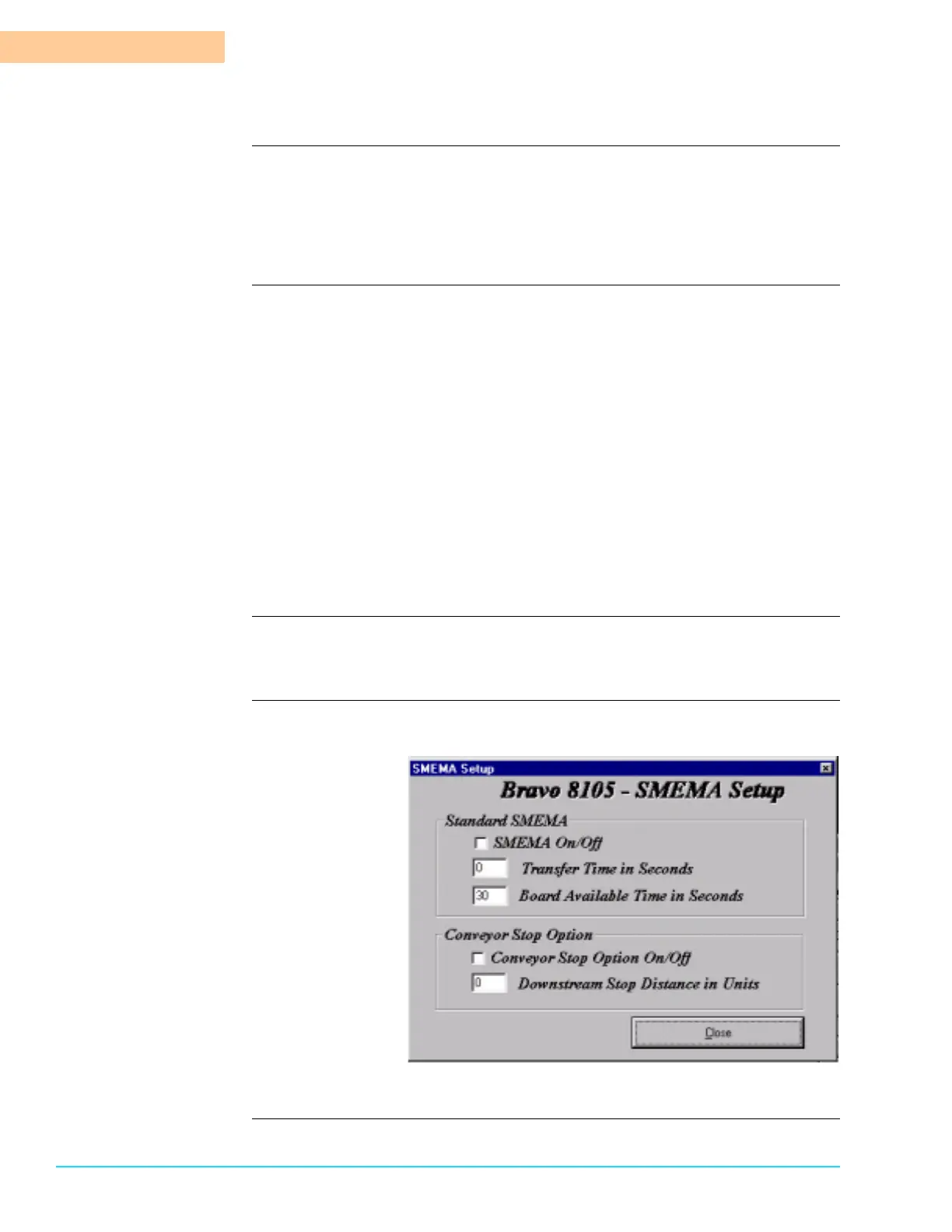
Introduction To configure the SMEMA setup, select Setup > SMEMA from the Menu Bar at
the top of the screen. Refer to Figure 8–8. The SMEMA Option is a
communications protocol that allows for automated operation with other
equipment in the line. A checkmark next to “SMEMA On/Off” activates the
SMEMA communication.
SMEMA Parameters Transfer Time in Seconds
The incoming photocell expects to detect a board within a specific amount of
time after receiving a Board Available signal from upstream. The Transfer
Time is the time in seconds between when the Board Available signal is
received and when the board is detected by the photocell. If the board is not
detected within this about of time, an alarm activates. The value entered
must be less than 1000.
Board Available Time in Seconds
The Bravo sends a Board Available signal to the downstream machine. It is
sometimes desirable to send the Board available signal before the board exits
the machine (i.e., before it is detected by the unload exit photocell). Board
Available Time in Seconds is the time in seconds that a Board Available signal
is sent to the downstream machine before the board is at the exit. The value
must be less than 30.
Conveyor Stop Option Enter a downstream stop distance in the same units that the conveyor is
configured in (i.e., either Metric or Imperial).
SMEMA Setup
Software Screen
Figure 8–8



 To Next Page