SETUP SCREENS
Motorized Width Option Setup
8-88 Bravo™ 8105 Programming and Operations Guide Rev. 2
8
Motorized Width Option Setup
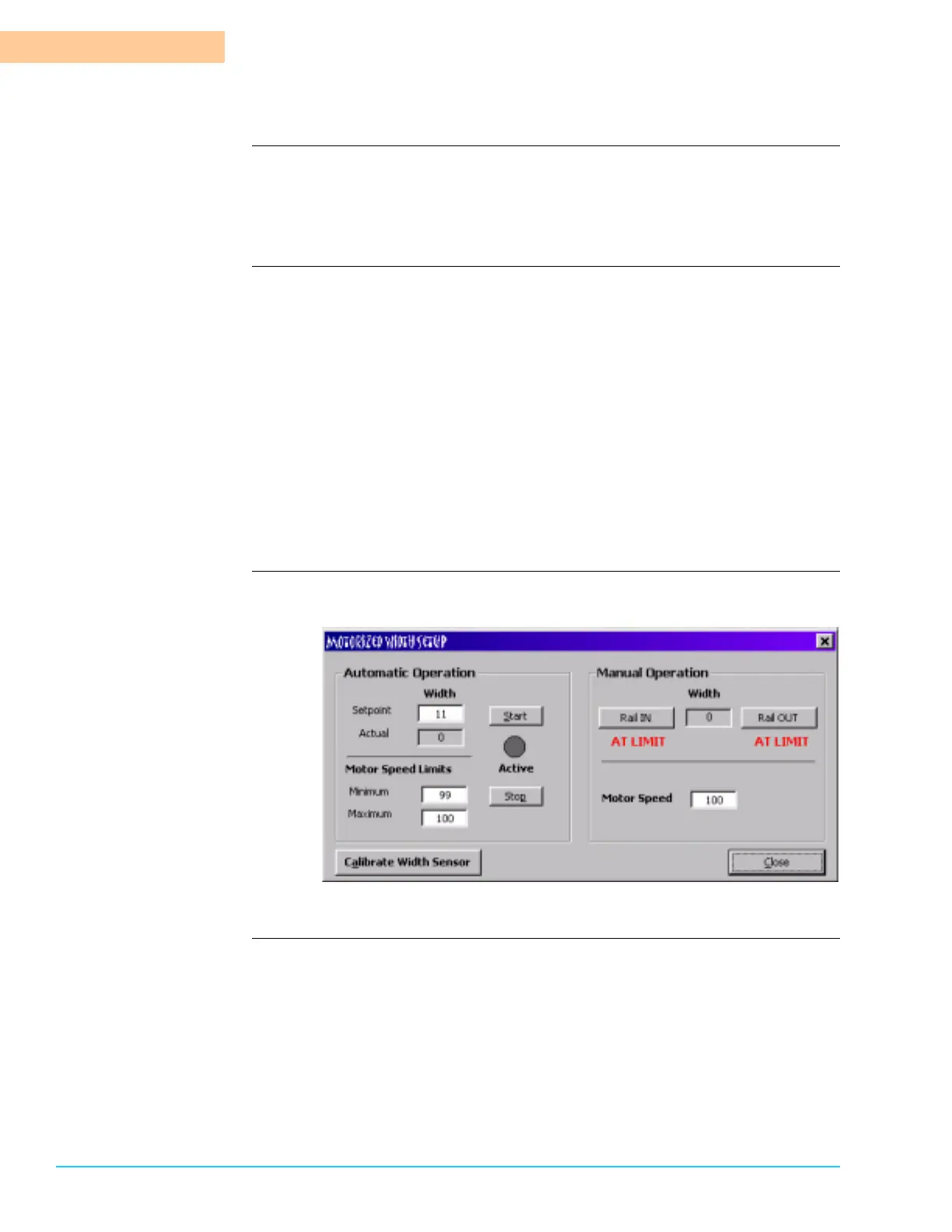
Introduction The Motorized Width Option Setup is available only with the optional Pin Chain
Conveyor. Access the Motorized Width Option Setup from the menu bar in Setup
> Motorized Width. Refer to Figure 8–10. The setup allows the motor speed for
the width motor to be defined.
Motorized Width Setup Enter both the minimum and maximum values as a percentage of total power in
the applicable fields. The automatic adjustment stays within the parameters
entered.
To set the width of the Pin Chain Conveyor in the Motorized Width Option Setup
Window, enter the desired Setpoint in the Width Setpoint field. Click on the Start
button. The indicator is Red when the Motorized Width motor is engaged and
Gray when the Motorized Width motor is Off.
To adjust the Pin Chain Conveyor using the software without entering an exact
setpoint parameter, use the Manual Operation function at the right of the
window. Select Rail IN to decrease the distance between the rails or Rail OUT to
increase the distance between the rails. If the rail reaches a limit switch, it is
indicated on the screen. Enter the desired speed of the motor in the Motor Speed
field. The Motor Speed is also a percentage of total power. It defaults to 100%.
Motorized Width Setup
Software Screen
Figure 8–10



 To Next Page