. . . . .
MAINT/DIAG SCREENS
Maintenance Timers
2-9317-372-00-0 Bravo™ 8105 Programming and Operations Guide 10-109
Maintenance Timers
Introduction The Maintenance Timers are two (2) timers that are configurable to alarm at a
user– entered parameter in hours. It is possible to monitor four (4) functions:
Conveyor, Heaters, Cooling (Blowers) and Convection (Blowers)
Setting Desired
Function
• To select a function, click on a box in the row next to the function under
the applicable column. Ensure that a checkmark appears.
• The Enable button at the top of the window must be selected to activate
the timer. The Enable button is selected if the box next to the button is red.
• Enter the time desired in hours next to the “Alarm Point” label that is the
time desired between timer alarms. To reset the timer to zero (0), select the
Reset button associated with the applicable timer.
Alarm Levels Each timer can be set to a warning level of Hard Stop, Soft Stop or Warning only.
To set the level of the alarm function, select the SetUp > Alarms screen from the
menu bar at the top of the screen. Click on the tab labeled Standard to set the
Maintenance Timer alarms.
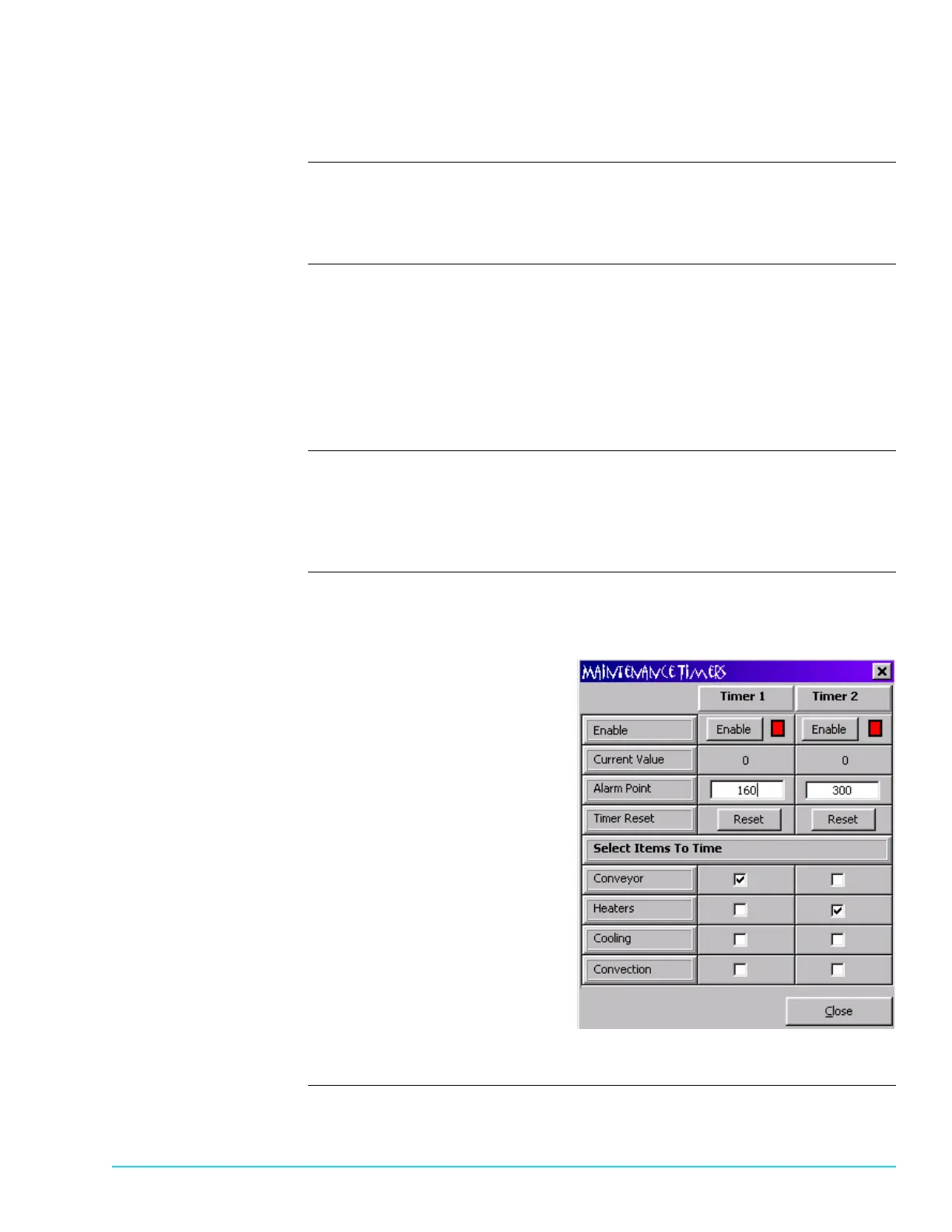
Software Screen In the example below, Timer 1 is set to alarm when the Conveyor operates 160
hours and Timer 2 is set to alarm when the Heaters operate every 300 hours.
Both alarms are enabled.
Figure 10–5



 To Next Page