115
CHAPTER 2: Instructor / Operator’s Station (IOS)
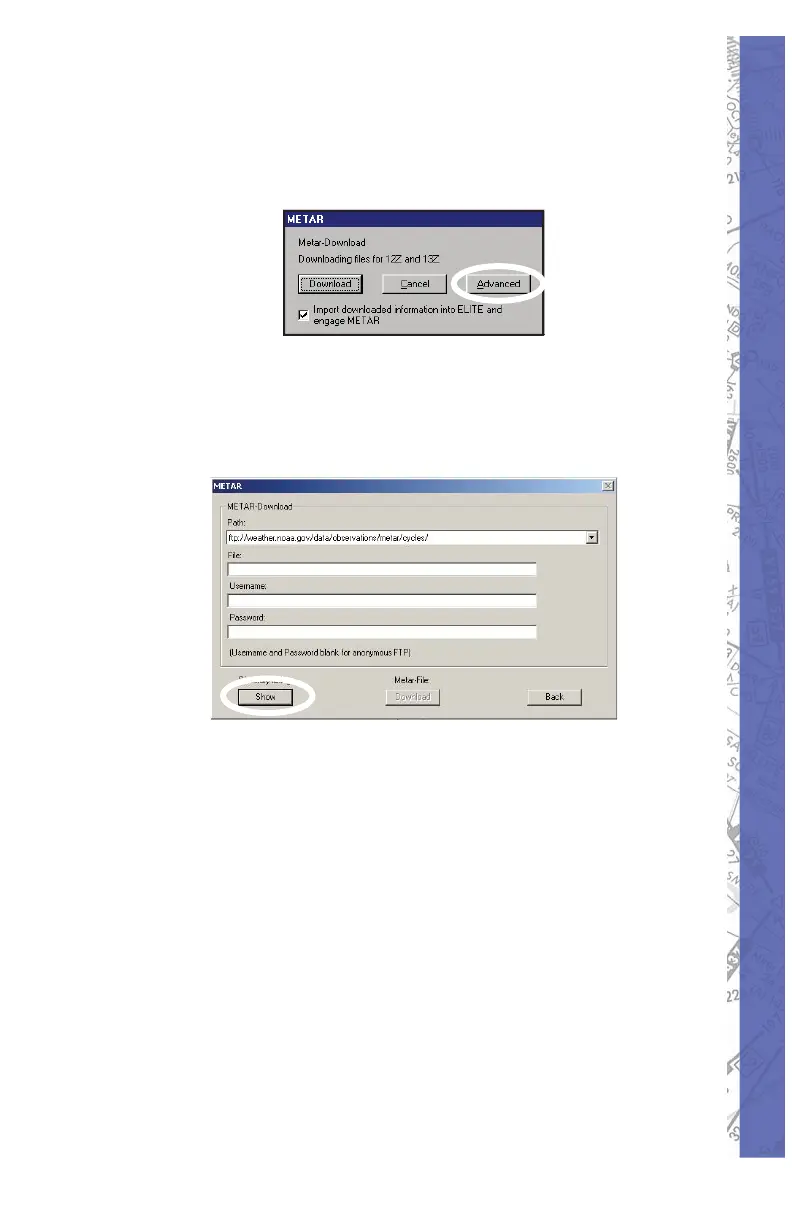
Advanced Method:
Press Advanced button and follow the procedure be low
for manual selection of METAR fi les as de sired.
Press the 1. SHOW button for the Directory
list ing. The METAR-Download page has a
default internet addresses ready. This will
connect you to the Internet.
Select a fi le you wish to download, i.e. 2.
1300Z (1300Z represents the UTC time of
the report)
NOTE: Downloading METAR data from the Internet
re quires a currently active Internet connection.
NOTE: METAR fi les cover the entire world.
Click the METAR-File 3. Download button to
start the download process. Click SAVE to
put the fi le into your METAR folder.



 To Next Page