77
CHAPTER 2: Instructor / Operator’s Station (IOS)
Extend Button
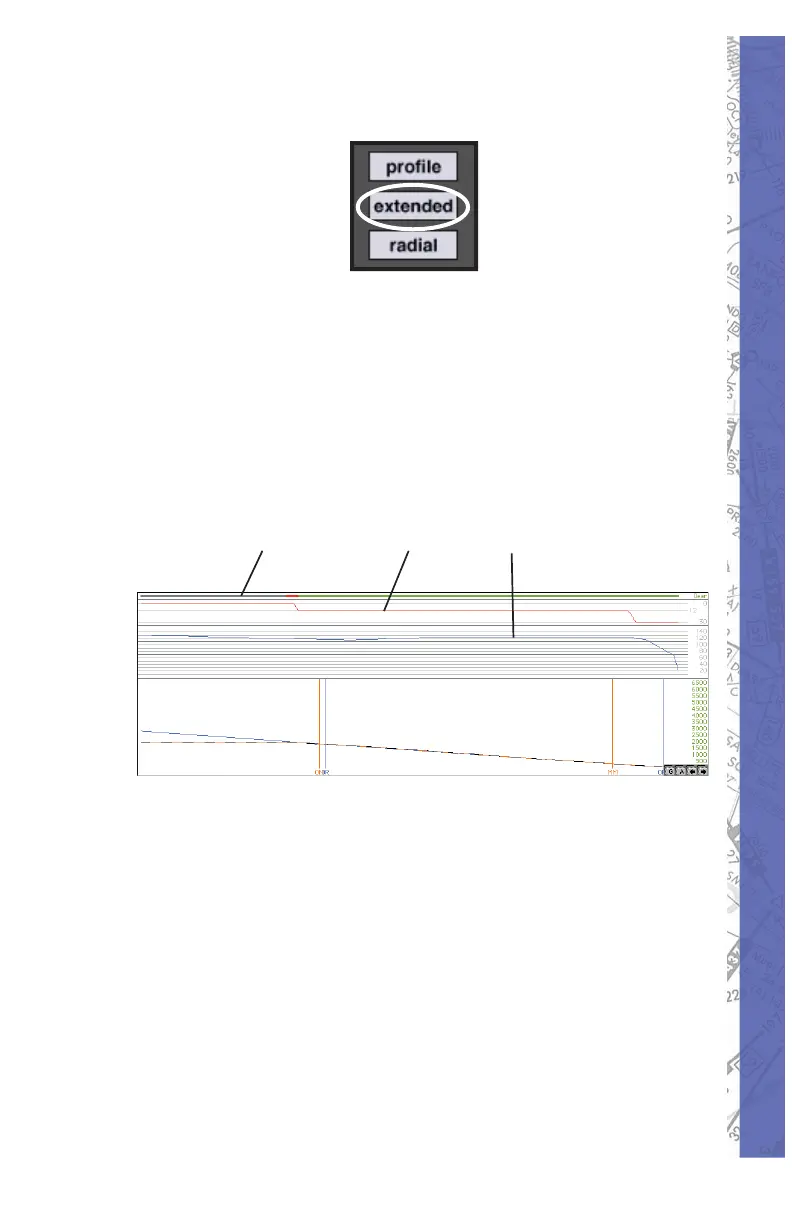
Clicking the EXTENDED but ton when the MAP PRO FILE is
displayed expands the pro fi le view to include air speed plot
as well as gear and fl ap po si tion graphs. The EX TEND ED
but ton func tions as a tog gle switch turn ing the ex pand ed
display ON/OFF. You can also click the EX TEND ED
button fi rst (in stead of the PROFILE but ton) to dis play
all four (altitude, air speed, gear, & fl ap) pro fi le sections
immediately.
Expanded MAP profi le view with EXTENDED button.
Notice gear, fl ap, and airspeed graphs in addition to altitude plot.
Gear Position Flap Position Airspeed Plot
ACFT Information
While viewing the MAP profi le, even more detailed
aircraft information is accessible for any position
along the plotted fl ight path. First ver i fy ELITE is in the
FREEZE mode and the replay function is not ac ti vat ed.
Click and hold the mouse but ton in side the profi le area
to dis play de tailed in for ma tion for any po si tion along the
plot ted fl ight path. A vertical line appears at the se lect ed
location in the pro fi le and po si tions the red air craft symbol



 To Next Page