ER1 User Guide 8-3
Camera Tab
Once the behavior is finished, the RCC goes back to looking for the trigger colors
(if any are specified).
Camera Tab
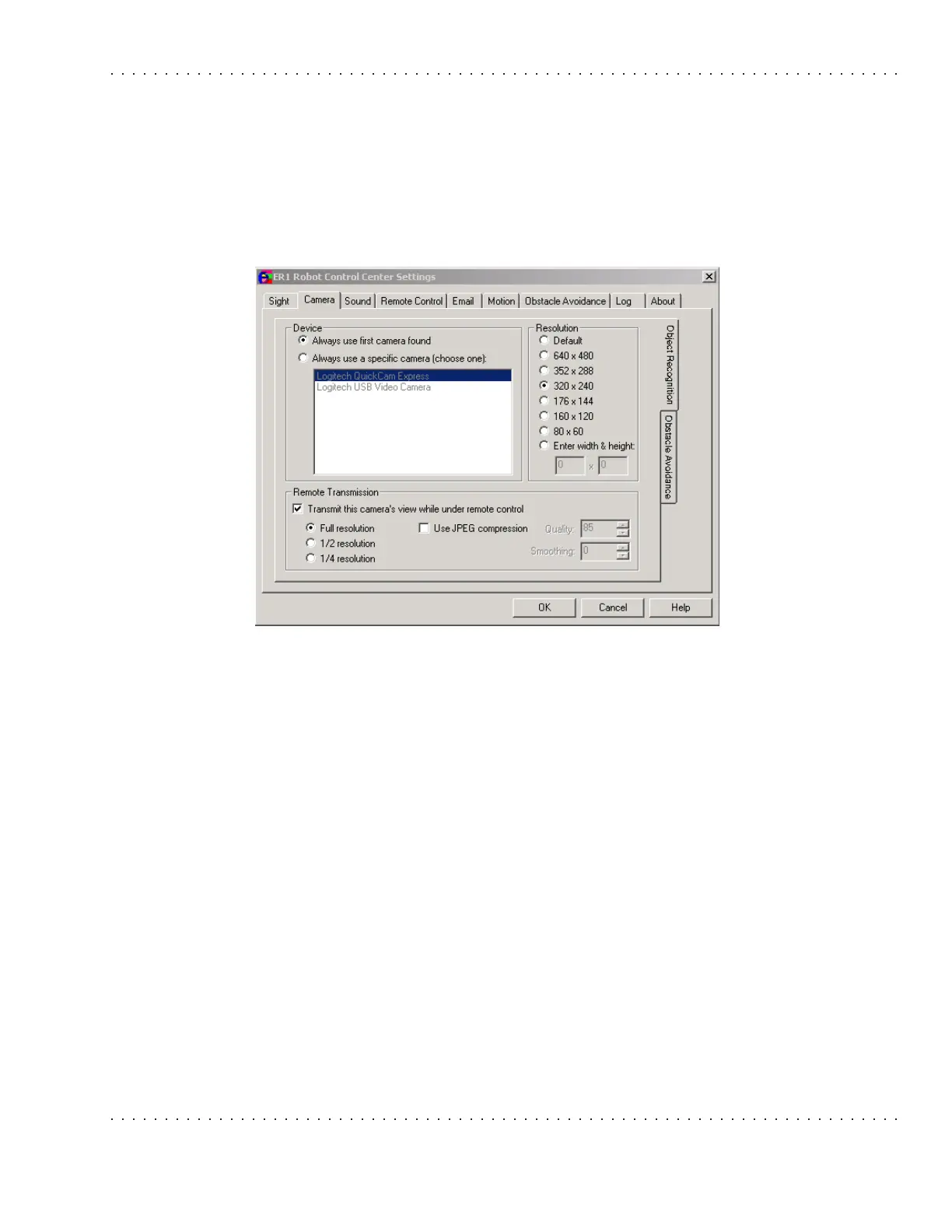
This tab allows you to set the camera parameters for both object recognition and obstacle
avoidance.
The camera shipped with your robot can be used by the robot for both obstacle avoidance
and object recognition. However, the software allows you the option of using a separate
camera for each of these functions.
• The object recognition camera is best mounted at the robot's "eye level".
• The obstacle avoidance camera is best mounted angled toward the floor in front of
the robot. Contact Evolution Robotics about getting additional hardware to mount
your camera.
Click on one of the two right-hand tabs to select a camera functionality. Only one camera
tab can be active at one time. Both camera tabs will be selectable even if the robot only
has one camera.
Device
This section is used to specify the camera that the robot will be using for object
recognition and/or obstacle avoidance. For each camera, parameters are:
• Always use first camera found- If this option is selected, the default camera will
be used. This is the first camera listed.
• Always use a specific camera- This option allows you to specify that a particular
model of camera is attached to the robot. It displays the device drivers it finds by
querying Windows using DirectX 8.1 (this is included in the installation). The



 To Next Page