Chapter 9 Behavior Settings
9-8 ER1 User Guide
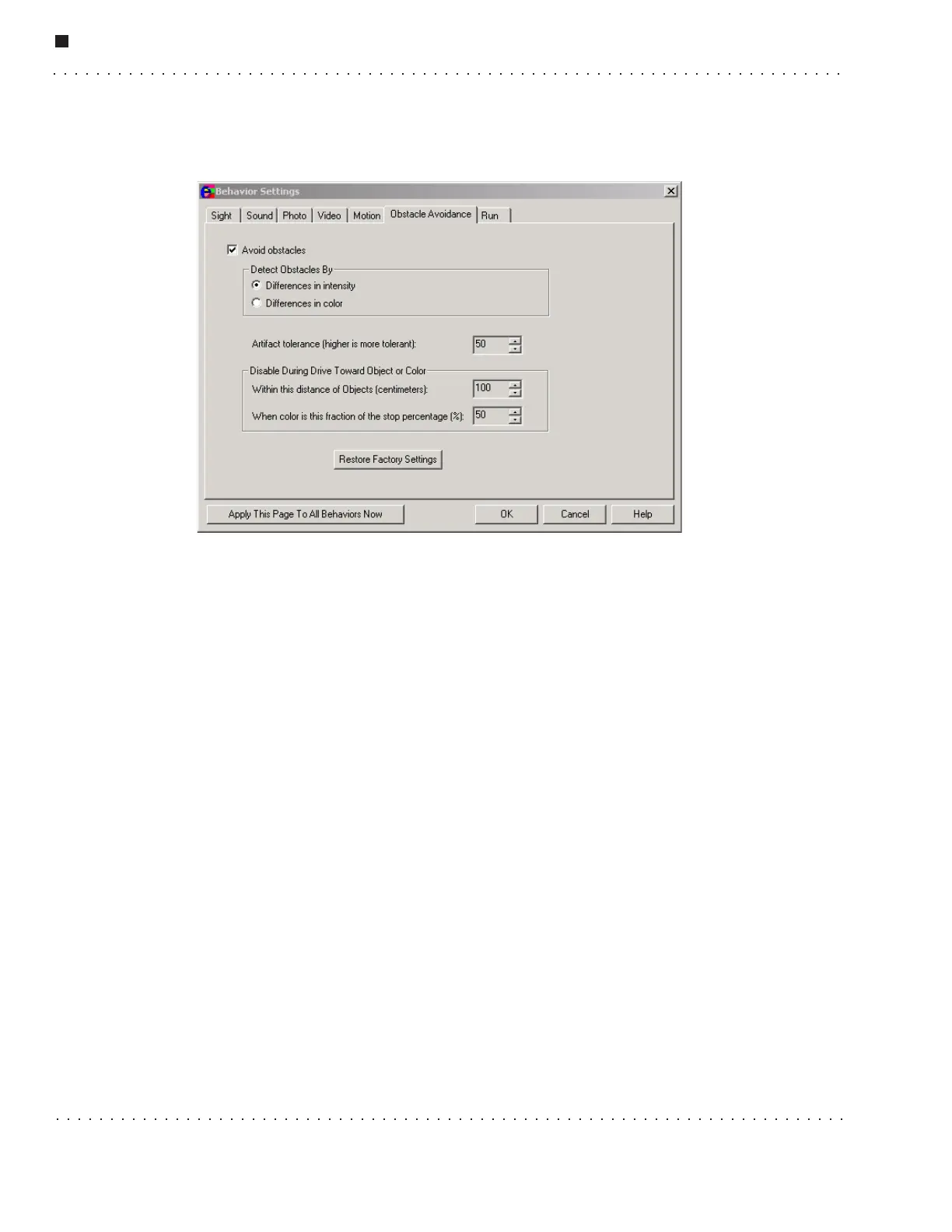
Obstacle Avoidance
These parameters are used to activate and adjust the ER1’s obstacle avoidance system.
• Avoid Obstacles - To activate the obstacle avoidance system, select this option.
This option is set to off by default.
• Detect Obstacles by - These parameters allow you to select a method for
detecting obstacles.
• Differences in intensity - This method detects obstacles by detecting
differences in light intensities.
• Difference in color - This method of obstacle avoidance uses differences in
color to detect obstacles.
• Artifact Tolerance - The higher this value is set, the less likely that differences
in colors and contrasts will be perceived as obstacles.
• Disable During Drive Toward Object or Color - These parameters specify
when to disengage the ER1’s motors when driving toward an object or color.
These parameters will prevent the robot from colliding with the intended target.
• Within this distance of objects - This value specifies the number of
centimeters from the target that the robot should stop. This value should
never be set to less than 4cm, as there is a good chance that the robot will
collide with the intended target.
• When color is this fraction of the stop percentage - This parameter
specifies that the robot should stop when the selected color takes up a
certain percentage of the screen.
When you have finished adjusting the parameters, click the Ok button. You may cancel at
any time by clicking on the Cancel button.



 To Next Page