WR1000-UM-251–01–9380 2 – 1
2. UPGRADING THE FIRMWARE
2. UPGRADING THE FIRMWARE
The version of your WR1000’s firmware can be upgraded by rewriting the flash ROM on the pertinent circuit
boards using one of two methods. You can upgrade the firmware by loading the update program from either
floppy disks or from a personal computer via the RS-232C interface.
2.1 Upgrading from Floppy Disks
(1) Turn off the WR1000.
(2) Insert the floppy disk containing the upgrade program into the WR1000’s floppy disk drive.
(3) Turn on the WR1000 to automatically execute the upgrade program.
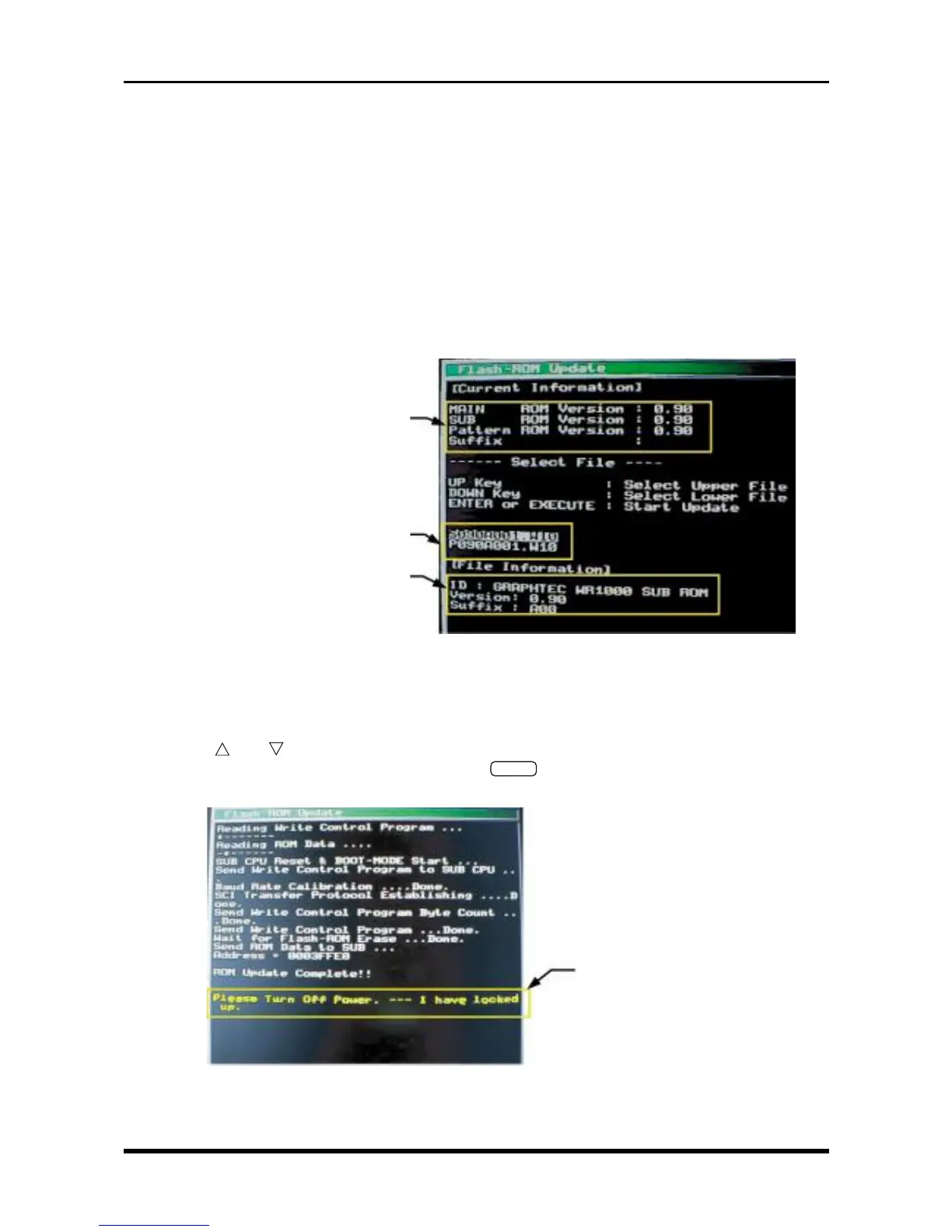
(4) Wait until the display shown below appears.
Mxxxxxxx.W10: Files for upgrading the main CPU
Sxxxxxxx.W10: File for upgrading the sub CPU
Pxxxxxxx.W10: Print pattern file
Fig. 2-1-1
(5) Use the and keys to select the file for the upgrade operation you wish to perform.
(6) To begin rewriting the target flash ROM, press the
ENTER
key on the Conditions panel.
(7) The following message appears to indicate that the upgrade operation has terminated normally.
Fig. 2-1-2
(8) Turn off the WR1000 and then remove the floppy disk.
Current version nos.
An upgrade file contained in the floppy disk
Content of the file selected by the cursor
Normal termination message



 To Next Page