www.honeywell.com/security
14 | HRGX DVR User Manual
Front Panel Layout
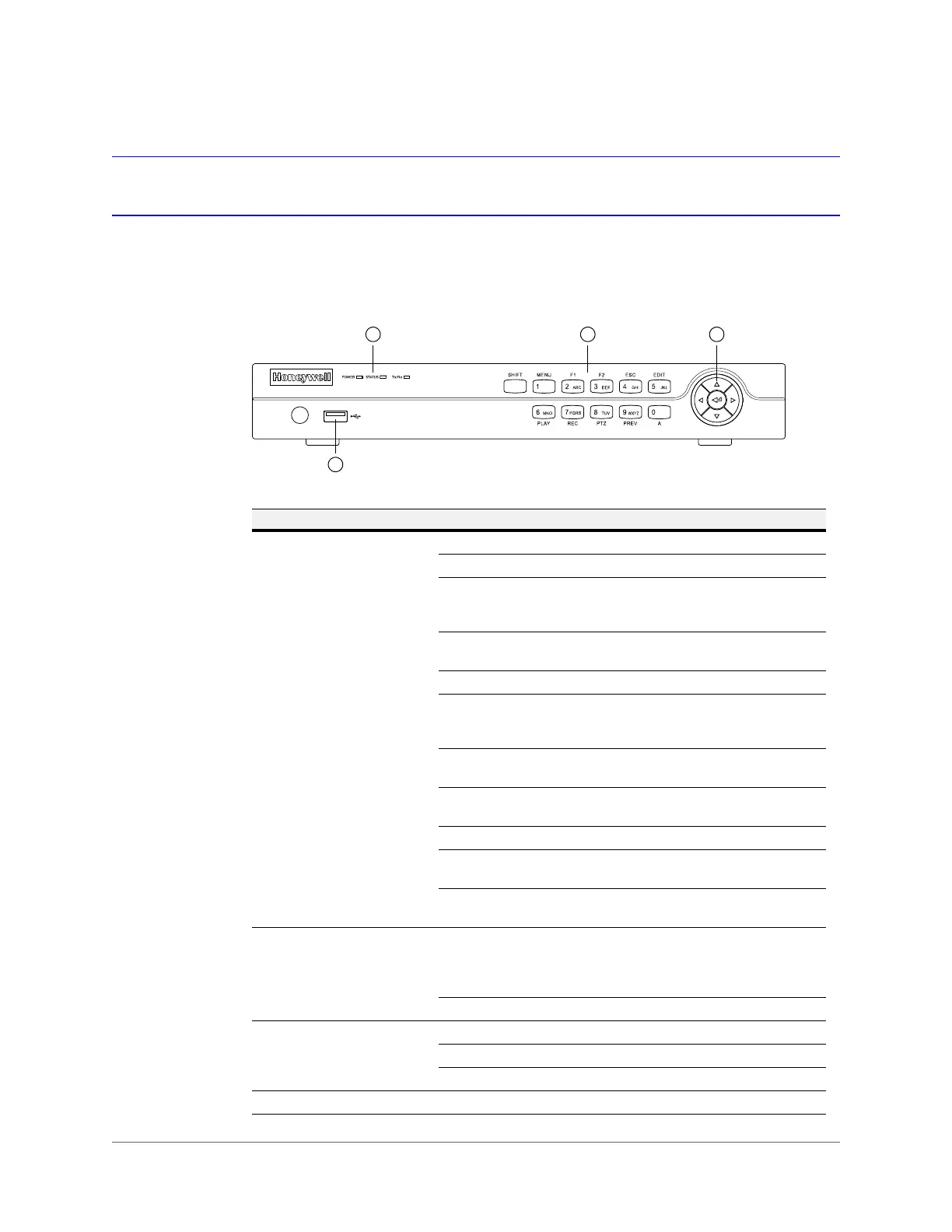
The following illustration shows the front panel of the 4-channel HRGX DVR.
Figure 1-1 HRGX4 Front Panel
No. Name Function
1 Alphanumeric Buttons SHIFT: Switches between number/letter input and function input.
MENU/1: Enters 1; MENU accesses the main menu interface.
2ABC/F1: Enters 2/A/B/C; F1 selects all items in a list. In live view or
playback mode, F1 switches between main and spot video output.
In PTZ mode, F1 zooms out PTZ camera.
3DEF/F2: Enters 3/D/E/F; F2 cycles through tabbed pages.
In PTZ mode, F2 zooms in PTZ camera.
4GHI/ESC: Enters 4/G/H/I; ESC returns to previous menu.
5JKL/EDIT: Enters 5/J/K/L; EDIT deletes characters before cursor,
selects check boxes and on/off switches. In playback mode, EDIT
starts/stops playback.
6MNO/PLAY: Enters 6/M/N/O. In playback mode, PLAY accesses the
playback interface.
7PQRS/REC: Enters 7/P/Q/R/S; REC accesses the manual recording
interface, manually starts/stops recording.
8TUV/PTZ: Enters 8/T/U/V; PTZ accesses the PTZ control interface.
9WXYZ/PREV: Enters 9/W/X/Y/Z. In live view mode, PREV enables
multi-camera display. In playback mode, PREV deletes selected tag.
0/A: Enters 0; A switches between uppercase and lowercase letters,
symbols, numeric input). In playback mode, A adds default tag.
2 Direction/Enter Buttons Direction buttons move the cursor up/down/left/right ( ).
In live view mode, the direction buttons cycle through channels. In
playback mode, up/down buttons speed up/slow down playback. In
PTZ mode, the direction buttons control PTZ camera movement.
The Enter button ( ) selects a menu item or executes a selection.
3 LED Indicators POWER: Lights green when DVR is receiving power.
STATUS: Lights red when DVR hard drive is reading/writing.
Tx/Rx: Flashes green when network connection is active.
4 USB Port Connects USB device (such as a flash drive for saving video clips).



 To Next Page
 Loading...



