• Configuration and management of VLS virtual devices (libraries and tape drives) and cartridges,
including LUN masking and LUN mapping
• Changing of the default Fibre Channel host port settings
• Viewing and deleting VLS notification alerts
• Configuring VLS mail and SNMP notification alert settings
• Editing VLS account passwords
• Enabling and disabling storage capacity oversubscription
• Managing storage pools
• Establishing automigration policies and copy pools, and performing destination library operations
• Viewing VLS hardware and virtual device status
• Installing VLS firmware updates
• Saving and restoring VLS network settings and virtual library configurations
• Restarting VLS device emulations and Command View VLS
• Viewing and saving VLS trace log files
Command View VLS is installed on the VLS and communicates through the LAN. Users can open a
Command View VLS session from a web browser on the LAN, HP StorageWorks Command View TL,
or HP Systems Insight Manager.
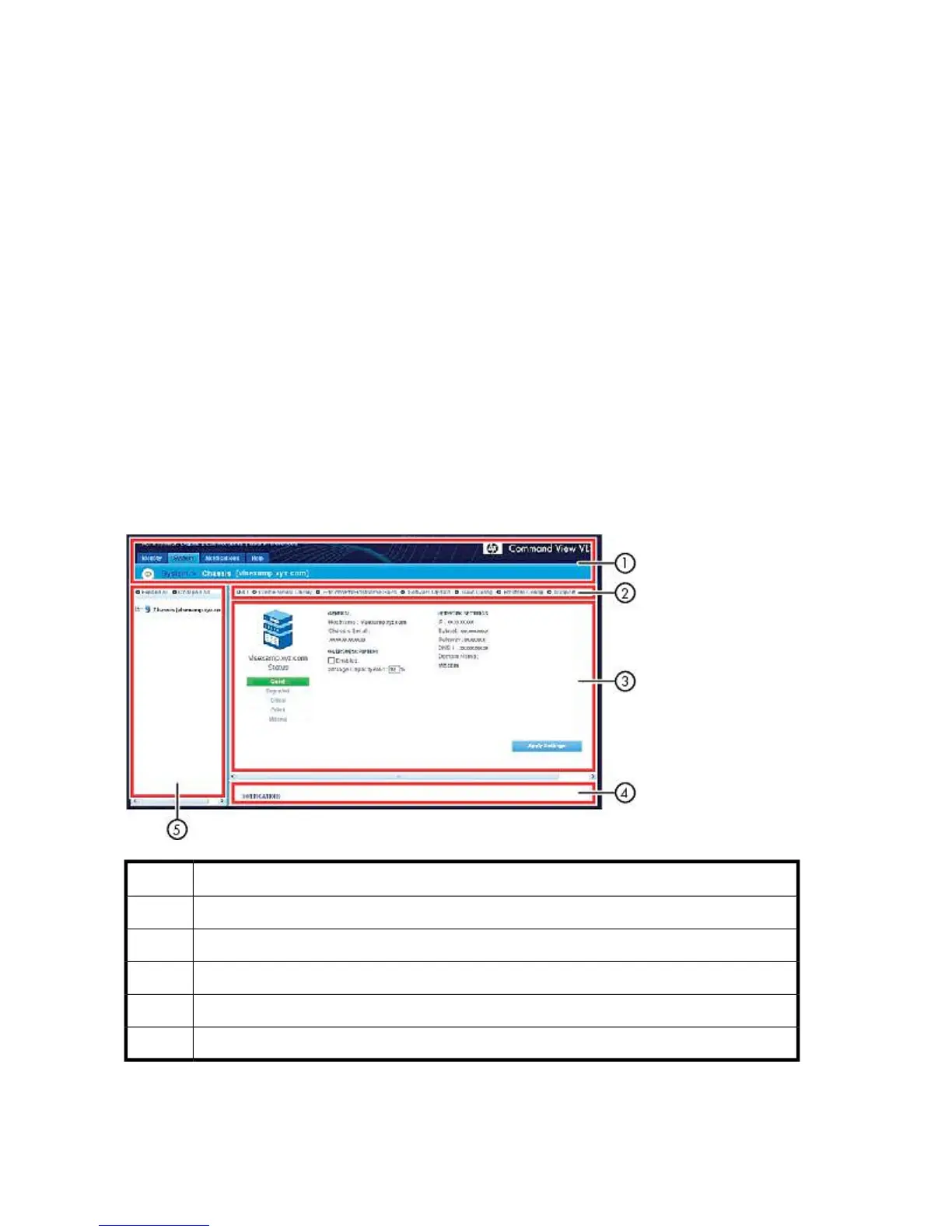
Window Regions
Command View VLS windows consist of five regions. Not all regions are displayed on all windows.
DescriptionItem
status banner1
task bar2
status pane3
notifications pane4
navigation tree5
User Interfaces142



 To Next Page