4. Repeat step 3 for all arrays.
NOTE:
Arrays 5 through 8, if present, reside in a separate rack.
5. Secure Ethernet cables with a Velcro tie to the right side of the rack.
WARNING!
Do not connect cables to unused ports on Ethernet Switches 2810–24G or 2510–24. Doing so could
result in data loss.
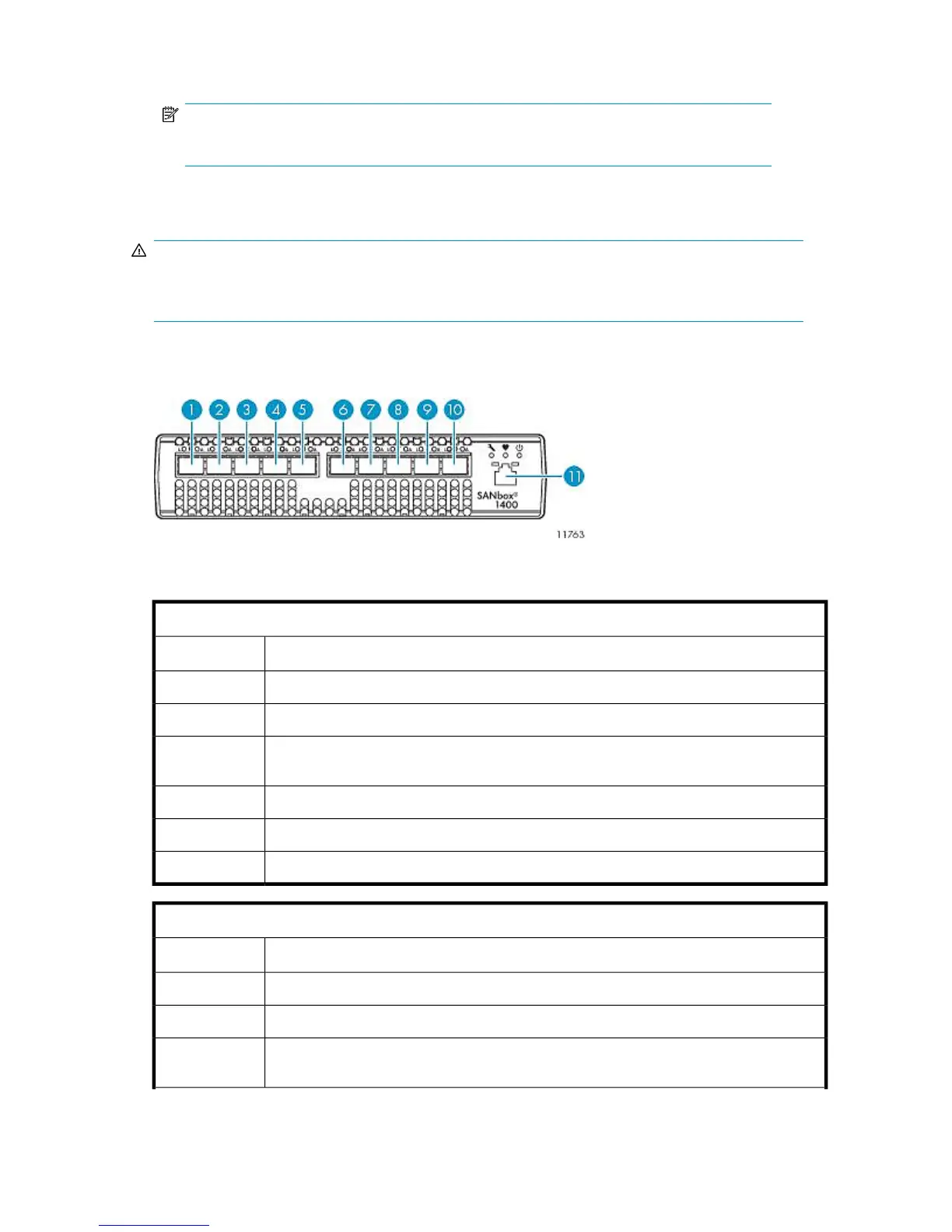
Cabling Fibre Channel Switch 4/10q
Figure 20 Fibre Channel Switch 4/10q port cabling
.
Fibre Channel Switch 4/10q #1
DescriptionItem
FC cable from port 3 of primary node1
FC cable from port 3 of secondary nodes (if present)2—4
FC cable from port 3 of 5th node (if present), or FC port 0 of RAID controller 0 of 6th array
(if present)
5
FC cable from FC port 0 of RAID controller 0 of 2nd — 5th arrays (if present)6—9
FC cable from FC port 0 of RAID controller 0 of 1st array (array 0)10
Ethernet cable from port 23 of Ethernet Switch 2510–2411
Fibre Channel Switch 4/10q #2
DescriptionItem
FC cable from port 4 of primary node1
FC cable from port 4 of secondary nodes (if present)2—4
FC cable from port 2 of 5th node (if present), or FC port 0 of RAID controller 1 of 6th array
(if present)
5
HP StorageWorks 63










 To Next Page