DescriptionItem
Expansion controller 02
Expansion controller 13
SAS port 0, input port4
Service port (for service only)5
SAS port 1, output port6
Power module 17
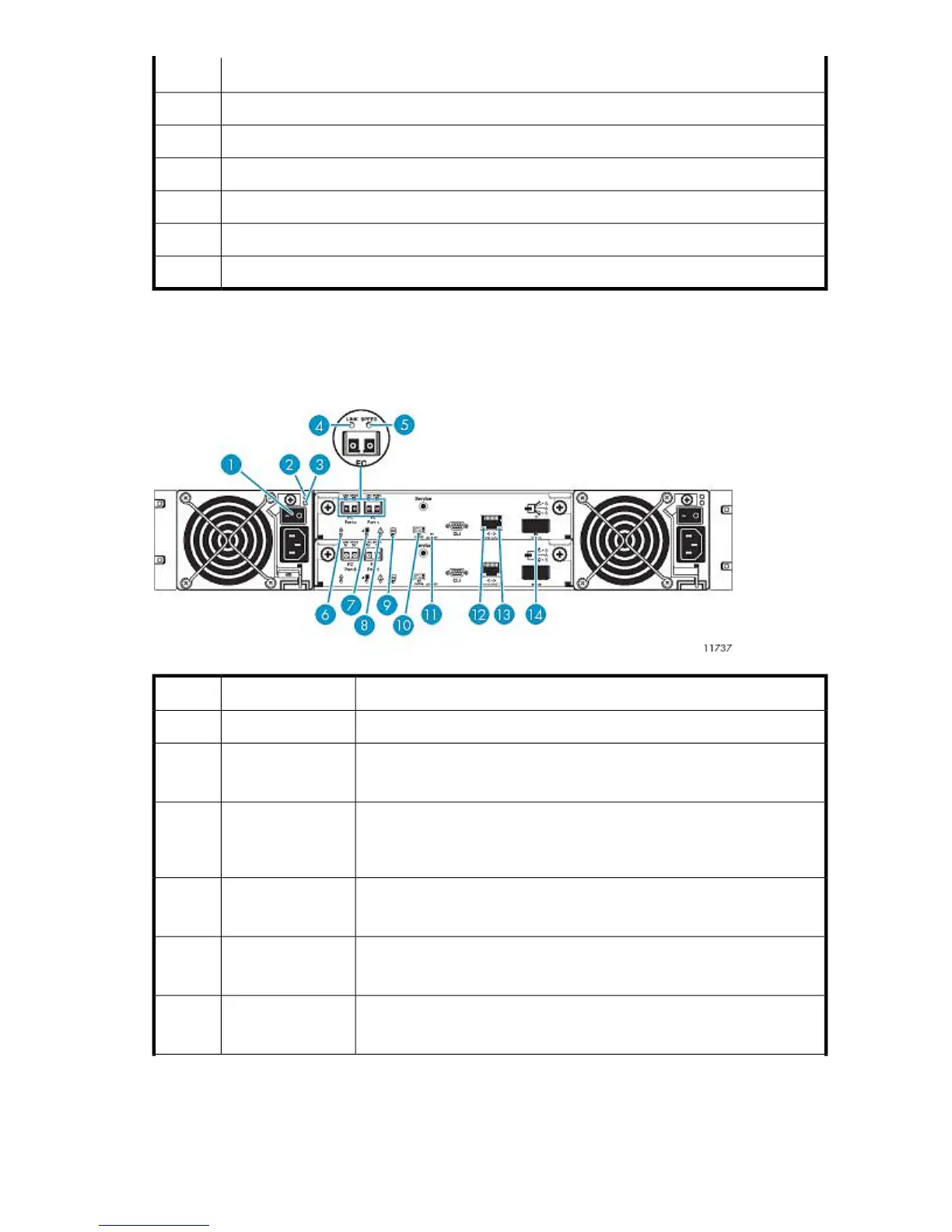
Rear Panel LEDs and Buttons
Base Disk Array Enclosure
StatusDescriptionItem
Toggle, where O is Off.Power switch1
Green = AC power is on and input voltage is normal.
Off = AC power is off or input voltage is below the minimum threshold.
AC Power Good
LED
2
Yellow = DC output voltage is out of range or a fan is operating below the
minimum required RPM.
Off = DC output voltage is normal.
DC-Fan Fault/ Ser-
vice Required LED
3
Green = The port link is connected.
Off = The port is empty or the link is down.
FC link status (L) LED4
Green = The data transfer rate is 4 Gbps.
Off = The data transfer rate is 2 Gbps.
FC link speed (S)
LED
5
Blinking white = RAID controller is selected (for identification purposes only).
Off = Not active.
Unit locator LED6
HP StorageWorks 249










 To Next Page