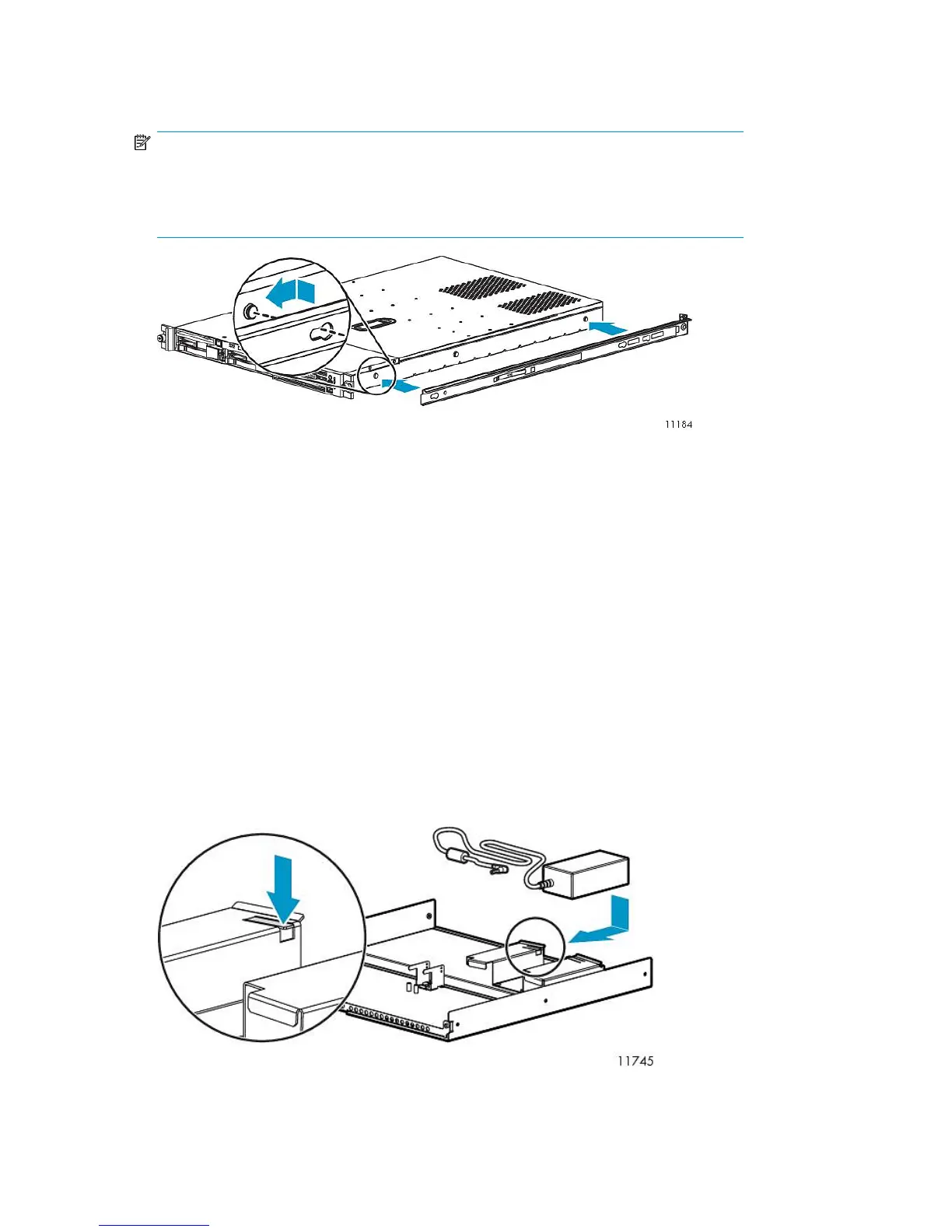
2. Attach the inner rails to the sides of the node.
Align the holes in the rail with the round tabs on the side of the node.
NOTE:
The inner rails are identical.
The word “FRONT” should face away from the node, but will appear updside-down on one
side.
3. Align the rails on the node with the rails in the rack, and slide the node fully into the rack.
4. Tighten the thumbscrews.
Installing Fibre Channel Switches 4/10q onto Racking Shelf
Locate the following items and set them aside on a stable work surface:
• Two Fibre Channel Switches 4/10q, two external power supplies, and two AC power cords
• 1U rails, adjustable mounting flanges, 1U cover plates (2), and hardware to secure the rails to
the rack
• Racking shelf and screws to secure rails to the shelf
To install the 4/10q switches onto the racking shelf:
1. Slide the power supply into the left bay of the power supply housing.
The DC power side faces the inside of the racking shelf. Hold the DC power cord so that it is not
abraded or crimped.
To ease the insertion of the power supply, slightly lift the outside edge of the power supply
housing.
Hardware Installation42










 To Next Page