v 1.4 — September 2015 Altanium Neo2
94 Enabling the Mold Cooling Temperature Limit
1. On the OPTIONS screen touch Inputs or Outputs.
2. On the Input or Output screen, touch the input or output you want to adjust.
3. Using the Scroll buttons, scroll to the option.
4. Touch OPEN/CLOSE to toggle the selected zones from OPEN to CLOSE or vice versa.
5. Touch OK.
11.5 Enabling the Mold Cooling Temperature Limit
The Mold Cooling Enabled signal is activated based on the temperature limit set on the Mold
Cooling button in the Options screen. If the controller is heating up, the output changes
state once all zone temperatures are above the Mold Cooling Enable limit. If the controller is
cooling down, then the output returns to its original state once all zone temperatures are
below the Mold Cooling Enable limit.
1. From the Home screen, touch OPTIONS.
2. Touch Mold Cooling, and a numerical Key window appears
3. Enter the temperature value, and then press Enter.
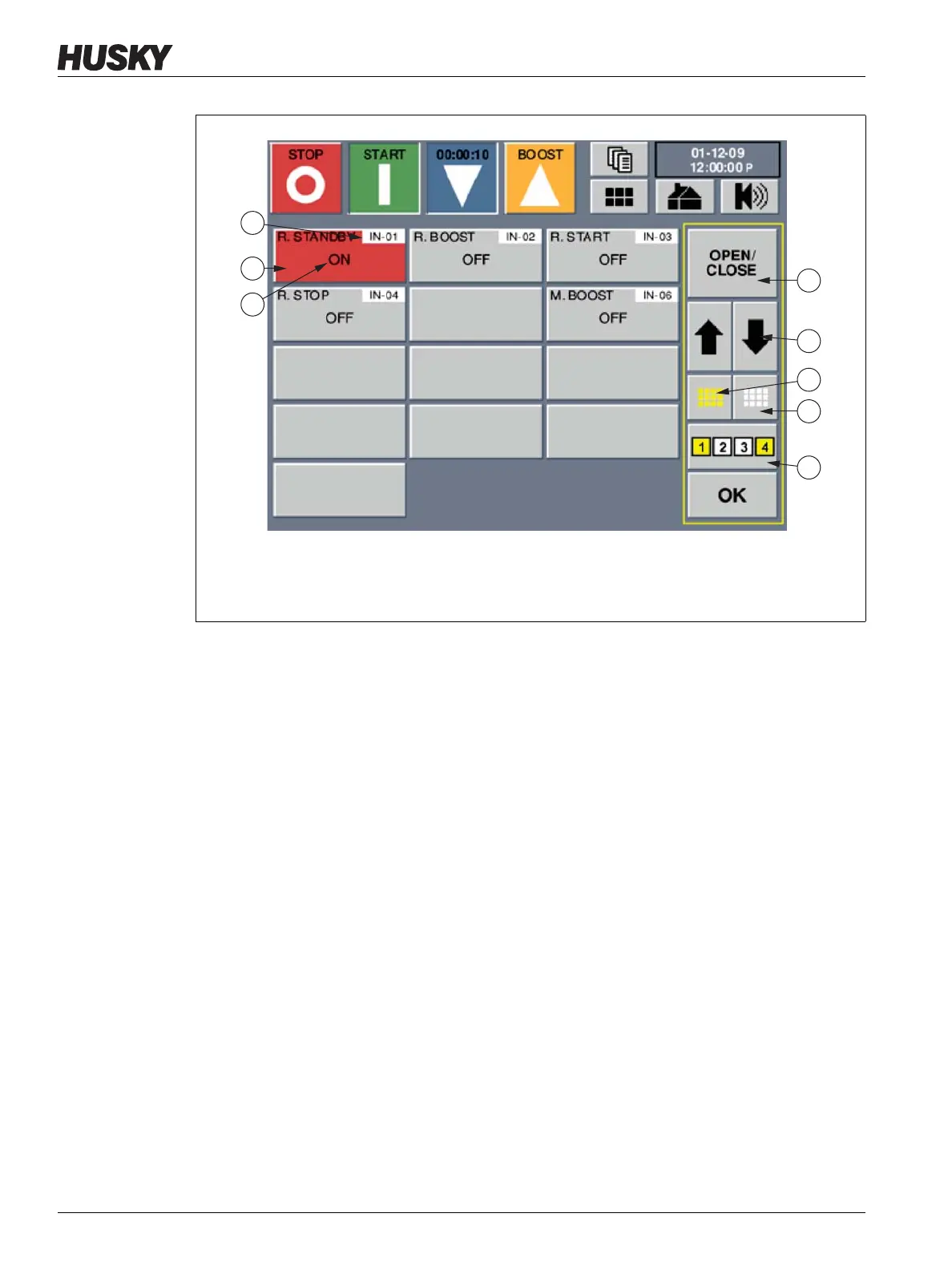
Figure 11-4 Inputs Screen
1. Input Number 2. Selected Input 3. Current Relay Status Value 4. Relay Status Option
5. Option Scroll Buttons 6. Select All Button 7. Clear All Button 8. Block Button



 To Next Page