EN
6 - USE AND OPERATION BOSS 332/545/552 HD
6 - Pag. 4 / 24
6.2 KEYBOARD CONTROL DESCRIPTION
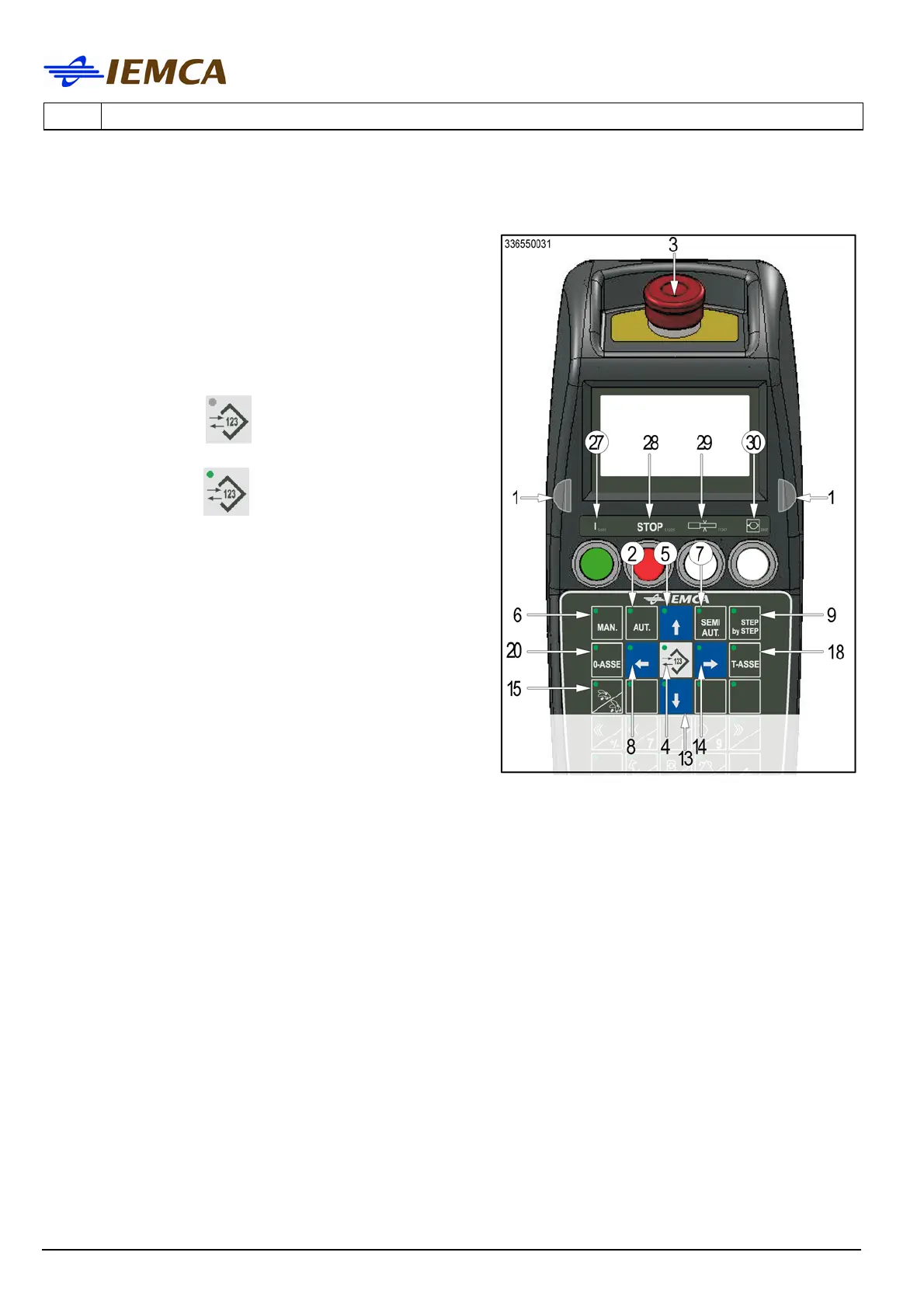
1 Start buttons: opposite buttons enabling the
keys for some functions. Press both buttons and
simultaneously the button corresponding to the
desired function.
2 Selects the automatic function.
3 It stops the bar feeder: for restart, manually
release the push-button.
4 Selects the keyboard modes:
- with LED off
; selects the "message
display" mode.
- with LED on
; selects the "parameter
display" mode.
5 Multifunction
- Allows scrolling the page upwards.
- Moves the selection cursor upwards.
- Increases by one the value set in the date
and time programming mode.
6 Selects the manual mode.
7 Selects the semiautomatic function.
Press to select, press again to unselect.
8 Multifunction
- Selects the previous parameter.
- Moves the selection cursor leftwards.
9 Activates the "step by step" operating cycle:
every time the button is pressed one step is performed.
10 Multifunction
- Sets the font.
- Turns on/off the oil pump.
Press to turn on the pump and press again to turn it off.
11 Multifunction
- Sets the numerical value.
- Loads the program from the PLC (entering default values in the parameters).
12 Multifunction
- Sets the font.
- Moves the bar pusher at a high speed.
13 Multifunction
- Allows scrolling the page downwards.
- Moves the selection cursor downwards.
- Decreases by one the value set in the date and time programming mode.
14 Multifunction
- Selects the next parameter
- Moves the selection cursor rightwards.





 To Next Page