Page 23
Copyright© 2019 Ingenico
Terminal Installation
Connect the equipment as described above. The following screens may be
displayed during the installation of your terminal. This is dependent on your
hardware and software loaded onto your terminal:
Please ensure that you leave your terminal
powered on at all times in order that it may
receive any automatic updates scheduled for it.
When not being used for transaction processing,
place your terminal on its base unit to ensure the
terminal battery remains fully charged.
Bluetooth
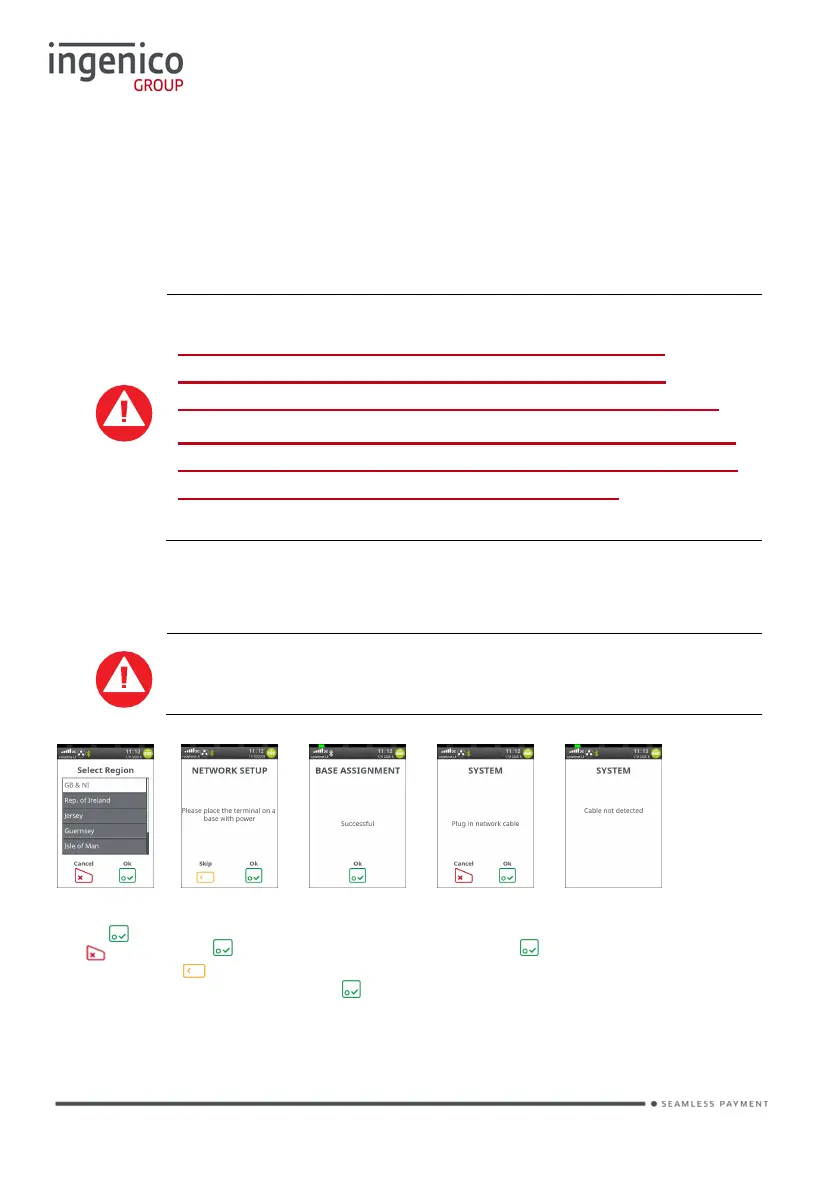
The following screens will be displayed; if the terminal is off the
base or the network cable is not attached at first installation.
Highlight Region
and press or
press to
Cancel.
Place the terminal
on the base and
press or press
to run the
setup at a later
time.
This screen will be
displayed if the
base assignment
was performed and
was successful,
press
Plug your network
cable into the base
and then press
This screen will be
displayed if the
terminal cannot
detect the network
cable on the base.
The screens that follow the base assignment are dependent on the terminal
capabilities and the software loaded.














 To Next Page