EasyManua.ls Logo

Ingenico Move 5000 - Account Verification Procedures; Account Verification Swipe Card

Ingenico Move 5000
108 pages
Print Icon
To Next Page IconTo Next Page
To Previous Page IconTo Previous Page
Loading...
Page 59
Move/
5000
User Guide
Copyright© 2019 Ingenico
Account Verification
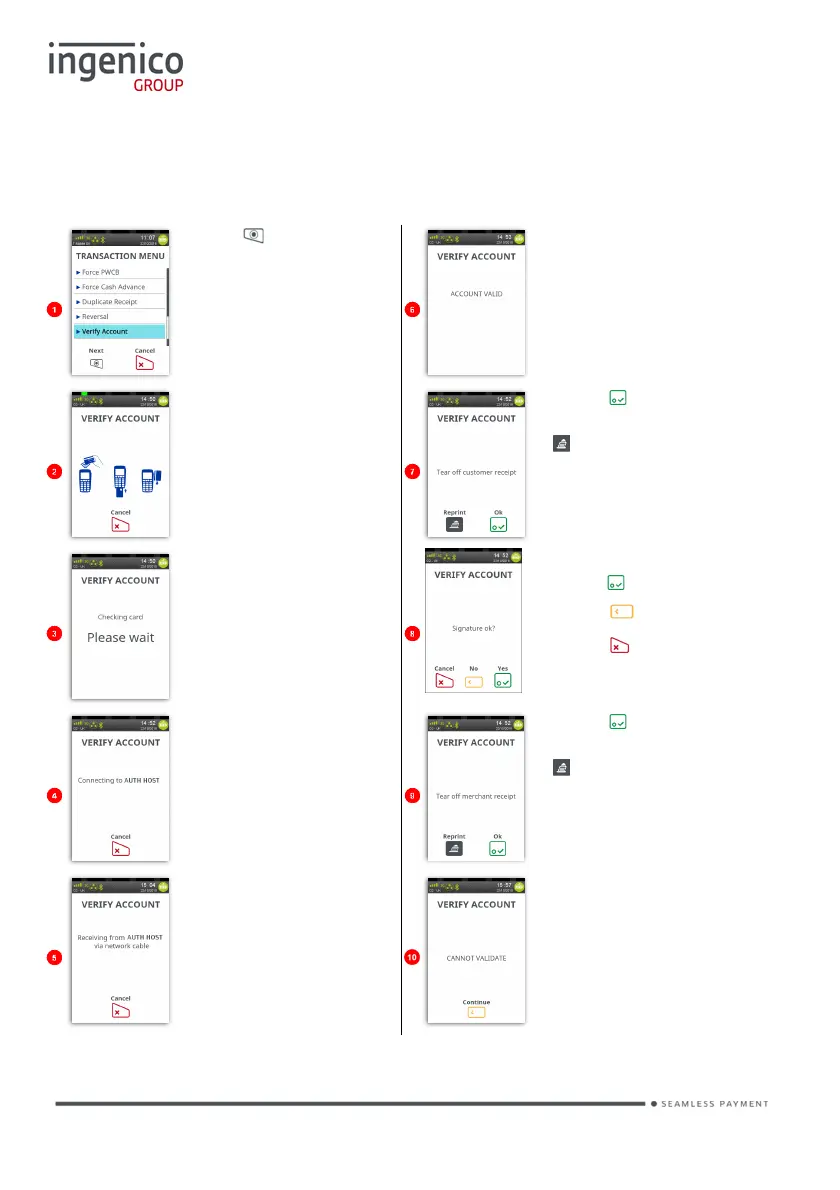
Account Verification Swipe Card
Press at the ‘Idle
Screen’. Touch ‘Verify
Account’ on the screen
to select it.
If the account is valid
this screen is shown.
Terminal will print the
cardholder receipt.
Swipe the cardholder’s
card.
Press
if the printout
is readable; or press
to print the
cardholder receipt
again.
The terminal will check
the card
Check Signature,
press if OK.
Press if not OK.
Press to Cancel.
Terminal will connect to
the host.
Press
if the printout
is readable; or press
button to print the
merchant receipt
again.
Terminal will receive a
response from the host.
Note: If the account is
not valid a screen
similar to the following
will be displayed.
Note: This is a ZERO value transaction. No transaction amount is required.

Table of Contents

Other manuals for Ingenico Move 5000

Related product manuals