Page 83
Copyright© 2019 Ingenico
Network Setup
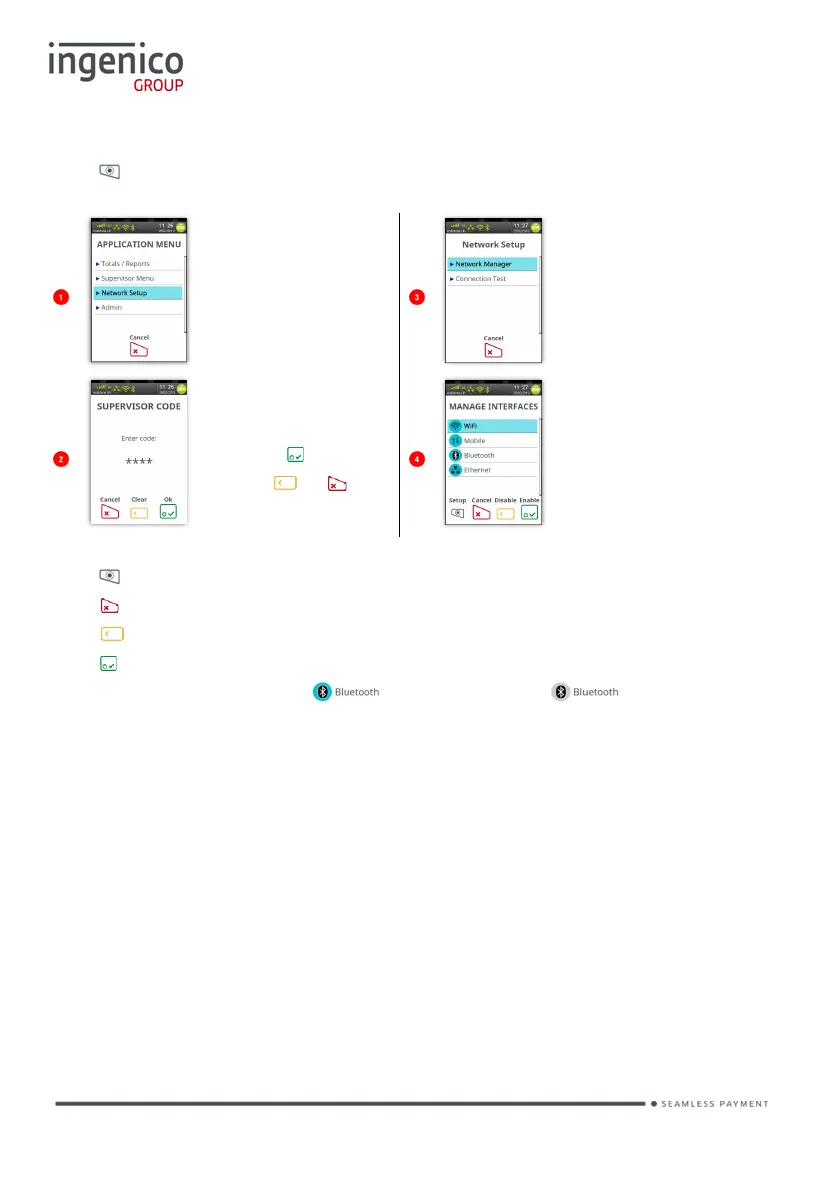
Press until the ‘Application Menu’ is displayed.
Touch ‘Network
Setup’ in the
menu to select it.
Touch ‘Network
Manager’ to
select it.
Enter your
‘Supervisor
Code’ and then
press .
Use or to
correct mistakes
Touch the
required
interface to
highlight it.
Press to enter ‘Setup Mode’ for the selected interface.
Press to exit the function.
Press to disable the interface.
Press to enable the interface.
The interface icon will be blue if enabled, or grey if disabled.
Note: If there are more Networks available than can be displayed on a single
screen, a scroll bar will be visible on the right hand side of the display.
You should scroll the menu as described earlier in this manual to view the other
available options.
You may now configure your network settings, especially any you postponed
during the installation process.














 To Next Page