EasyManua.ls Logo

Ingenico Move 5000 - Helpdesk Menu: Print Function Codes; Helpdesk Menu: Select Function

Ingenico Move 5000
108 pages
Print Icon
To Next Page IconTo Next Page
To Previous Page IconTo Previous Page
Loading...
Page 76
Move/
5000
User Guide
Copyright© 2019 Ingenico
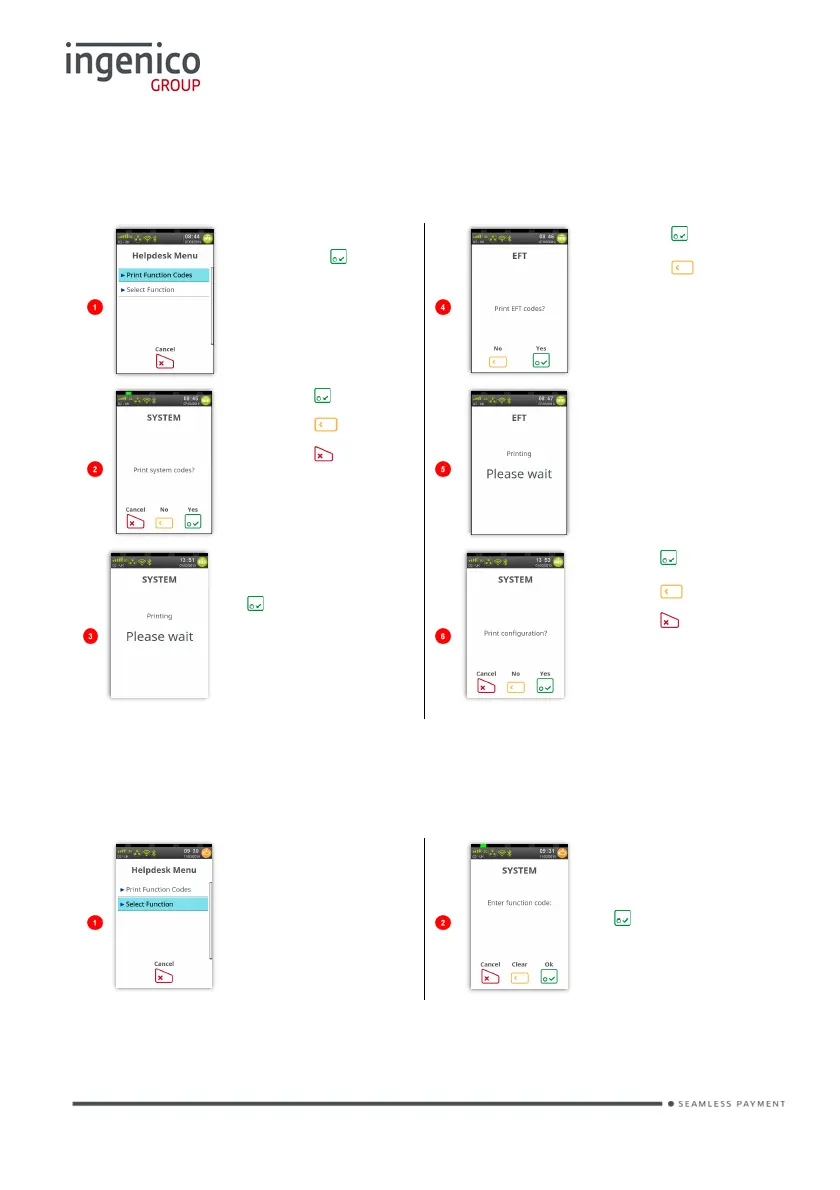
Helpdesk Menu (Print Function Codes)
Access the ‘Helpdesk Menu’ as described above.
Touch the screen
or press to
select highlighted
option.
Press to print
Press to skip
and return to the
‘Idle Screen’.
Press to print.
Press to skip.
Press to exit.
This screen will
be displayed
whilst the EFT
codes are being
printed.
This screen will
only be displayed if
was pressed to
print the systems
codes.
Press to print
Press to skip
Press to cancel
the function.
Helpdesk Menu (Select Function)
Access the ‘Helpdesk Menu’ as described above.
Touch ‘Select
Function’ on the
screen to select it.
Type in the
required function
code and press
to select it.

Table of Contents

Other manuals for Ingenico Move 5000

Related product manuals