Page 55
Copyright© 2019 Ingenico
Top-Up – Swipe Card
Please note that this option is only available for certain types of business. Please
contact ‘Customer Services’ for further information.
If, following a ‘Pre-Authorisation’ transaction, the value of the
transaction increases (e.g. as a result of an extended stay at a
hotel) an additional ‘Pre-Authorisation’ transaction will be
required.
If your terminal is not configured to automatically perform the
additional ‘Pre-Authorisation’, you may have to perform a ‘Top-
Up’ as follows.
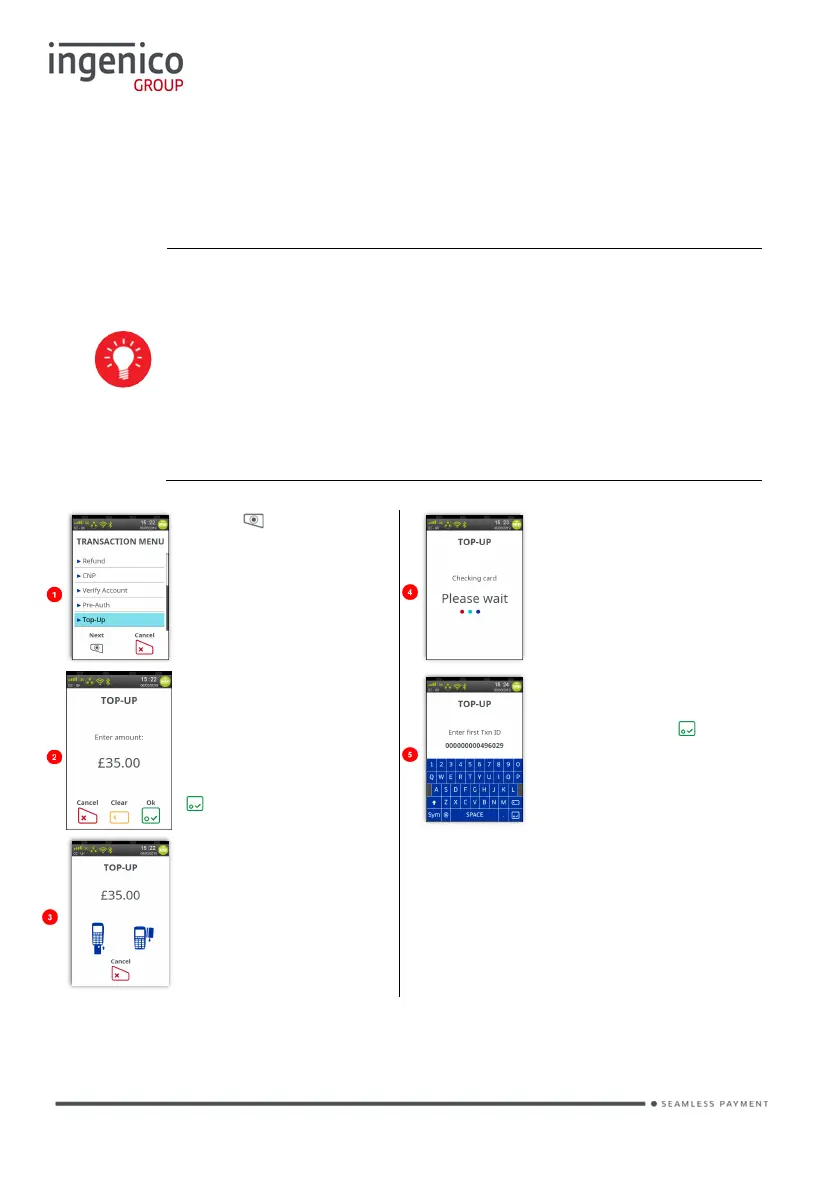
Press at the ‘Idle
Screen’. Touch ‘Top-
Up’ on the screen to
select it.
Terminal will check the
card.
The Top-Up menu
screen will be
displayed.
Enter the additional
amount and then press
.
Type in the ‘Txn ID’
from original Pre-Auth
and then press .
Swipe the cardholder’s
card into the terminal.
Note there is NO ‘Signature
Verification’ for this transaction type.
The transaction will now continue as a normal ‘Sale’ transaction, except the
header will be ‘Top-Up’.














 To Next Page