EasyManua.ls Logo

Ingenico Move 5000 - Completion - Insert Card

Ingenico Move 5000
108 pages
Print Icon
To Next Page IconTo Next Page
To Previous Page IconTo Previous Page
Loading...
Page 57
Move/
5000
User Guide
Copyright© 2019 Ingenico
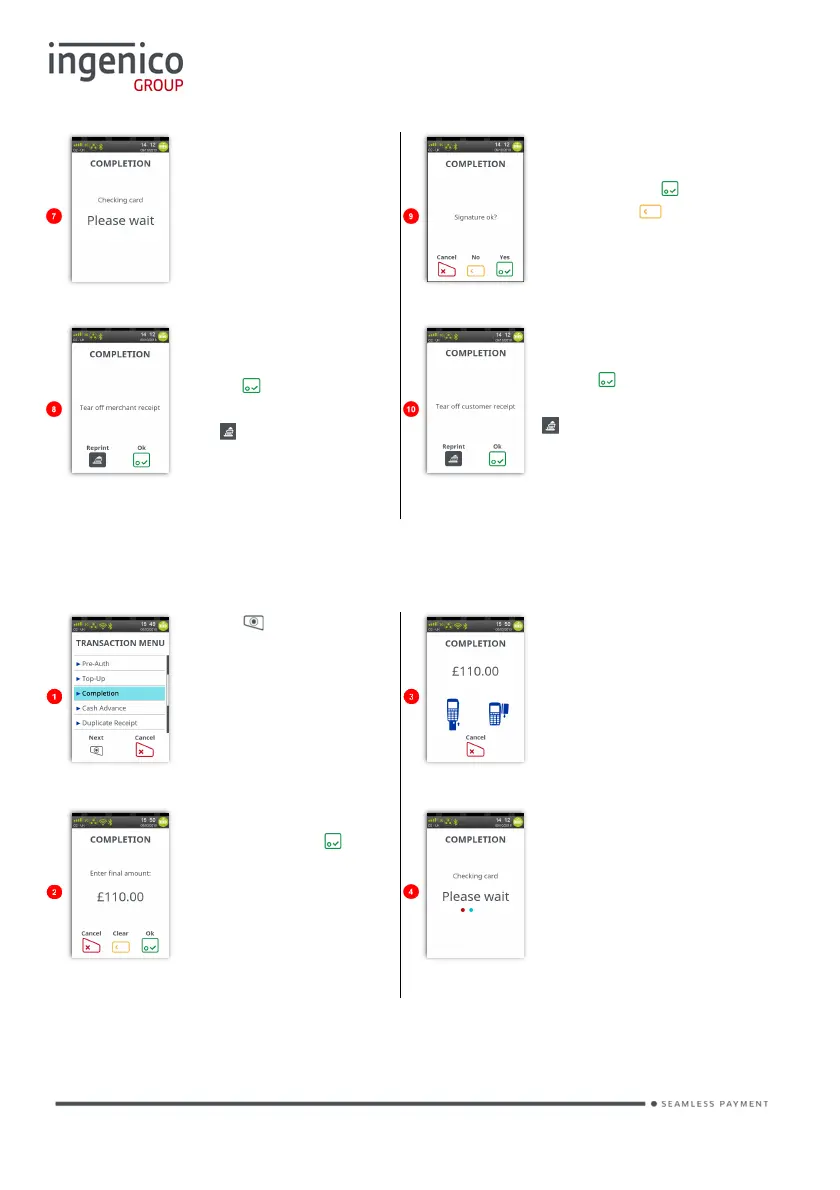
Terminal will check the
card details.
Cardholder to sign the
receipt. Check if they
match, press if OK,
else press to
reverse transaction.
Terminal will print a
merchant receipt.
Press if the printout
is readable; else press
the
button to print the
merchant receipt again.
Terminal will print a
cardholder receipt.
Press if the printout
is readable; else press
to print the
cardholder receipt
again.
Completion - Insert Card
Press at the ‘Idle
Screen’. Touch
‘Completion’ on the
screen to select it.
Insert the cardholder’s
card into the terminal.
Enter the final amount
and then press .
Terminal will check the
card details.

Table of Contents

Other manuals for Ingenico Move 5000

Related product manuals