Page 34
Copyright© 2019 Ingenico
CNP Transactions
This transaction type allows you to ‘Key Enter’ the customer’s card details for all
the supported transaction types for ‘Customer Not Present’ transactions or as a
fallback from a failed card read.
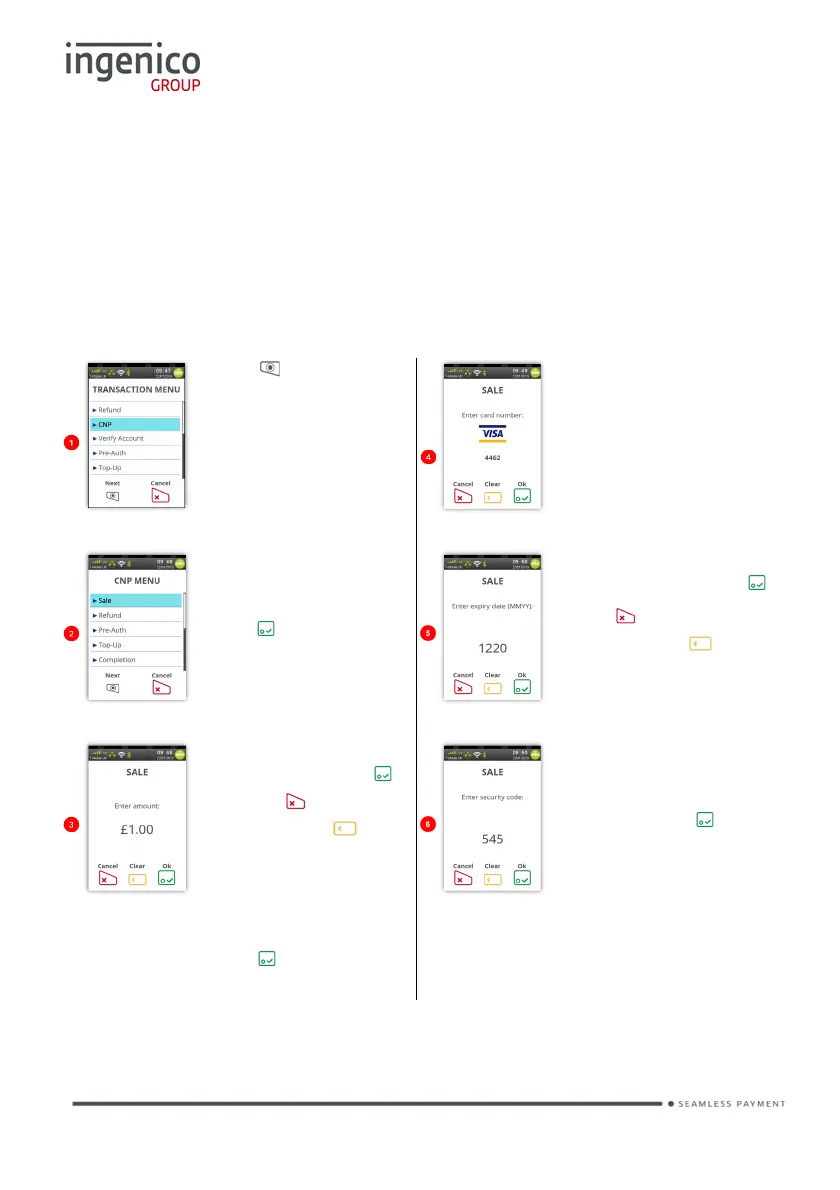
The following example is for a ‘Sale’ transaction.
CNP Sale
Press at the ‘Idle
Screen’ to display the
‘Transaction Menu’ and
touch ‘CNP’ on the
screen to select it.
Start to type in the card
number and the screen
The icon displayed will
depend on the card
number.
and highlight the
required option then
press to select it.
Type in the ‘Expiry
Date’ and then press
Press to clear all
digits or press to
clear one digit at a time
and type in new value.
Enter transaction
amount then press .
Or press to clear all
digits or press to
clear one digit at a time
and type in new value.
Type in the security
code from the back of
the cardholder’s card
and then press .
Depending on your configuration, you
may be asked to confirm amount or
add a gratuity once has been
pressed.














 To Next Page