Page 24
Copyright© 2019 Ingenico
Wi-Fi
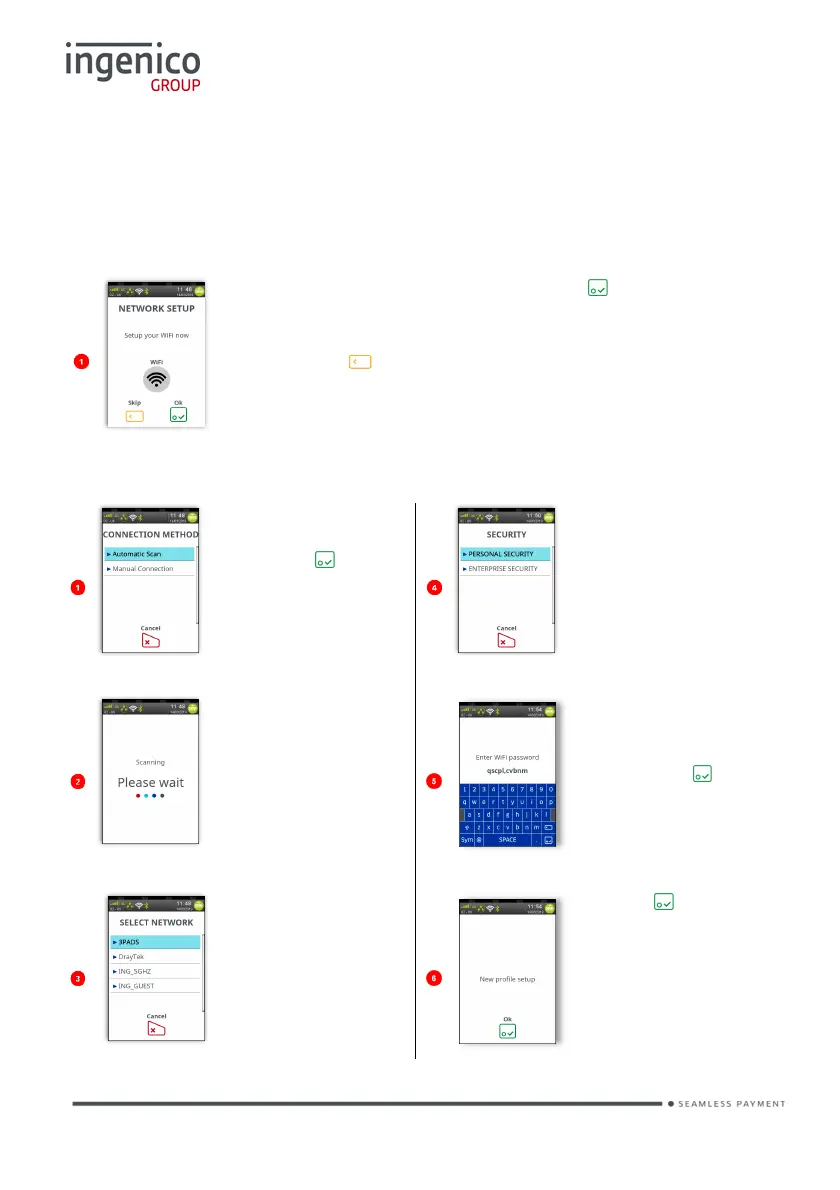
If your terminal is configured to support multiple comms methods, the following
screens will be displayed:
The number of available comms methods may differ from those shown.
To setup your ‘WiFi’ connection, press and follow the
screens.
If you choose not to setup your ‘WiFi’ connection at this
time, press to skip the process.
The following screens will help you setup your ‘WiFi’ connection:
Wi-Fi (Automatic Scan)
Touch ‘Automatic
Scan’ on the
or press to select
the highlighted
option.
Touch ‘Personal
Security’ on the
screen.
The terminal will
scan for networks,
before displaying a
list of all available
networks
password using
the stylus and
then press .
Touch the
required network
on the screen to
select it.
Press to
continue.














 To Next Page