EasyManua.ls Logo

Ingenico Move 5000 - Supervisor Menu Access

Ingenico Move 5000
108 pages
Print Icon
To Next Page IconTo Next Page
To Previous Page IconTo Previous Page
Loading...
Page 82
Move/
5000
User Guide
Copyright© 2019 Ingenico
Supervisor Menu
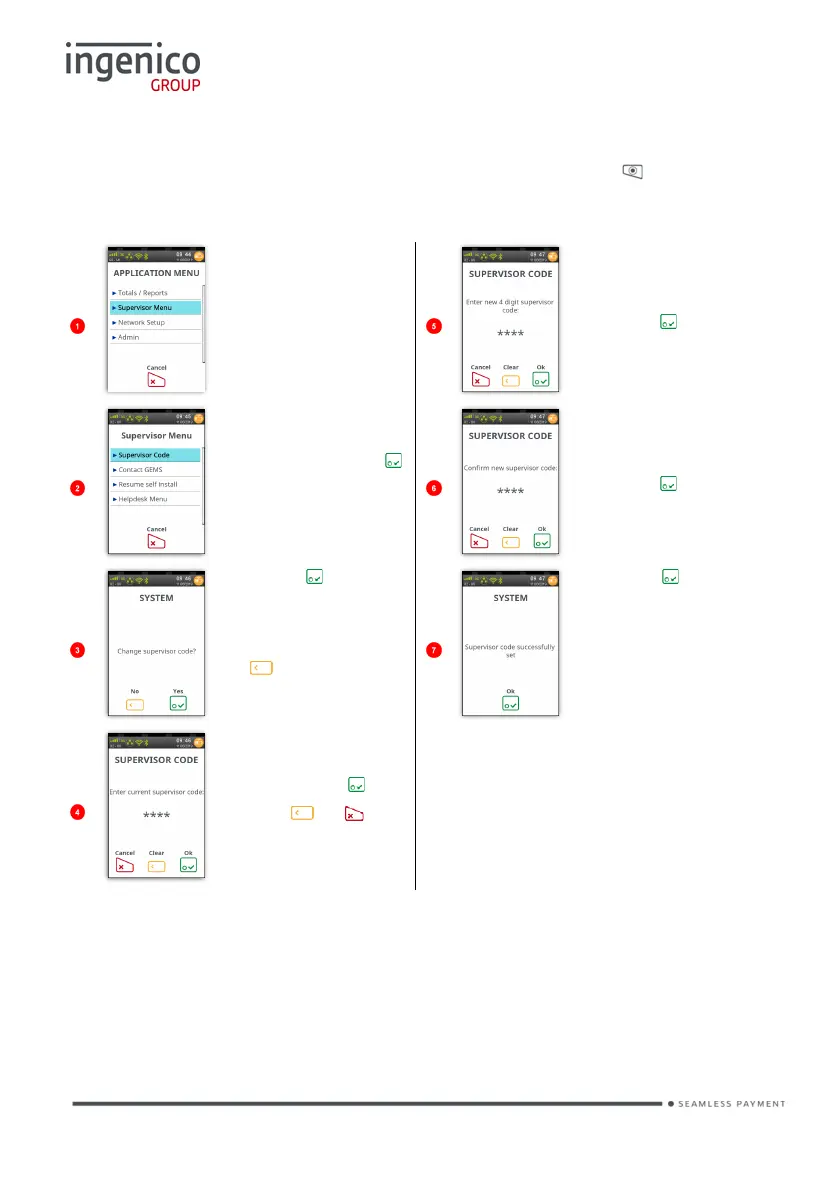
If you know your ‘Supervisor Code’ but wish to change it; press until the
‘Application Menu’ is displayed. The following screens will be displayed:
Touch
‘Supervisor
Menu’ to select it.
Type in new
‘Supervisor
Code’ and then
press to
confirm.
Touch
‘Supervisor
Code’ or press
to select
highlighted
option.
Re-type in new
‘Supervisor
Code’ and then
press to
confirm.
Press if you
wish to change
your ‘Supervisor
Code’ or press
to exit without
changing it.
Press to
confirm code
change.
Enter your
current code and
then press .
Use or to
correct mistakes.
The above process is the same as if you had performed a ‘Function 34’ from the
‘Helpdesk Menu’.

Table of Contents

Other manuals for Ingenico Move 5000

Related product manuals