EasyManua.ls Logo

Ingenico Move 5000 - Terminal Configuration Process

Ingenico Move 5000
108 pages
Print Icon
To Next Page IconTo Next Page
To Previous Page IconTo Previous Page
Loading...
Page 28
Move/
5000
User Guide
Copyright© 2019 Ingenico
Terminal Configuration
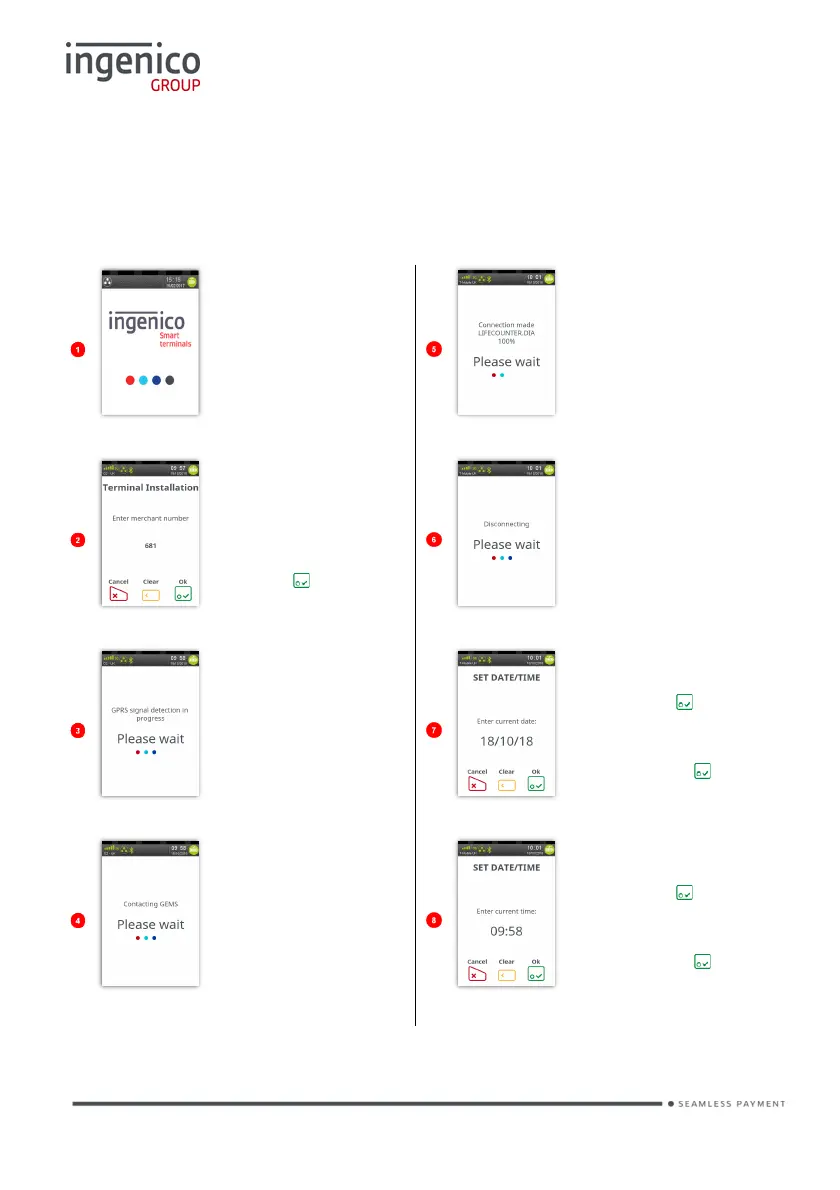
Connect the equipment as described above. The following screens will be
displayed during the configuration of your terminal:
Various screens will
be briefly displayed
as the terminal
powers up.
Once a connection
has been made
various files will be
downloaded to the
terminal.
Type in your
merchant number
(provided in your
supplier’s welcome
letter) and then
press .
Various
file names
will be
displayed
before the terminal
disconnects from
the configuration
host.
The terminal will
attempt to get a
GPRS Signal.
If prompted
confirm
the date by
pressing if it is
correct, or type in
correct date and
then press .
The terminal will
contact the
configuration host.
If prompted
confirm
the time by
pressing if it is
correct, or type in
the
correct time and
then press .

Table of Contents

Other manuals for Ingenico Move 5000

Related product manuals