EasyManua.ls Logo

Ingenico Move 5000 - Page 29

Ingenico Move 5000
108 pages
Print Icon
To Next Page IconTo Next Page
To Previous Page IconTo Previous Page
Loading...
Page 29
Move/
5000
User Guide
Copyright© 2019 Ingenico
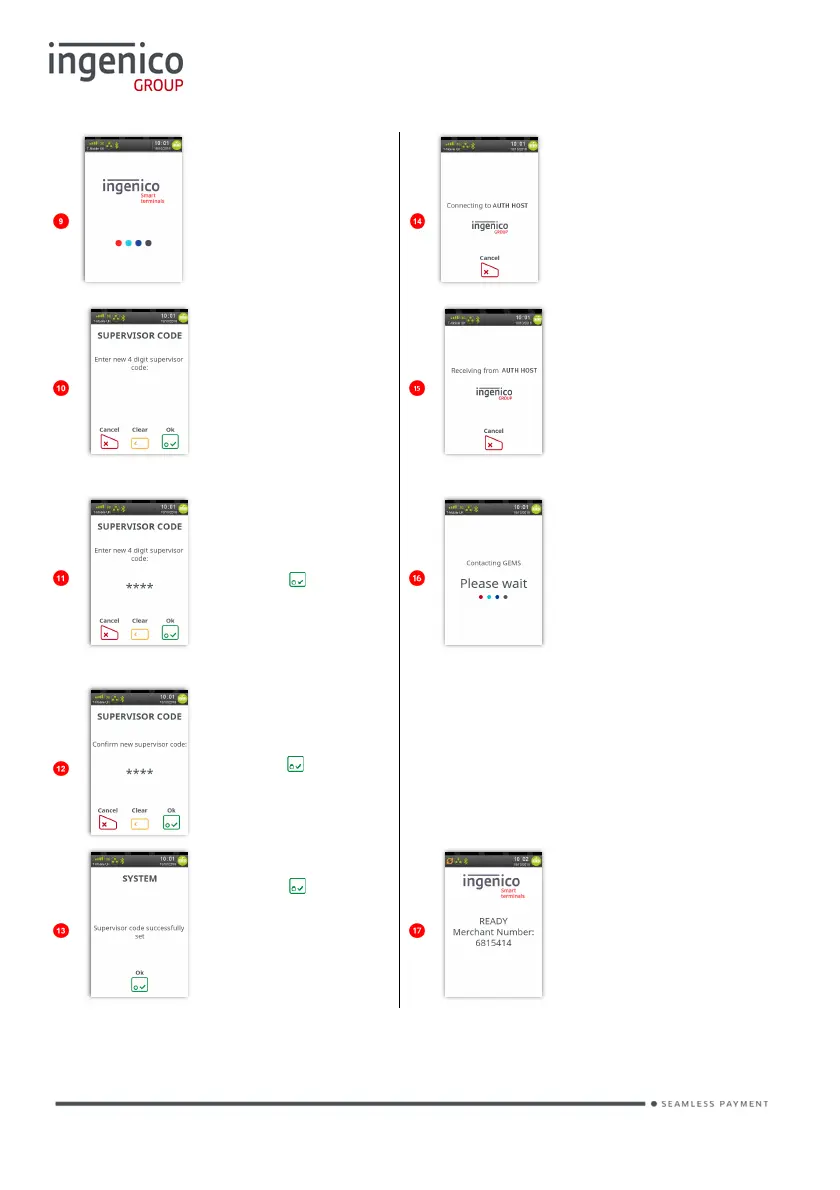
The terminal will
power cycle.
The terminal may
then con
tact any/all
acquirers for
verification.
Type in your
preferred
‘Supervisor
Code’.
The ‘Logo’ and
text ‘AUTH
HOST’ will differ
for each Acquirer
Asterisks will
appear as you
type in the code.
Press to save
the code.
The terminal will
contact the
configuration
host.
Re-type your
new ‘Supervisor
Code’ and then
press to
confirm it.
The terminal will upload the
status of its applications and print
a list of card types that will be
accepted.
Press to
acknowledge the
change.
Terminal will
return to the ‘Idle
Screen’ if
installation is
successful.

Table of Contents

Other manuals for Ingenico Move 5000

Related product manuals