Page 48
Copyright© 2019 Ingenico
Purchase with Cashback (PWCB)
This menu option is only used to provide ‘Cashback’ where a normal ‘Sale’
transaction has been performed with a ‘Gratuity’. Selecting this option allows a
transaction to be carried out with ‘Cashback’ instead of ‘With Gratuity’.
Only certain types of debit cards allow ‘Purchase with Cashback’
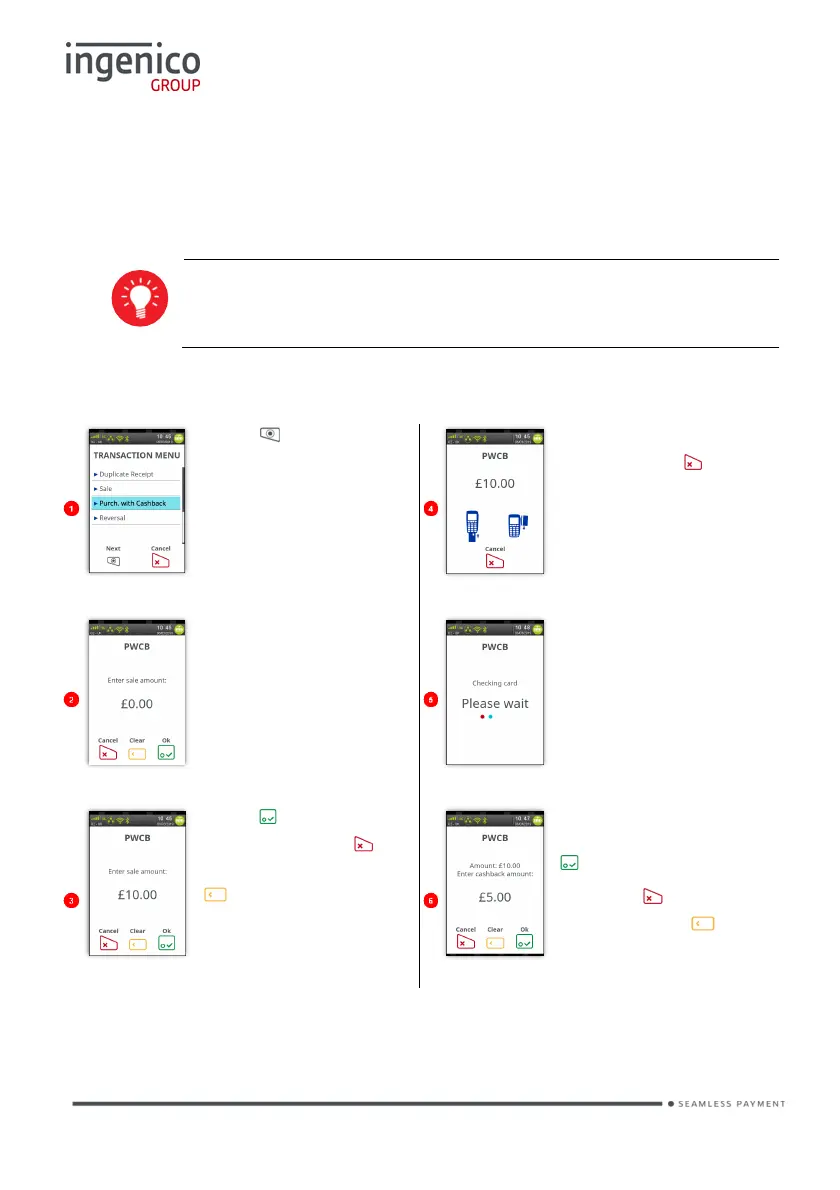
PWCB Swiped Card
Press at the ‘Idle
Screen’. Touch ‘Purch.
on the
screen to select it.
Swipe the cardholder’s
card or press to
Cancel the transaction.
Type in the transaction
amount, the screen will
change as the amount
is being typed in:
Terminal will check the
card to ensure it is
valid.
You may be asked to
enter the last four digits
of the card number.
Press to confirm
amount or press to
clear all digits or press
time and type in new
value.
Type in cash back
amount and then press
to confirm.
Or press to clear all
digits or press to
clear one digit at a time
and type in new value.
The transaction will now continue as a normal ‘Sale’ transaction.














 To Next Page