Page 56
Copyright© 2019 Ingenico
Completion
If the final bill is more than 15% higher than the total ‘Pre-
Authorised’ amount, an additional ‘Top-up’ transaction will be
required for the difference which must be obtained prior to the
carrying out of the ‘Completion’ transaction.
The following procedure will complete a ‘Pre-Authorised’ transaction when the final
amount is confirmed with the customer.
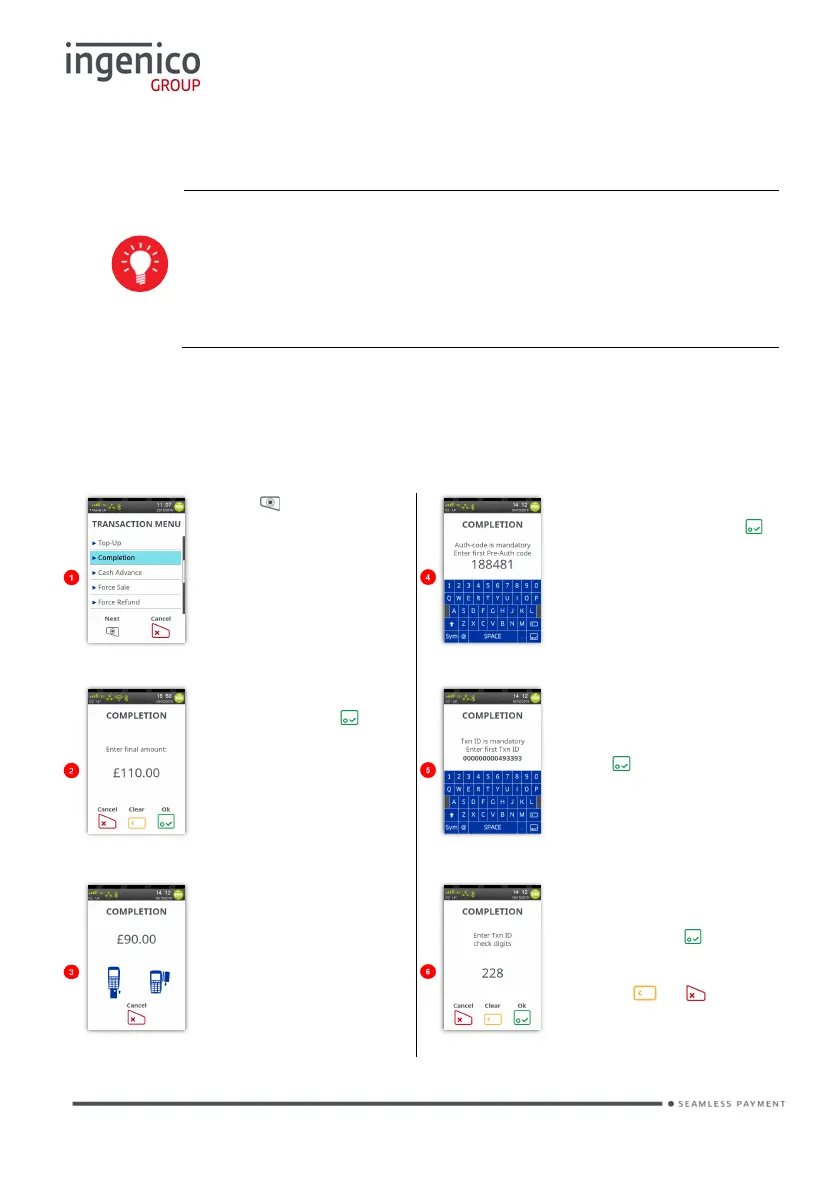
Completion - Swipe Card
Press at the ‘Idle
Screen’. Touch
‘Completion’ on the
screen to select it.
Enter first pre-auth
code and then press .
Enter the code as
described previously in
‘Data Input’.
Enter the final amount
and then press .
You may be asked to
enter first Txn ID from
Pre-Auth and then
press . Enter the
code as described
previously in ‘Data
Input’.
Swipe the cardholder’s
card. You may be
asked to key in the last
four digits of the
cardholder’s card
number.
Enter Txn ID Check
Digit from Pre-Auth
receipt, press to
submit value.
Use the or
buttons to correct
mistakes.














 To Next Page