EasyManua.ls Logo

Ingenico Move 5000 - Wi-Fi Setup: Automatic Scan

Ingenico Move 5000
108 pages
Print Icon
To Next Page IconTo Next Page
To Previous Page IconTo Previous Page
Loading...
Page 84
Move/
5000
User Guide
Copyright© 2019 Ingenico
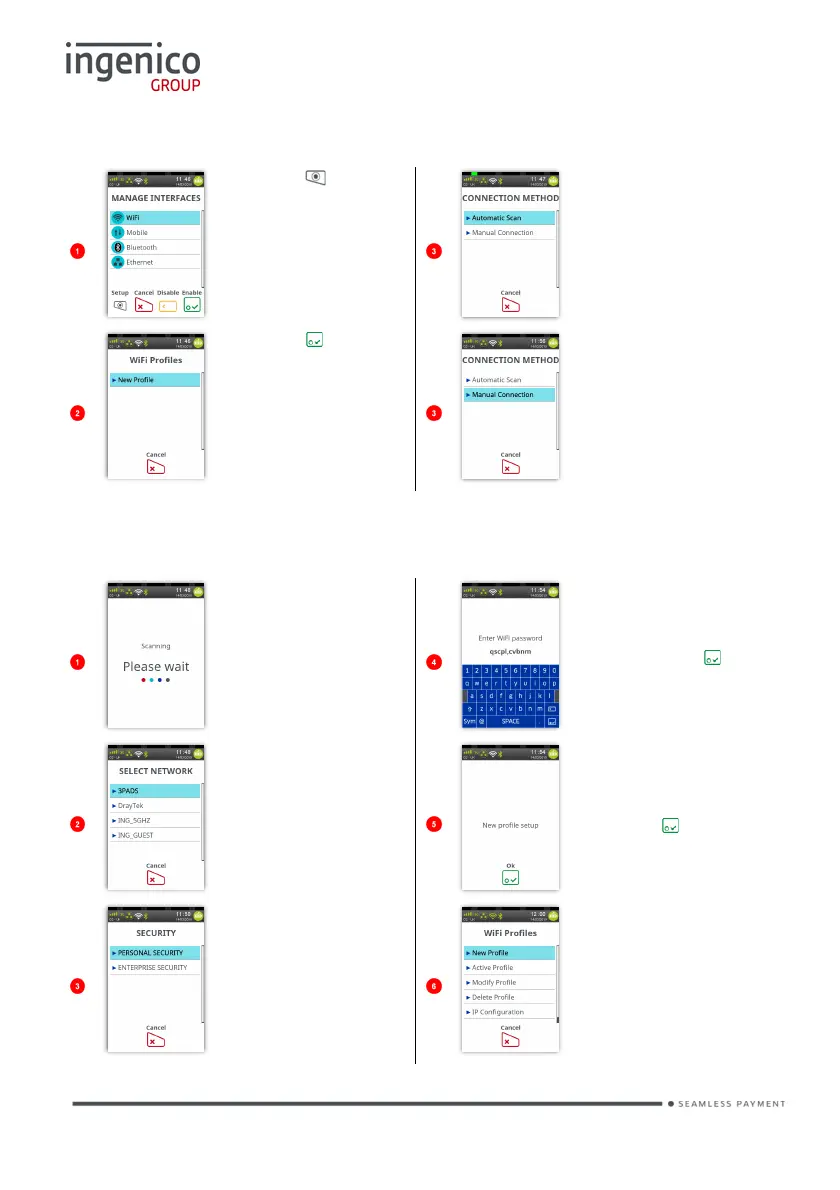
WiFi
Press to setup
WiFi Interface’.
Touch the screen
to select the
preferred
method.
Press to start
to create a ‘WiFi
Profile’.
Touch the screen
to select the
preferred
method.
WiFi (Automatic Scan)
The terminal will
scan for and list
all the available
networks.
Type in the
network
password and
then press to
confirm.
Touch the screen
to select the
required network.
The new profile
has been
created.
Press to
confirm.
Touch the screen
to select the
correct security
for the selected
network.
Terminal will
display a ‘WiFi
Profile Menu’.

Table of Contents

Other manuals for Ingenico Move 5000

Related product manuals