EasyManua.ls Logo

Ingenico Move 5000 - Manual Mode for Mobile Networks

Ingenico Move 5000
108 pages
Print Icon
To Next Page IconTo Next Page
To Previous Page IconTo Previous Page
Loading...
Page 27
Move/
5000
User Guide
Copyright© 2019 Ingenico
Manual Mode
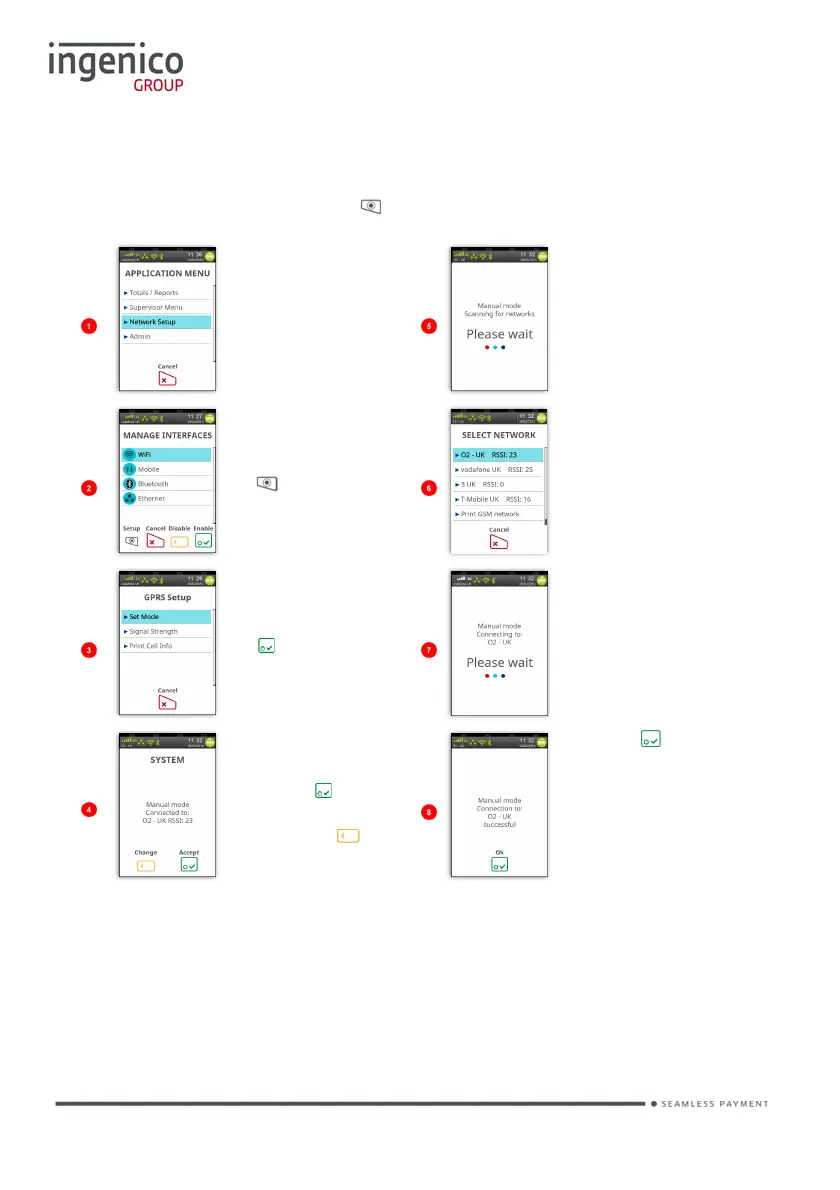
To enable the ‘Manual Mode’ press until the ‘Application Menu’ is displayed:
Touch ‘Network
Setup’ on the
screen. You
will be asked
for ‘Supervisor
Code’.
The terminal will
scan for and
display a list of
available
networks.
Touch ‘Mobile’
on the screen
and then press
to select
setup.
Touch the screen
to highlight the
required network.
Touch ‘Set
Mode’ on the
screen or press
to select ‘Set
Mode’ if it is
highlighted.
Terminal will
attempt to
register with the
selected network.
Current mode
is displayed.
Press to
remain in mode
or press to
change mode.
Press to
confirm.
The terminal will now remain in ‘Manual Mode’ until you re-select ‘Automatic Mode’.

Table of Contents

Other manuals for Ingenico Move 5000

Related product manuals