EasyManua.ls Logo

Ingenico Move 5000 - Page 58

Ingenico Move 5000
108 pages
Print Icon
To Next Page IconTo Next Page
To Previous Page IconTo Previous Page
Loading...
Page 58
Move/
5000
User Guide
Copyright© 2019 Ingenico
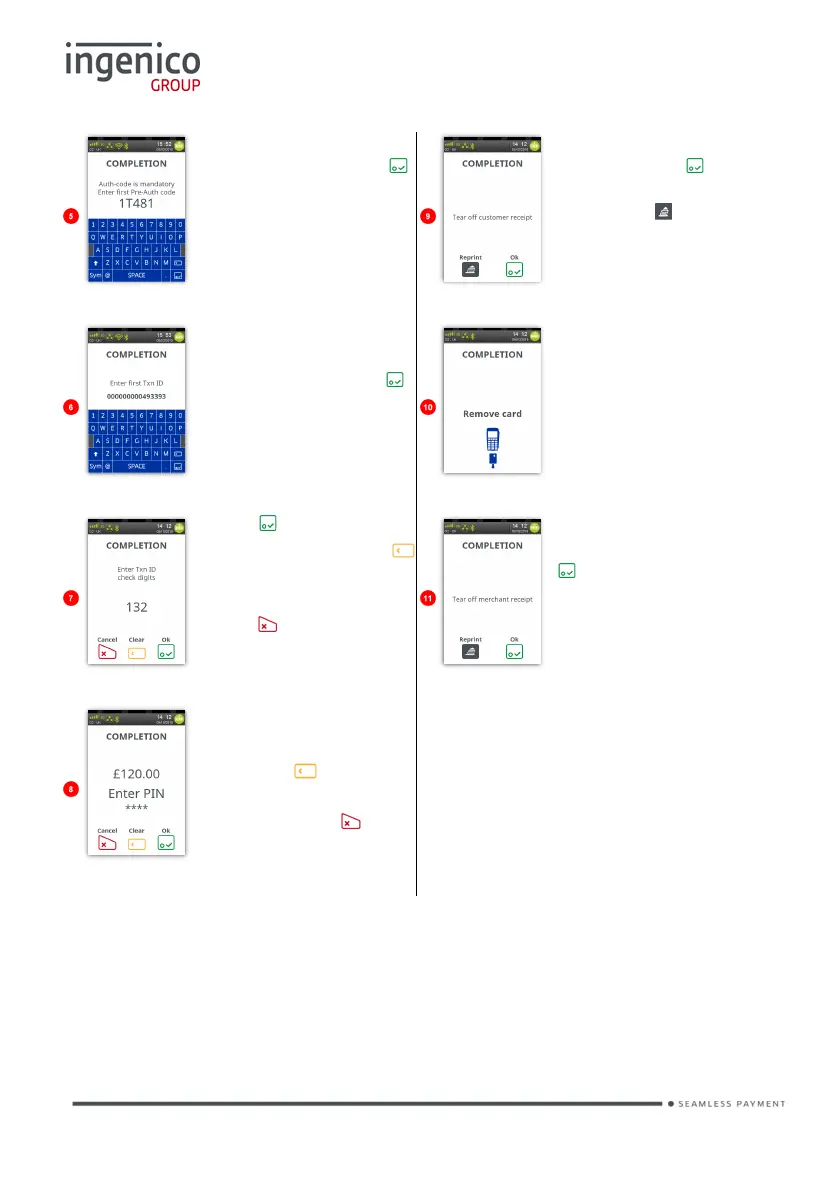
Enter first pre-auth
code and then press .
Enter the code as
described previously in
‘Data Input’.
Tear off cardholder
receipt. Press if the
printout is readable;
else press to print
the cardholder receipt
again.
You may be asked to
enter first Txn ID from
Pre-Auth then press .
Enter the code as
described previously in
‘Data Input’.
Remove the
cardholder’s card from
the terminal.
Press to submit
value; else press the
button to edit the text
one digit at a time or
press to clear all
digits.
Tear off the merchant
receipt and then press
.
Cardholder to enter
their PIN.
Press the button to
edit the text one digit at
a time or press to
clear all digits.

Table of Contents

Other manuals for Ingenico Move 5000

Related product manuals