EasyManua.ls Logo

Ingenico Move 5000 - Delete All Waiters; Create Waiter Defaults

Ingenico Move 5000
108 pages
Print Icon
To Next Page IconTo Next Page
To Previous Page IconTo Previous Page
Loading...
Page 80
Move/
5000
User Guide
Copyright© 2019 Ingenico
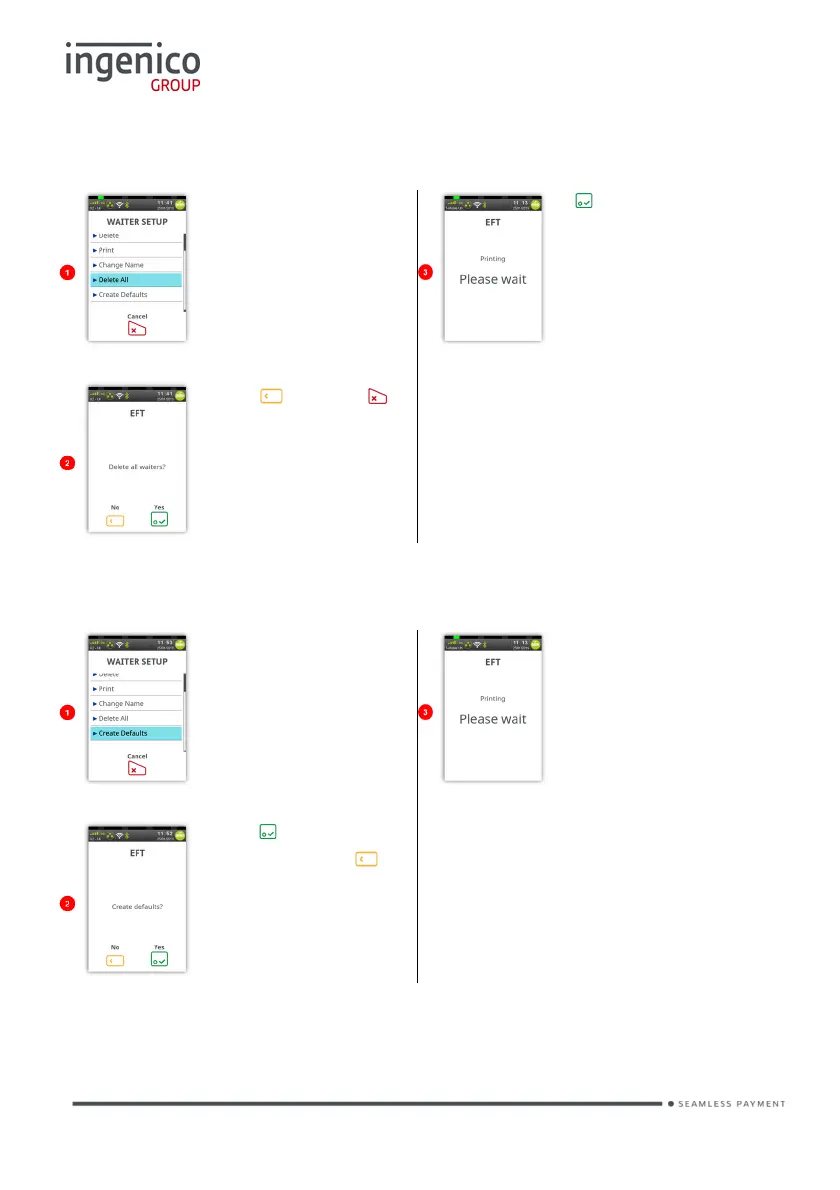
Delete All
Return to the ‘Waiter
Setup Menu’ as
described above.
Touch ‘Delete All’ on
the screen to select it.
If was pressed the
terminal will print
confirmation that ‘ALL’
of the waiters have
been deleted.
Press or press to
exit back to the ‘Waiter
Setup Menu’ without
deleting the waiters.
Create Defaults
Return to the ‘Waiter
Setup Menu’ as
described above.
Touch ‘Create Defaults’
on the screen to select
it.
The terminal will print
confirmation that
Waiter Defaults’ have
been created.
Press to ‘Create
Defaults’. Press to
exit back to the ‘Waiter
Setup Menu’ without
creating the defaults.
“Create Defaults” will create waiter codes 01 – 99 instead of adding individual
waiter names.

Table of Contents

Other manuals for Ingenico Move 5000

Related product manuals