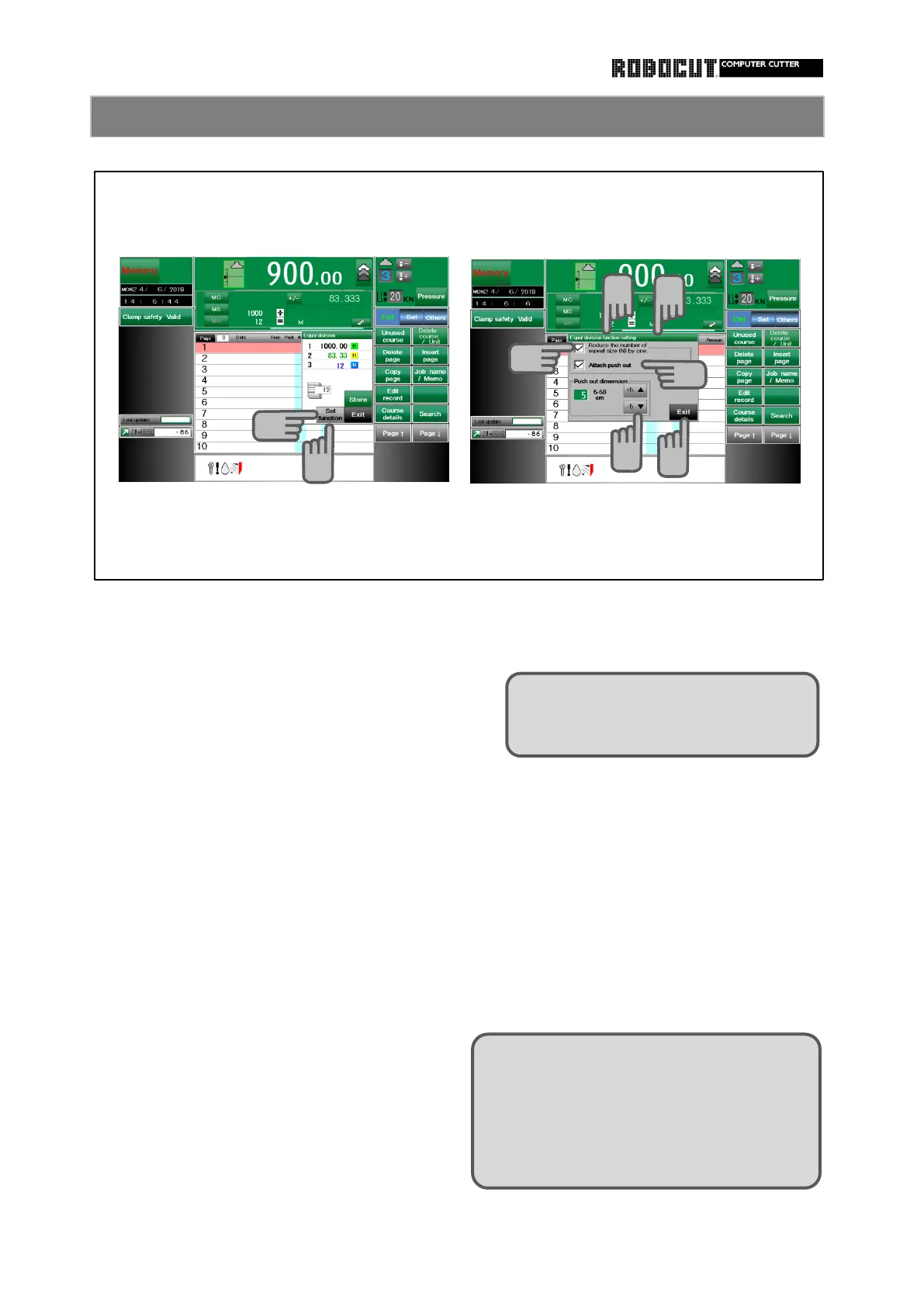
Reducing the number of repeat size ( N ) by 1
Press 【 Set function 】 in the automatic
equal division window.
window is displayed.
Press 【 Set function 】 in automatic equal
Place a check mark at "Reduce the division window.
number of repeat size ( N ) by 1 .
The automatic equal division function
The number of repeat size decreases by 1 setting window is displayed.
and is stored in memory.
Place a check mark at " Attach push-
out ".
Use 【 ▲ 】 and 【 ▼ 】 to enter the
push-out dimension.
Press 【 Exit 】 .
Configure the modification / addition function for automatic eauql division .
The automatic equal division function setting
How to store automatic equal division memory 2
Selection can be made only if a check
mark is placed at " Reduce the num-
ber of repeat size by one ".
After the number of repeat size is finished,
the backgauge moves to the next data
while the last one remains. To push -out
at the timing, place a check mark in adva-
nce. Push-out stored on the last page
when the Store-key is pressed.
1
3
2
1
3
4
5
6



 To Next Page