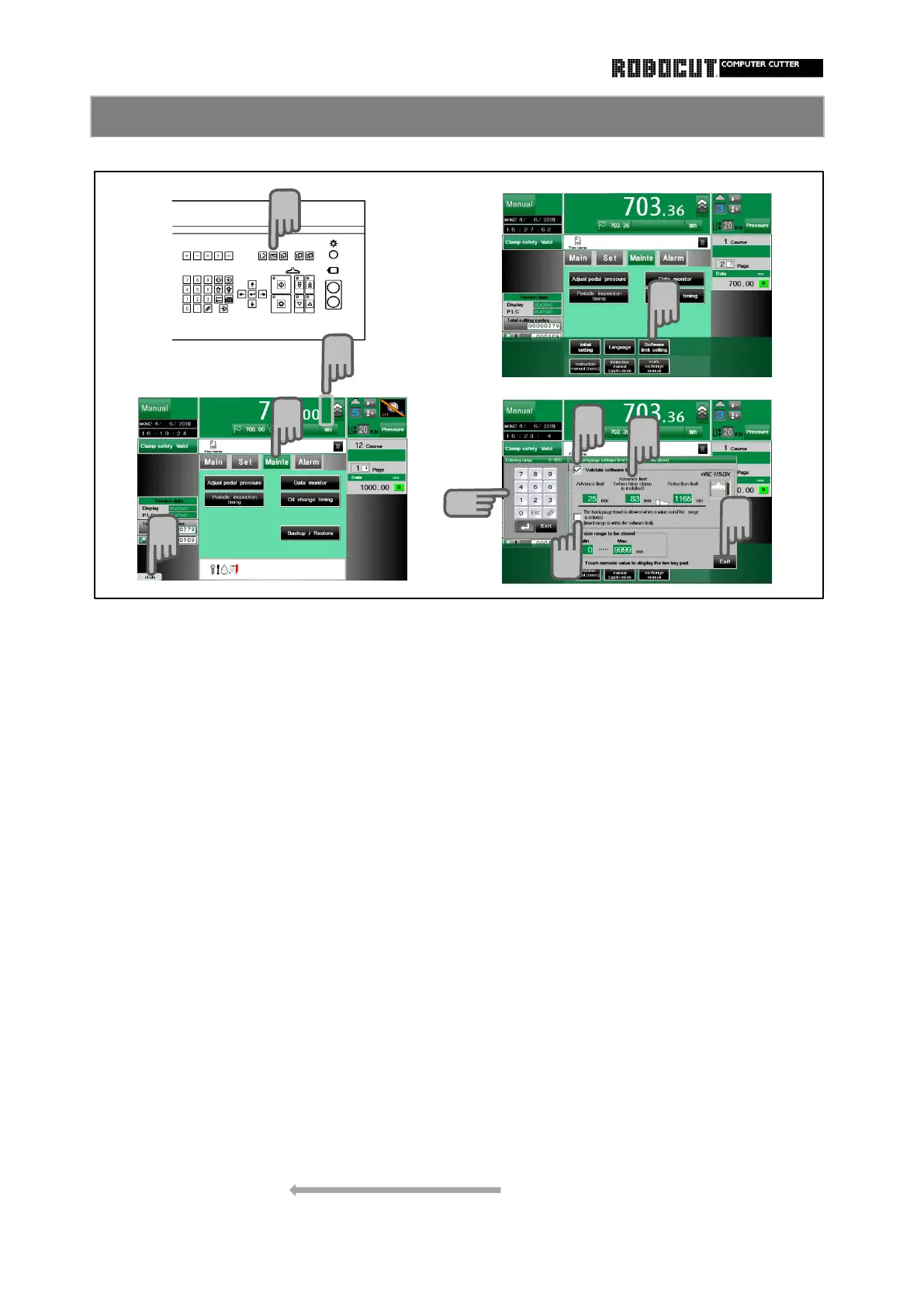
Selest the manual mode.
Backgauge travel permition setting
Press sub mode menu 【 Mainte 】 .
Select either enabled or disabled for the
action taken after a value out of the
Press Option-key permissible range is enteredzat the ten-
key pad and the advance/retraction
Press 【 Software limit setting 】 . start butoon is pressed.
Enabled ;The backgauge starts to travel
Check 【 Validate software limit 】 . and then is stopped at the hardware
or software.
Press the advance limit (retraction limit). Disabled ; No motion is caused. An " Out
of travel range" message is displayed
Enter the value.
・ An appropriate value is set as an
View upon stop atadvance/retrac-
initial value duiring model selection in
tion limit.
initial setting. Upon stoppage at advance limit ;
・ The value remains unchangeed during A down arrow is displayed below the
data initialization. right limit of the backgauge data view
Upon stoppage at retraction limit ;
A up arrow is displayed above the
right limit of the backgauge data view
Press 【 Exit 】 . Color ;



 To Next Page