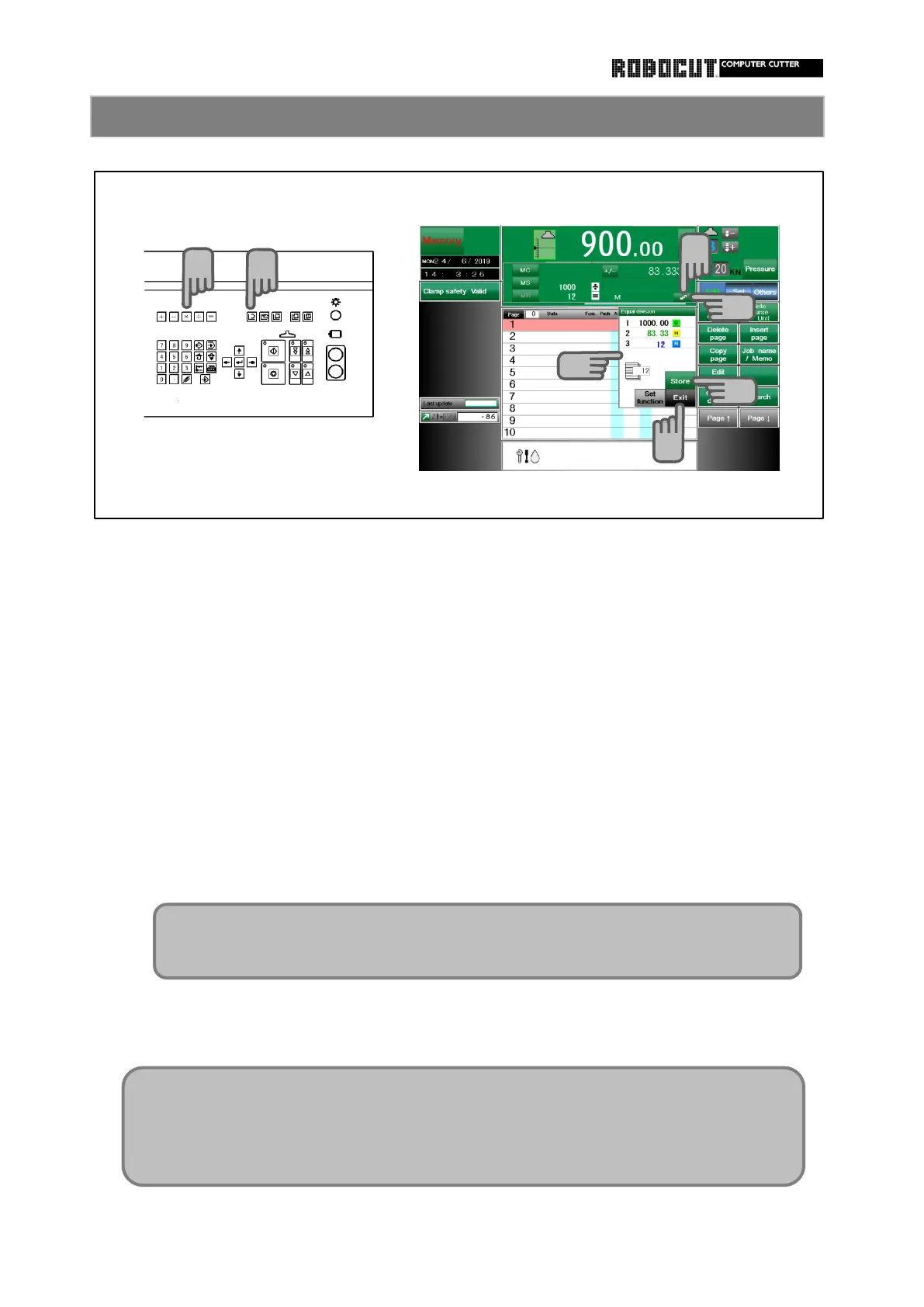
automatically calculated and stored.
Select the memory mode.
division ) = ".
Press 【 Equal division 】 .
Press the Store key.
3 pages are automatically used and stored from the current coursor position.
The data having been written, if there is any, is overwrutten.
Press 【 Close 】 or 【 Cancel 】 to close the automatic equal division window.
Using calculation keys and ten-key pad, enter "( Overall length of item) / (number of
An Automatic equal division window is displayed and the stored data is displayed.
Enter the ocrall length and the number of divisions of the item. Repeat size data is
The 【 Equal division 】 button is displayed at the right end to the calculation window.
Configure the automatic equal division function.
How to store automatic equal division memory 1
If the Store key has not been pressed, use 【 Page ↑ 】 【 Page ↓ 】 to change the
first page of storage area.
◆ The 【 Equal division 】 button is not displayedin other than the memory mode
even if division is made.
◆ This function can be used at all units.



 To Next Page