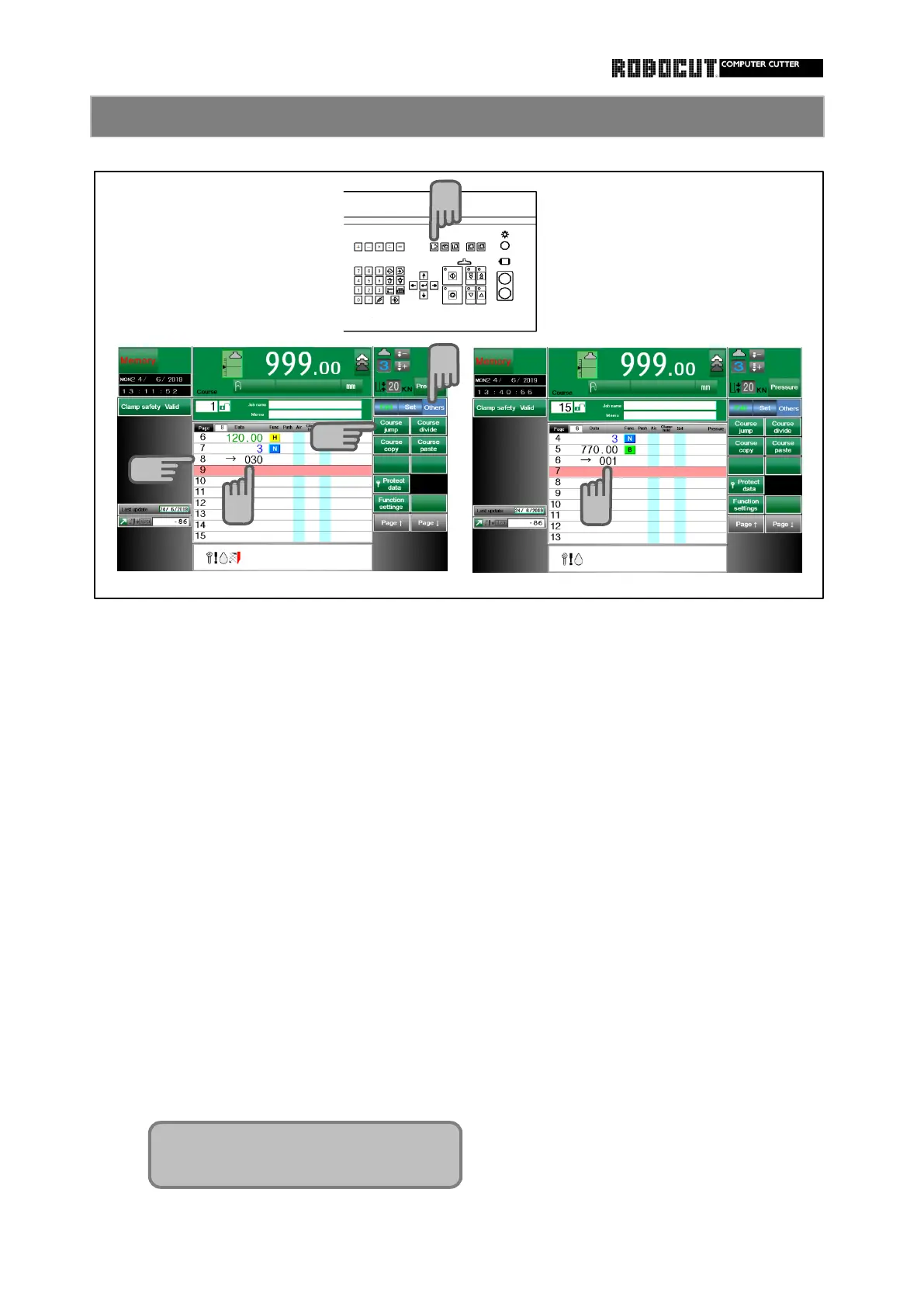
Select the memory mode.
◆
While there is no need to continue the de-
stination of jump, it is understandable and
Store data as usual
helpful to edit that the jump destination is
the following course.
Move cursor after last page momorized. ◆
There is no limit in the number of jumps as
far as the destination of each jumpdiffers
Enter destination curse number.
from the others.
( 100 → 101 → 102 → 103 → 100 )
Press sub mode menu 【 Others 】 and ◆
To enter 60 pages, avoid entering full 50
Press 【 Course jump 】 .
pages in the first course; place a jump at
Displayed distination course number. an understandable point such as page 30
Displayed in 3 digit including 0. It will be for easier use.
displayed as 005 for 5 course.
◆
The jump is caused in paper cutting in the
automatic mode. No jump is caused in the
Call the next destination course and
memory mode.
enter data. ◆
Becauuse each course is independent of
the others, the course at the destination
On the last page, set the previous course
of jump is not deleted evn if one course
numver to be returned in the same way.
is deleted.
◆
To move the course, the jump destination
course number must be corrected after
moving each.
◆
If course jump is caused during fully aut-
omatic operation, the fully automatioc
mode is canceled even in the advance
direction.



 To Next Page