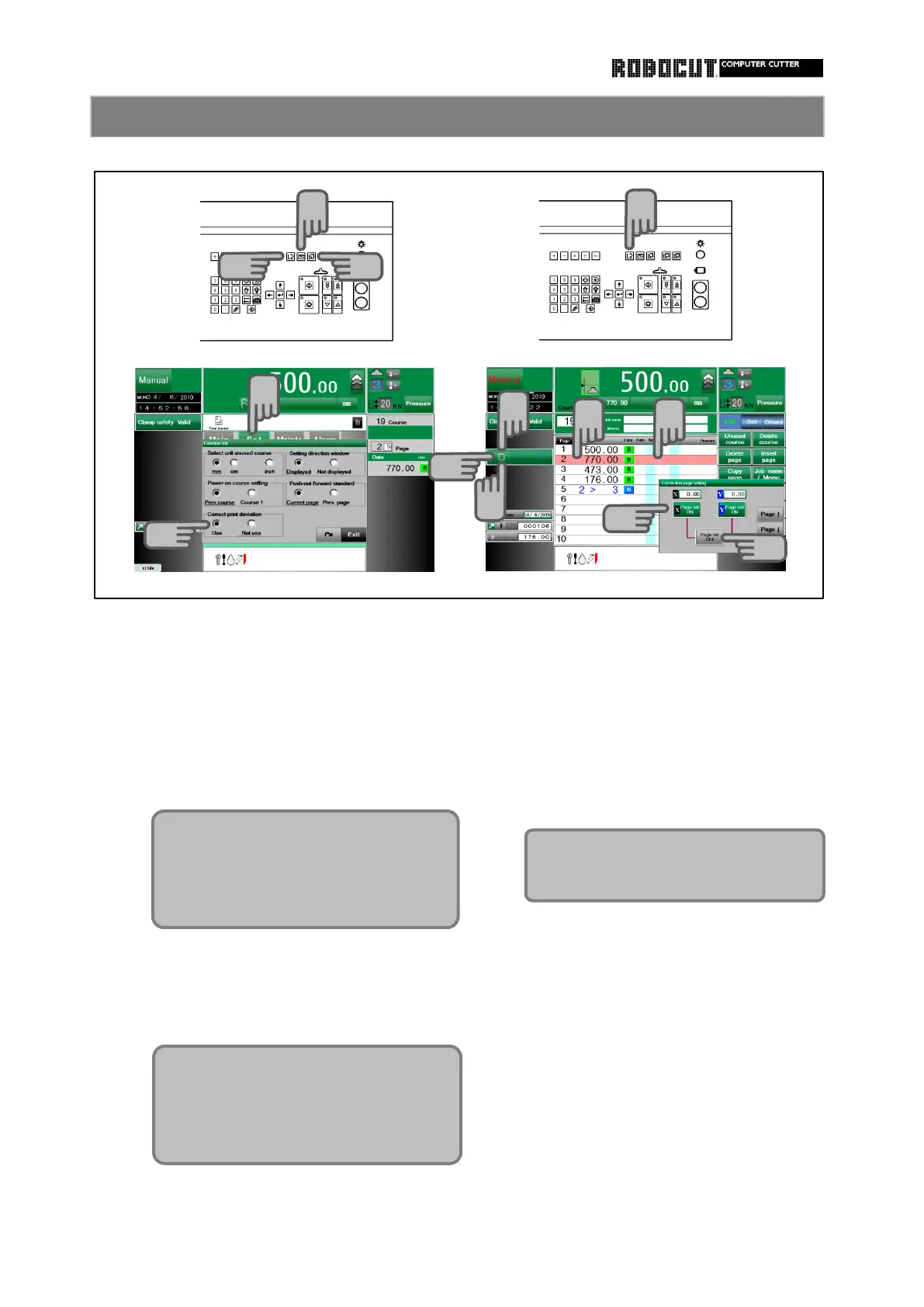
Select the manual mode. Select the memory mode.
Press sub mode menu 【 Set 】 → Move the cursor to the correction page.
【 Function list 】 →Correct print deviation
→ check " Use " Press 【 Correction setting 】 .
Press 【 X(Y) Page set ON 】 .
Displayed Correction page setting.
In the memory mode and the automatic Now correction X(Y) is set.
mode, displayed 【 Correction setting 】 .
At this stage, the correction value is still 0.
To cancel the correction set on the page,
move the cursor to the page and press
【 Correction setting 】 and 【 Page set
OFFF 】 .
Now you can use correction function.
By default, it is not used. In this case
the correction button is not displayed.
Can be set crrection ( X , Y ) for each
of the 500 courses.
Correction value ±5.00 mm
±0.5 inch
Correction data can be used X and
Y.
1
4
2
2
3
3
7
5
3
6
8
8
8



 To Next Page