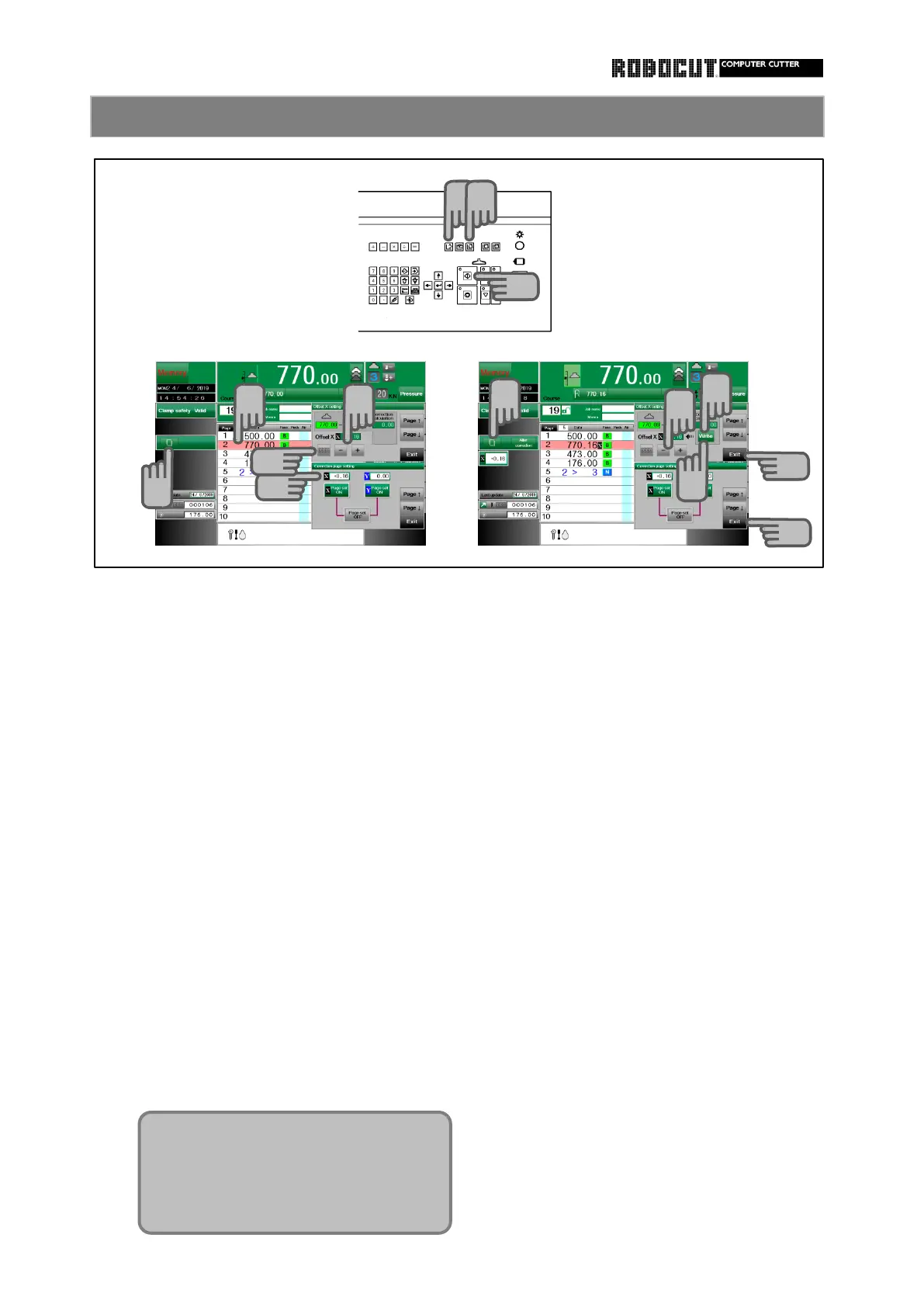
1. Input the correction value directly.
2. Move the backgauge to cutting
position and set the differnce with
Select the memory mode or automatic
data as correction value.
mode.
Select the memory mode or automatic
Select the page you want to correct press
mode.
【 Start 】 and set the backgauge position.
On the correction setting page, actually
Press 【 Corrction settiong 】 . set the paper.
Press 【 X 】 or 【 Y 】 . Move the backgauge and align marks.
Set correction value using 【 + 】 or 【 - 】.
Press 【 Corrction settiong 】 and press
【 X 】 or 【 Y 】 .
Press 【 000 】 and set 0 .
Displayed Backgauge position, mamory size
and its difference.
Press 【 Write 】 .
Press 【 Write 】 , the value of the differ-
ence is memorized as correction value.
Press 【 Exit 】 .
1
1
2
2
3
4
6
10
7
10
8
8
9
5
Can be set crrection ( X , Y ) for each
of the 500 courses.
Correction value ±5.00 mm
±0.5 inch



 To Next Page