EasyManua.ls Logo

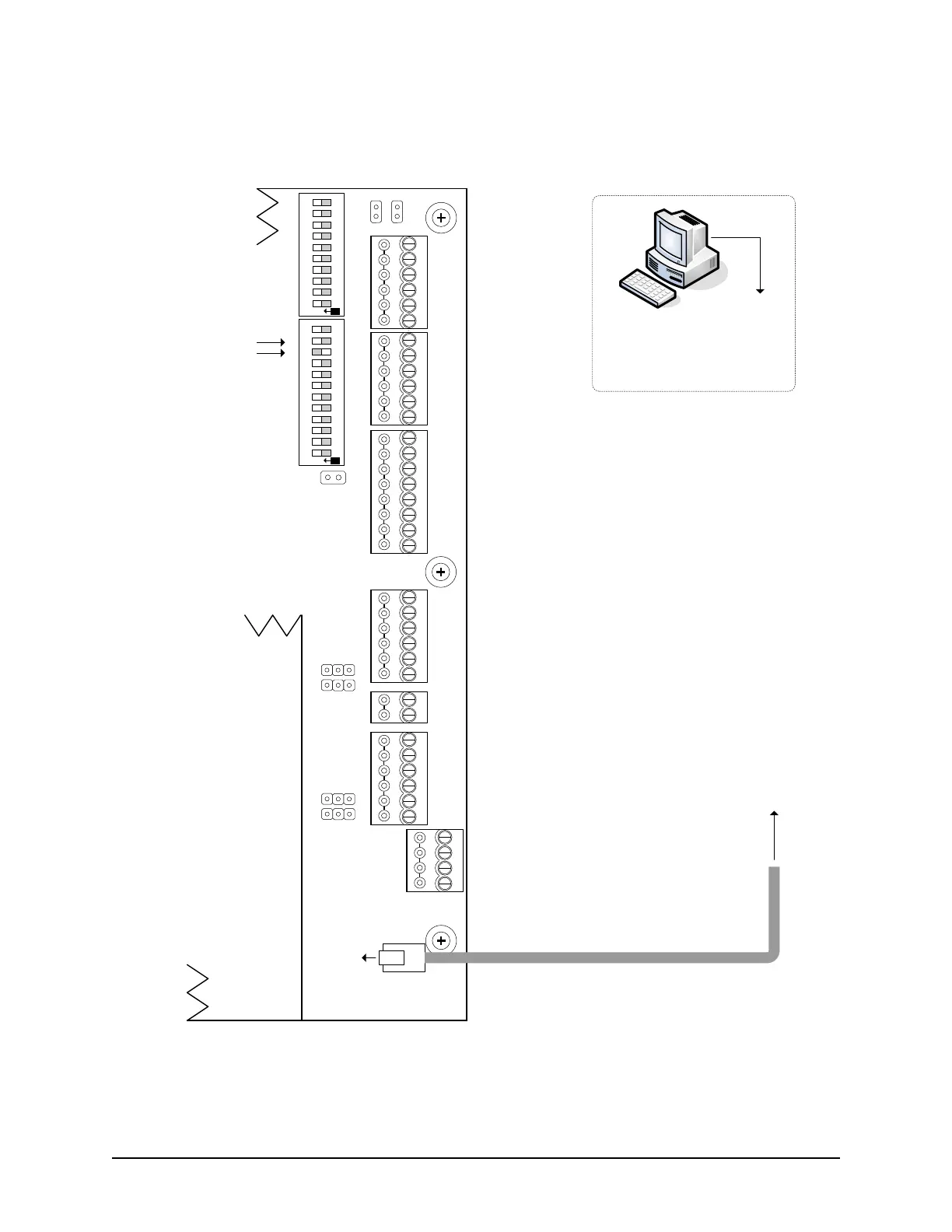
Keyscan CA150 - Figure 34 - Communication - Ethernet

Keyscan CA150
113 pages
Print Icon
To Next Page IconTo Next Page
To Previous Page IconTo Previous Page
Loading...
Keyscan Inc. A Member of the Kaba Group CA150 Rev. B Installation Guide (07.15)
57
Figure 34 - Communication Ethernet
Also see Figure 7 Grounding Access Control Units and Cables to properly ground the unit when using PoE.
POWER
INOUT
-
+
-
+
DOOR
AUX.
N/C
(+)
COM
(-)
N/O
(+)
N/C
(+)
COM
(-)
N/O
(+)
RS-485
A
B
RS-232
CTS
DTR
DCD
RD
TD
GND
DOOR
RTE AUX1 AUX2
-
+
-
+
-
+
-
+
READER 2
READER 1
C1
(BEEP)
LED
D1
WHITE
D0
GREEN
PWR
RED
GND
BLK
C1
(BEEP)
LED
D1
WHITE
D0
GREEN
PWR
RED
GND
BLK
J4
J1
RDR
RST.
CLR
MEM.
(+ 12 VDC)
CA150B
KEYSCAN INC.
J10
J11
J9
J8
DIP Switches
S1.11 = OFF
S1.10 = ON
to network
PC with
Communication
Manager
to network
KI-00353E-07-14
Communication
Standard Polling S1.1 = OFF
Reverse Network Polling S1.1 = ON
Baud Rate
115,200 BPS S1.2 = OFF
57,600 BPS S1.2 = ON
Left Cover
to
Ethernet
terminal
SYS.
RST.
S1
RDR/SUPV. CONFIG.SYSTEM CONFIG.
ON
6
7
8
9
10
2
3
4
5
1
6
7
8
9
10
2
3
4
5
1
11 12
ON
Rev. B

Table of Contents

Related product manuals